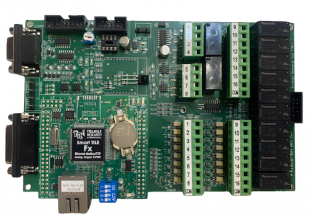
> They sell a USB to Dh+ now that works in a vm at least it is a solution <
But how do you get the USB device into the VM? Are you using virtualization software that supports USB, or does the converter emulate a serial port at the host machine level?
VM is potentially a great solution for dealing with installation incompatibility and legacy software. But I've struggled with Windows activation so much with VMWare that I now have to be desperate to use it. It seems to me that you need a pool of Windows site licenses to keep a VM working when you copy it from one machine to another. I don't want my laptop to break and have no fast, easy, and inexpensive way to get my VMs running again.
Steve, perhaps you are aware of some way to deal with the Windows activation problem. If so, please share
Win2k and earlier is no problem, but we are running out of new application software that doesn't require WinXP or later.
And the some of the rest could be solved by writing the PLC software on top of a portable OS so a change of hardware is not a major event. The available processors today are certainly up to the level that doesn't require writing low level software. For example, the PLC project I have suspended. In 10 years, you can replace the obsolete processor with any new one with a Linux port and compile and run. In fact, by the time I get the funds to build it, it will already be running on a more powerful processor than was available at design time. You don't have to design in obsolescence.
"It seems to me that you need a pool of Windows site licenses to keep a VM working when you copy it from one machine to another. I don't want my laptop to break and have no fast, easy, and inexpensive way to get my VMs running again."
I'm actually kind of baffled at the question. To me, that's exactly one of the virtues of the VM solution. If a laptop dies but the VM's are intact or backed up, simply install the VM host software on the new machine, move the VM files, and you're back in business. That's the whole point, the guest OS, whether XP or whatever, has no idea it's been moved and DOESN'T need re-installation.
Now I'm a one-man band, so I'm only running one copy of each VM and will only run another to replace one that's been destroyed or deleted. Is your problem because you're trying to mass produce identical VM's for controls engineers who work at the same company? Even then, I believe there are tools available for IT people who roll out a standardized PC configuration on real hardware so they can apply the license after the fact. Those might work here as well.
In reply to Steve Myres: Some software copy protection libraries try to detect whether they are running in a VM and will refuse to run in those cases. The idea is to prevent copying by cloning the VM. Also, some VMs will pass through the actual hardware serial numbers to allow the software to be locked to specific hardware (for copy protection reasons).
VMs are intended as a solution to what are essentially deficiencies in some operating systems. If the guest operating system or application program decides it doesn't want to co-operate it can block installation or use on a VM. The more I consider the situation the more I think that virtualisation isn't a long term panacea. It may be a usable solution now for many problems, but over the long run I suspect that software vendors will start to block that avenue by one means or another for the more expensive packages. They want your upgrade revenue and have no interest in making it easy for you to keep using your old software, or to use a competitor's product. The cheaper or no-charge packages will probably be no problem, but then for some reason those aren't usually the ones that people seem to have problems with.
> If a laptop dies but the VM's are intact or backed up, simply install the VM host software on the new machine, move the VM files, and you're back in business. <
Well, you're having better luck with that than me. I have had no problems virtualizing WinXP on my laptop with the same OEM product key as my laptop. But when I copy it to another computer with VMWare it will want to re-activate Windows. I can only do that a few times.
I have one new retail license for WinXP that I bought a couple of years ago. I don't think retail XPs are available anymore. But that won't activate on VMWare. It will on a real machine.
The IT people I work with use Windows VMs, but they all have site licenses.
Must be a VMWare thing. I use Virtual PC and don't have any issues with that. Sounds like maybe VMWare passes in the serial numbers from the hardware as Michael said some VM's do, and Windows can tell it's not on the brand machine it's supposed to be, or something.
That's good to know, because as I said, I'm interested in VMWare because of the USB virtualization issues. If it's not portable for quick disaster recovery or working with different machines, I'm not nearly as interested.
II have never had this issue with VMWare, I use Workstation 7, I use esxi server and vitualize our servers onto a few giant dell boxes and have moved them, cloned them, restored them etc. all over. 90% are corporate license but some are not (and are used once but have existed at the same time while converting (they mod SIDS but not windows serial numbers).
Not sure what your issue was or what version, maybe using player or something like that ?
I have not seen this issue with VMWare workstation (currently 7.x) and I use it all over, I also use esxi with out servers and have yet to see this issue either. I have been running it since it first came out.
Looks like your reply posted as a response to me. Not sure if you were responding to me or Kirk, but I have little to no experience with VMWare. I was interested because I was under the impression it could use USB devices from VM, which as Michael noted are becoming popular in automation comms hardware, and was noting that if Kirks problems were representative, it would diminish my interest quite a bit as portability is one reason I like the VM solution.
I also have a copy of VirtualBox from Sun/Oracle and it supports USB stuff, so I may give that one a try as well. I'll be on the lookout for the issues people have mentioned and maybe come back with an update and post it to this thread.
In reply to Steve Myres: I wouldn't want to draw any conclusions on the differences between VMs based just on how MS Windows behaves. Different versions of MS Windows use different copy protection schemes. When I say "different versions", I don't mean just the difference between XP and Vista. I mean the versions sold to businesses, consumers, PC OEMs, etc. all use different copy protection schemes as well. You would have to know the exact details of what someone tested before drawing any conclusions.
As far as VMs themselves are concerned, different ones work in different ways. There is usually also a split between server and desktop virtualisation even with the same brand. VM images are *not* always portable between different hardware. In fact, portability can be a big problem if you are using MS Windows (due to the way it handles drivers), in many cases requiring identical (or at least very similar) hardware. The problem is that hardware is not necessarily emulated (or virtualised). The VM may simply have a scheme for sharing hardware (this is usually done for performance reasons and may require special drivers). Some VMs may adapt themselves to the hardware in different ways depending on what sort of CPU or graphics chip you have, or what installation options you selected.
You mentioned Virtual PC. Microsoft bought the company a few years ago and now sell it as their own product. The newer versions of it actually support fewer versions of MS Windows as guests than the older versions did, so things that used to work on a older version don't work now on a newer one. They have by the way a completely different VM altogether for server applications. It's basically a re-branded and modified version of XEN (a popular open source VM).
Many of the various VM software vendors are working with other software companies to provide support for their copy protection systems. Different copy protection schemes work in different ways, and they will often do things which go around the operating system and may reach areas which VMs do not support. In addition, some software vendors make you buy a special version of their software if you want to run it in a VM (no real reason for this, it's just because they can). I haven't seen that particular one in the automation market yet however.
What all of this amounts to is that VMs are not a panacea. You can test particular setups and see if they work for you. If you change hardware, software, OS versions, VM versions, etc., then things may stop working. It's certainly worth investigating for solving particular problems, but I wouldn't rely on it for anything really important without testing that specific setup.
Dave Ferguson said: "The reason RA and Siemens cost what they do ... the infrastructure needed to support the legality of liability etc. I prefer that infrastructure when I make these big decisions that lives depend on."
What normal automation (non-safety product line) software products do AB or Siemens sell that "lives depend on"? I've never heard of any. I've always been told that if "lives depend on" your (non-safety) PLC functioning correctly then you have designed your system wrong. Are you telling us that your control system designs depend on normal (i.e. non-safety certified) PLCs and software?
<i>In reply to Steve Myres: I wouldn't want to draw any conclusions on the differences between VMs based just on how MS Windows behaves.</i>
No, I think my conclusion was valid, though maybe I stated it too strongly. My point was that if software inside the virtual machine is EVER aware of a move to a new platform, it proves there is information leaking in from the host, which might prove problematic in some applications, thus less confidence in that VM than one which hasn't been shown to leak.
We use both the DH+ and DH485 USB adapters in VMPlayer/Workstations. you just need to VM to connect to the USB. The serial ports have been fine to with AB, S5, Omron and Schneider for us.
Please don't base your decision to look into VMWare on my bad experiences. You can google "VMware Windows activation" and see that the problems I have had are shared by others, but certainly not everyone. Could be my fault, it usually is.
Whether VMWaring Windows works or not for you, I can only point out the licensing and activation is a potentially messy problem.
>I must now retire from the list for
>fear that I do not offend anyone.
I'm always sorry to see a forum participant leave, especially one with important ideas to share. Just to be clear, the moderator interaction involved the specific language of the post and the focus on certain other forum members rather than the ideas being expressed.
We try to maintain the Control.com forum as a useful venue for professional interchange. Often, this involves strong opinions, and sometimes our moderators discuss the tone and language of those opinions with a contributor prior to posting a message. These interchanges often result in a posting that has more impact and better represents the author's ideas by keeping the focus on those ideas and opinions being conveyed, rather than heating up a discussion without shedding further light.
I hope Dave continues to post -- we weren't singling him out, but rather trying to uphold a consistent set of standards to maintain a useful technical resource for all our participants.

 Facebook
 Google
 GitHub
 Linkedin