ModbusMagic: Modbus in your pocket, laptop in your bag

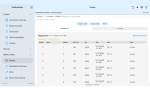
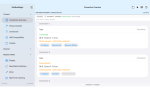
Hi everyone! I’ve been working on an Android Modbus app so you don’t have to pull out a laptop for every little job in the field. You can read registers, plot values, and create reports from your phone or tablet. It’s called ModbusMagic. Please give it a try and let me know what you think!

If you’d like to test it, send me a private message with the email address you use for Google Play so I can add you to the test and send you the download link.
 

Attachments

ModbusMagic – Key Features
  • Field diagnostics from your phone or tablet: Connect via USB–RS485 or Modbus over a network, without needing a laptop.
  • Customizable and reusable device templates: Create, save, edit, and expand your own device templates. Configure registers, data formats, scaling factors, and custom names once, then reuse and modify them whenever needed. No need to start from scratch every time you work with the same device type.
  • Up to four simultaneous connections: Manage and troubleshoot multiple devices within a single application.
  • Device and register discovery: Identify devices and explore registers, even when working with unknown or poorly documented equipment.
  • Readable measurement data: Interpret values using configurable data formats, byte and word order, scaling factors, and custom register names.
  • Charts, logging, and history: Monitor changes over time, record measurements, and review historical data for further analysis.
  • Before-and-after comparison: Compare measurements before and after configuration changes or maintenance work to verify their impact.
  • On-site verification and PDF reports: Generate commissioning and inspection reports containing project details, measured values, and checklists.
  • Safe register writing: Controlled write operations with confirmation and read-back verification to ensure changes have been applied correctly.
 
Interesting one !

Some challenges we face are:
1.) Most of the Cyber secured - Hardened site, we are not allowed to hook any unauthorized devices, due to current high risk attack on OT Infrastructure due to recent geopolitical situations.

2.) Also for most of the USB to RS 485 hardware don't support Android Drivers & Your phone should support USB-OTG (Available in mid range & above phones only)

3.) Mobile screens are too tiny, but will be useful if climbing up - like a wind turbine, chimney etc.,
 
Thank you — these are very practical points.

We fully agree about secured OT sites: the app would only be used with the site owner’s authorization and according to their security procedures. Our initial focus is approved commissioning, maintenance and bench testing.

The current version is being developed for iPad, rather than Android. USB compatibility is being validated with specific adapters; we are not claiming universal dongle support.

The larger iPad screen helps with register tables and charts, while portability is especially useful in the hard-to-reach locations you mentioned.

For your work, would an approved Wi-Fi/Ethernet gateway be a practical connection option, or would you mainly consider direct USB–RS485 during isolated maintenance?
 
Thank you — these are very practical points.

We fully agree about secured OT sites: the app would only be used with the site owner’s authorization and according to their security procedures. Our initial focus is approved commissioning, maintenance and bench testing.

The current version is being developed for iPad, rather than Android. USB compatibility is being validated with specific adapters; we are not claiming universal dongle support.

The larger iPad screen helps with register tables and charts, while portability is especially useful in the hard-to-reach locations you mentioned.

For your work, would an approved Wi-Fi/Ethernet gateway be a practical connection option, or would you mainly consider direct USB–RS485 during isolated maintenance?
Thank you for your response. To provide some additional context:

  • Device Adoption: In many developing or cost-sensitive regions, iPads are still considered a luxury item, meaning the vast majority of users rely on Android devices.
  • Network Security: My work is focused on the power generation sector, where Wi-Fi is strictly prohibited inside the plant due to cybersecurity risks. Our control environments are air-gapped 99.99% of the time.
  • Communication Protocols: We utilize Modbus across both serial and TCP/IP connections.
 
Nice work — the stale-data flag and write-confirmation gating are the right calls. Two suggestions:


1. Show the age of the last successful poll next to stale values (e.g., "stale 12s"). In the field, "how old is this number" instantly separates a polling/timeout issue from a wiring issue.


2. In the connection stats, log timeouts separately from CRC errors — on RS-485 they point to very different root causes (segment loading vs. baud mismatch/noise).
 
Thank you for your response. To provide some additional context:

  • Device Adoption: In many developing or cost-sensitive regions, iPads are still considered a luxury item, meaning the vast majority of users rely on Android devices.
  • Network Security: My work is focused on the power generation sector, where Wi-Fi is strictly prohibited inside the plant due to cybersecurity risks. Our control environments are air-gapped 99.99% of the time.
  • Communication Protocols: We utilize Modbus across both serial and TCP/IP connections.
Hi, thanks so much for your valuable feedback!
 
Nice work — the stale-data flag and write-confirmation gating are the right calls. Two suggestions:


1. Show the age of the last successful poll next to stale values (e.g., "stale 12s"). In the field, "how old is this number" instantly separates a polling/timeout issue from a wiring issue.


2. In the connection stats, log timeouts separately from CRC errors — on RS-485 they point to very different root causes (segment loading vs. baud mismatch/noise).
Hi, thanks so much for your valuable feedback! We’ve already incorporated it into our Android version, which is now in testing and available to download if you’d like to try it.

As for the iPad version, we’ve been waiting for Apple to sign our DriverKit extension for a month now, so that’s on hold for the time being.

If you’d like to test the Android version, I’d be happy to give you access! Just send me your email address so I can add you to the tester list.
 
Top