Facebook
 Google
 GitHub
 Linkedin
Hi,
I am new to RS485 communication and would appreciate some insights on resolving an issue. I am trying to read a value from a West 6100+ Controller using an Arduino UNO R3 and an RS485 to TTL converter. I believe my wiring is correct since I am receiving proper readings on the serial monitor. However, I am encountering square symbols along with the value, and I’m unsure why they are appearing. My goal is to remove these symbols and plot the value in real time. The square symbols is making it difficult to do so.
If anyone is interested, this is the RS485 to TTL Converter I am using. (https://www.amazon.ca/Fafeicy-MAX48...5&psc=1&mcid=fc410e1f694d3ffe81a63df27356f370)
The program I'm using for coding is Arduino IDE.
The header I'm using is ModbusMaster by Doc Walker.
This is the output I am getting.
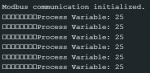
I am new to RS485 communication and would appreciate some insights on resolving an issue. I am trying to read a value from a West 6100+ Controller using an Arduino UNO R3 and an RS485 to TTL converter. I believe my wiring is correct since I am receiving proper readings on the serial monitor. However, I am encountering square symbols along with the value, and I’m unsure why they are appearing. My goal is to remove these symbols and plot the value in real time. The square symbols is making it difficult to do so.
If anyone is interested, this is the RS485 to TTL Converter I am using. (https://www.amazon.ca/Fafeicy-MAX48...5&psc=1&mcid=fc410e1f694d3ffe81a63df27356f370)
The program I'm using for coding is Arduino IDE.
The header I'm using is ModbusMaster by Doc Walker.
Code:
#include <ModbusMaster.h>

#define RS485_DE_PIN 4  // Driver Enable pin
#define RS485_RE_PIN 5  // Receiver Enable pin

ModbusMaster node;

void preTransmission() {
  digitalWrite(RS485_DE_PIN, HIGH);  // Enable transmission mode (DE HIGH)
  digitalWrite(RS485_RE_PIN, HIGH);  // Disable reception mode (RE HIGH)
}

void postTransmission() {
  digitalWrite(RS485_DE_PIN, LOW);   // Disable transmission mode (DE LOW)
  digitalWrite(RS485_RE_PIN, LOW);   // Enable reception mode (RE LOW)
  delay(6);
}

void setup() {
  pinMode(RS485_DE_PIN, OUTPUT);
  pinMode(RS485_RE_PIN, OUTPUT);

  digitalWrite(RS485_DE_PIN, LOW);  // Start with transmission disabled
  digitalWrite(RS485_RE_PIN, HIGH); // Start with reception enabled

  Serial.begin(9600, SERIAL_8N1);  // Start serial communication at 9600 baud


  // Modbus communication setup
  node.begin(1, Serial);  // Set Modbus slave ID (PID controller address = 1)
  node.preTransmission(preTransmission);  // Set pre-transmission function
  node.postTransmission(postTransmission);  // Set post-transmission function

  Serial.println("Modbus communication initialized.");
}

void loop() {
  uint8_t result;
  uint16_t data;

  // Query the Process Variable (stored in Modbus register 1)
  result = node.readHoldingRegisters(0x01, 1);  // Query Modbus register 1 (Process Variable)

  if (result == node.ku8MBSuccess) {
    data = node.getResponseBuffer(0x00);  // Retrieve the Process Variable value
    Serial.print("Process Variable: ");
    Serial.println(data);  // Display the Process Variable
  } else {
    Serial.print("Error: ");
    Serial.println(result, HEX);  // Print error code if communication fails
  }

  delay(1000);  // Delay before the next query
}