Facebook
 Google
 GitHub
 Linkedin
New Fanuc Roboguide V10 Brings VR to Robot Simulation and Planning
Fanuc launches Roboguide V10, introducing VR, enhanced CAD support, and a modern interface to redefine 3D robot simulation and offline programming.
Fanuc’s Roboguide V10 takes robot simulation to the next level with integrated virtual reality, faster performance, and an intuitive modern interface. Engineers can now design, program, and walk through robot workcells in a fully immersive 3D space, helping them catch layout issues, safety risks, and inefficiencies before building physical prototypes. With support for native CAD files, a streamlined UI, and enhanced simulation capabilities, Roboguide V10 offers faster, more accurate planning for complex automation systems. The software is built to save time, reduce errors, and give manufacturers a powerful, human-centered tool for robot programming and offline validation.
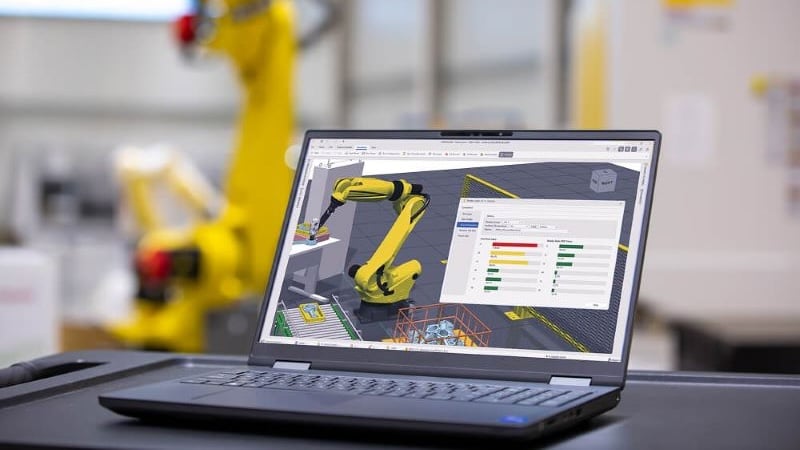
Programming a Fanuc robot with Roboguide. Image used courtesy of Fanuc
At its core, Roboguide lets users design, program, and simulate robotic environments in a fully virtual 3D space. The upgrade to Version 10 represents a significant leap forward, introducing virtual reality playback and walkthrough capabilities that allow engineers to experience a workcell as if they were standing inside it. That immersive dimension helps teams catch flaws in layout, safety issues, or reach limitations that would be hard to spot on a 2D screen. It’s a far cry from the traditional “trial and error” approach, where a small miscalculation might only appear after an expensive prototype is already in place.
Fanuc has also re-engineered Roboguide to run on a 64-bit architecture, making it far more capable of handling complex systems with high content demands. Combined with upgraded graphics, the software can manage larger projects with greater speed and stability. As Eric Potter, general manager of Fanuc America’s Robot Application Segment, explained, the focus is on giving manufacturers “a smarter, more powerful simulation tool that meets the evolving needs of the automation industry.” That means everything from design tweaks to advanced robot path optimization can be performed with greater confidence and fewer surprises down the line.
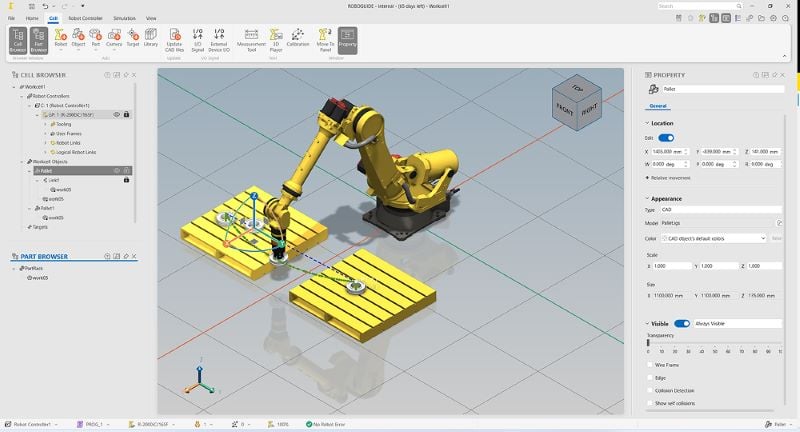
A closer look at Fanuc’s Roboguide. Image used courtesy of Fanuc
Beyond technical horsepower, Roboguide V10 modernizes the user experience in thoughtful ways. The new ribbon-style toolbar, floating and docking windows, and drag-and-drop robot addition tools help engineers get more done with fewer clicks. Expanded support for native CAD file imports eliminates a persistent headache, enabling simpler integration with engineering workflows. Teams can easily import parts and layouts from their existing design libraries and start testing immediately, thereby reducing errors associated with manual conversion or rebuilding parts of the model from scratch.
Fanuc ensures that customers transitioning to V10 won’t lose compatibility with previous versions. Both versions will share the same licensing structure, so current users can explore the new features at their own pace while maintaining access to familiar tools. Engineers, integrators, and even students in robotics programs can dive deeper into the software’s functions through Fanuc’s Tech Transfer website, which hosts tutorial videos and engineering guidance to get new users up to speed.
Virtual reality support is perhaps the most headline-grabbing addition, reflecting the industry’s hunger for more human-centered design tools. When an engineer can virtually walk through a proposed workcell, view robot movements in real scale, and verify safety distances with a VR headset, it changes the game. Instead of reviewing static renderings, they get a real sense of space and movement, the kind of insight that helps eliminate costly errors before physical installation even begins.
From a broader perspective, Roboguide V10 is part of a steady evolution in robotics engineering that prioritizes speed, accuracy, and user experience. By blending VR, modern UI design, and robust data integration, Fanuc provides manufacturers with a bridge to more efficient and confident deployment of automation systems.