Facebook
 Google
 GitHub
 Linkedin
Dot Notation: A Different Way Of Addressing Integers in PLCs
Addressing variables at the bit level can save precious PLC memory as well as make your code more readable and easier to understand.
Within the PLC programming environment, there are many ways to address variables of different types. A double word, for example, consists of 32 individual bits that make up a binary representation of the double word data type that can contain integer values.
But did you know you can address each bit individually?
This is called dot notation, and there are specific ways in which it can be used. I’ll give some tips on how and when to use dot notation, and some pitfalls that can be avoided.
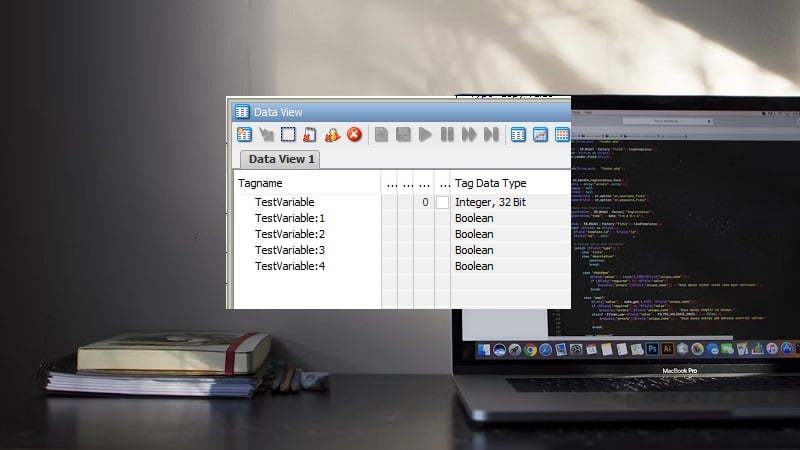
Figure 1. Laptop and tag listing with dot notation. Image (modified) used courtesy of Unsplash
Memory Management
A PLC uses non-replaceable memory, and to add some perspective, it’s typically enough to store one decent-sized digital picture. For example, the 5580 series PLC from Allen-Bradley ranges from 3 MB to 40 MB. Upgrading your PLC to a larger memory size can be very costly, sometimes requiring you to replace the PLC entirely. This is why it is important to ensure you are using memory as efficiently as possible.
The programming interface for all PLCs allows you to create variables with different data types. In the background, for all PLCs that are built on 32-bit CPU architecture (the popular Allen-Bradley ControlLogix and CompactLogix included), all data types consume a minimum of 32 bits.
When you create a new boolean (BOOL) data type, the PLC uses up 32 bits of memory, even though you are only going to see one bit.
Careless use of new tags can add up quickly to a few thousand bytes here and there, and before you know it, half your PLC memory is gone.
It’s certainly a good thing we aren’t trying to store pictures and videos on a PLC!
Addressing At The Bit Level
Each data type, at its root, consists of a binary value. This means each bit of any integer can be manipulated to contain either a 1 or a 0.
To address integers at the bit level in Studio 5000, you simply reference the tag that is an integer type (DINT, by default), then add a “.” after the variable name and attach a number to represent the individual bit. With this syntax, you can now use boolean operators on the specific bit. In some programming languages, the notation may use a “:” symbol, but the strategy is the same.
In the example logic rung below, there is a DINT called TestVariable in the tag list. This variable is used to monitor whether various conditions have occurred, even momentarily. This one TestVariable DINT can store up to 32 different latchable conditions. Since this is a single variable, all of the conditions can be viewed at once in the tag listing.

Figure 2. Referencing a bit inside of an integer. Image used courtesy of the author
If each of these 32 monitored conditions were to latch a different, separate BOOL tag, it would use up 1024 bits (32 boolean tags, at 32 bits each). Dot notation can be an efficient strategy for using these integer-type tags.
Indirect Addressing At The Bit Level
In some situations, you may want to programmatically change which bit level your dot notation is referencing. This can be done with specific syntax. Just like before, type the name of the variable and add the “.” at the end. Now, add square brackets “[]” with a new integer variable inside those brackets. As the value of the variable inside the brackets changes, the bit level will change.

Figure 3. Indirect referencing of a bit inside an integer. Image used courtesy of the author
Indirect referencing is often used for counting, and although there are counters already available, one counter consumes more memory than the two DINTs in this example.
Pitfalls with Dot Referencing
Using dot notation does allow you to make your code more efficient and readable, but there are some pitfalls.
The biggest issue is memory overrun when using indirect addressing. If your indirect variable goes higher than 31, your processor will fault and all outputs will be set to false. This event can be very serious if your equipment is in full production. To prevent this from happening, always check the value of your indirect variable before using it.
Cross-referencing is a very useful debug tool that shows where the variable is being used. If you are using indirect dot notation, you will not be able to cross-reference the indirect variable by right-clicking on it. Most of the time, you will also not be able to see the value of the indirect variable during runtime. You will be able to see the value in the tag editor, and you will be able to initiate the cross-reference from there as well.
The dot notation strategy works for integer data types, but it’s not particularly useful for strings, which contain byte-sized characters. It may also have limited use in user-defined data types, which are structured combinations of standard data types.
Use Cases
A common place to use dot notation is palletizing or tray handling. In these cases, you need to track how many parts you have placed and where they were placed. If we take a tray, for example, that has 20 pockets by 5 rows, and every time the robot places a part in a pocket, we can latch a bit representing the pocket. This way, if the robot program gets reset, the PLC will still know where parts have been placed or not placed.
We could create a user-defined type consisting of 20 boolean variables. We could then assign 5x variables with the new type. This solution would create five variables with a memory size of 640 bits each, totaling 3200 bits (or 400 bytes).
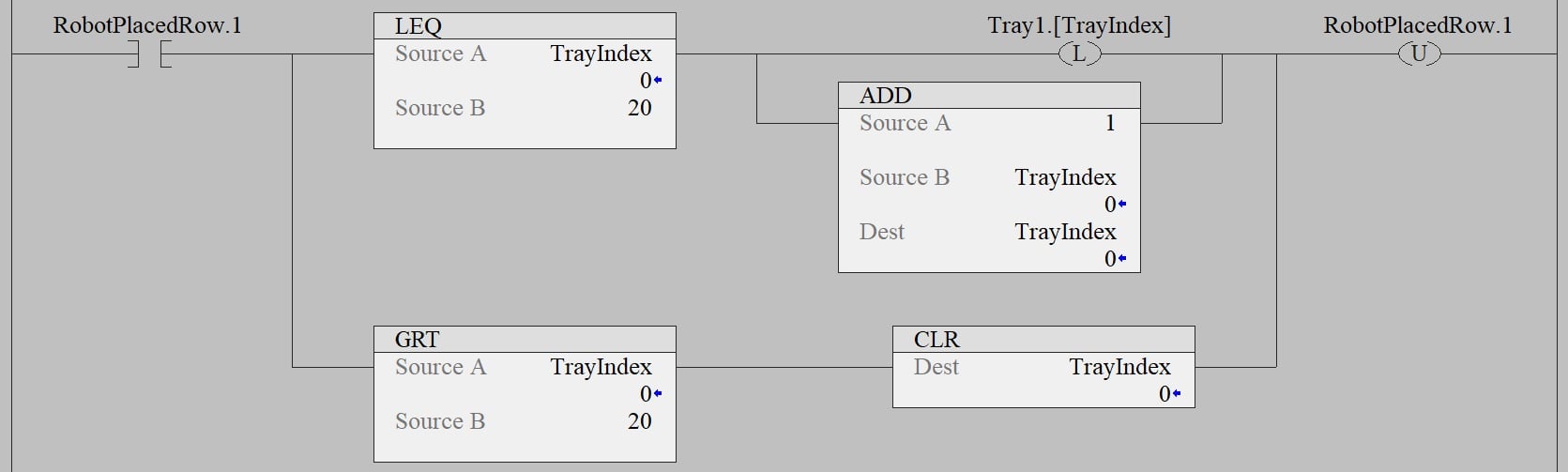
Figure 4. Sample program that uses indirect referencing to fill a Tray1 integer, showing current status from trays 0-20 before resetting. Image used courtesy of the author
Alternatively, using dot notation, we could create five variables again, but this time each variable would be one DINT. Our new memory size would be only 32 bits per variable. With 5 variables, the total consumption is 160 bits, or 20 bytes.
PLC Programming Strategies
As we have learned from these examples, using dot notation greatly reduces the size of the occupied memory, makes your code cleaner to read, and reduces the number of UDTs required.
As always, adopting programming strategies means that documenting and explaining the code is of utmost importance. Always document your work, and it will be easier for you and others to troubleshoot in the future.