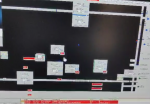
display garbled on HMI

Hello! I am having a display issue on the HMI. The screen appears to have some black blocks.
Had you guys experience the same on some systems.

Thank you in advance for any helpful inputs.
 

Attachments

That's fugly. (Unless it's just an unclear photo--and we get a few of those on Control.com.)

I know that's not of any help, but then we can't tell what software package was in use on the HMI, or how it's connected to wherever it's getting it's data from.

Has anything changed in the cabling between the HMI and the data source?

Is this just happening on one HMI--or are there other HMIs on the same network that are also experiencing the same problem?

Have you tried rebooting the HMI?

Have you tried a different--but suitable--monitor?

Was someone using a high-powered "walkie-talkie" radio close to the monitor or CPU (Central Processing Unit)?

It might be the graphics card--again, I'm making an assumption, that the HMI uses a PC running MS-Windows and uses a graphics card in a slot in the CPU (cause if it's a graphics card built onto the motherboard and it's the source of the problem, then there's a whole nother problem to be solved to get this one solved).

Look--you didn't really give us anything that we could use to make any kind of intelligent observation or recommendation. We aren't there sitting next to you and we don't know anything about the equipment and its configuration or what's been done to try to troubleshoot/resolve the problem. If we had some idea of the equipment and configuration and what you've done to try to troubleshoot the problem we might be able to offer more help. But you gotta give us something to work with.

Best of luck with your HMI problem!
 
Top