Facebook
 Google
 GitHub
 Linkedin
Hi,
I hope everyone is doing well. I am facing some issues while interfacing some RS485 based sensors.
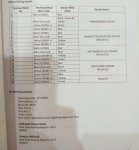
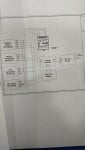
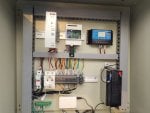
Starting from the equipment background, the 4 sensors were connected in a daisy chain configuration, over RS485, to raspberry pi via RS485 to USB converter. The 4 sensors were installed and commissioned by the installer. The relevant details are attached in image. Due to some hardware issues, raspberry pi was removed and i am hence trying to connect them directly to Sungrow logger 1000A through available COM port. Before connecting it directly to logger i am trying to confirm whether the sensor is individually active or not.
Thank you for your patience if you have gone through all the above text. I have attached the supporting documents and datasheets for the mentioned sensors. If any thing is missing from my side kindly let me know.
Best Regards
Hanzala
I hope everyone is doing well. I am facing some issues while interfacing some RS485 based sensors.
Starting from the equipment background, the 4 sensors were connected in a daisy chain configuration, over RS485, to raspberry pi via RS485 to USB converter. The 4 sensors were installed and commissioned by the installer. The relevant details are attached in image. Due to some hardware issues, raspberry pi was removed and i am hence trying to connect them directly to Sungrow logger 1000A through available COM port. Before connecting it directly to logger i am trying to confirm whether the sensor is individually active or not.
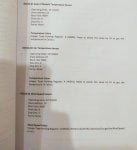
- Wind Speed Sensor RK-100-02 (RIKA Electronics): After making connections on hardware side, i tried connecting it to my system via RS485 to USB converter. As per the vendor documentation, i have assigned slave address as 24 and made settings accordingly. But the modpoll is giving timeout error. I have tried everything from changing baud rate, stop bit, parity, data bits, register type but unable to get any data. Secondly please share whether there is any way to locate an unknown slave address when device connected via RS485.
- SP522 Pyranometer by Apogee Instruments: This sensor is behaving odd. For like 10 seconds it is working fine and sharing data. But after some it starts giving time out error on modpoll software. The behavior is random. I have checked the supply and connections but there is no issue. I am unable to identify why it stops giving data on random pattern and resolve automatically itself for only a short duration.
- RK330-01C Air temperature Sensor: I was able to connect with device without any modpoll software errors. But the data it is giving is totally constant and it should vary as it is analog data. Which i believe is a sensor issue.
- RK220-01 Module Temperature Sensor: I was able to connect with the device successfully without any errors from MODPOLL software. The temperature it is showing is too low. Which i believe is sensor calibration issue.
Thank you for your patience if you have gone through all the above text. I have attached the supporting documents and datasheets for the mentioned sensors. If any thing is missing from my side kindly let me know.
Best Regards
Hanzala
Attachments
-
 101.8 KB Views: 5
 -
 71.7 KB Views: 6
 -
 101 KB Views: 6
 -
 99.3 KB Views: 3
 -
775.8 KB Views: 1
-
99.8 KB Views: 1
-
316.1 KB Views: 1