Mark V HMI Fail to enter the WIN2000 operating system

Hello everyone:
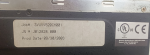
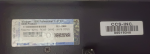
We have a GE 9E gas turbine on-site, with a GE Mark V HMI control system. The control computer runs on WIN2000 and Cimplicity 5.5. During a power switch, the control computer was damaged due to power loss. After power was restored, the control computer cannot enter the WIN2000 system. We plan to purchase a new computer from GE. What information do we need to provide to GE? Is it sufficient to provide only the information obtained from the old computer (see image)? Are there any other details needed?
Tkankyou.
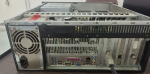
1715613986146.png 1715614038307.png1715614119470.png
 
@DGY,

GE will tell you what you need to provide, and it will likely take several exchanges to get everything they should know they need to effect an HMI upgrade.

All GE will provide you is the newest version of their HMI which runs very different software and may even require PROM changes in the Mark* V panel. It will not be an easy process, and the entire process will most likely not go smoothly. It may even require pulling new communication cables if the HMI is located remotely from the Mark* V panel. They will also apply very heavy pressure to upgrade the Mark* V panel to the Mark V Life Extension, which is another process which will not likely go smoothly--but you will have some newer control system components (which will require purchasing new spares ... an additional cost).

YOU ARE CAUTIONED TO NOT LET ANY COMMISSIONING PERSONNEL TO LEAVE THE SITE UNTIL ALL FUNCTIONS HAVE BEEN TESTED AND CONFIRMED!!! MOST SITE PERSONNEL ONLY CONCENTRATE ON DISPLAY ISSUES BUT EVERY BUTTON (TARGET) ON EVERY DISPLAY NEEDS TO BE TESTED AND CONFIRMED. IF YOU OPT TO PURCHASE THE MARK* V LIFE EXTENSION YOU NEED TO TEST THE STARTING, LOADING/UNLOADING AND STOPPING FUNCTIONS AS WELL TO MAKE SURE THEY ARE ALL FUNCTIONING PROPERLY!!! THE "CONVERSION" FROM MARK* V TO MARK* V LIFE EXTENSION HAS A FEW BUGS WHICH NEVER BECOME APPARENT UNTIL AFTER COMMISSIONING PERSONNEL HAVE LEFT THE SITE--AND IT IS EXTREMELY DIFFICULT TO GET GE TO SEND COMMISSIONING PERSONNEL BACK TO SITE TO SOLVE THE PROBLEMS.

Finally, no matter which option(s) you choose, there will be a new learning curve for the new software on the HMI that interfaces with the Mark* V (or Mark* V Life Extension). It's quite a difficult process for the site technicians, and can also be difficult for the site operators. (If you thought learning all of the command line processes for the Mark* V was difficult, this is equally as difficult and there probably won't be any training provided with the new equipment.

Personally, I would not choose GE as the supplier for a new HMI for many reasons. If the site only has one GE-design heavy duty gas turbine and there are people who are familiar with that they have been working with it would be a huge change, and as with all things GE turbine-related the documentation leaves a lot to be desired. There are a few suppliers of GE Mark* V HMI software, and as with all things some are better than others. As for references from the suppliers AND CHECK WITH THE REFERENCES TO LEARN WHAT THEIR EXPERIENCES WERE--DURING THE COMMISSIONING AND AFTER THE COMMISSIONING. It's not a simple task asking strangers what their experiences were--but if you don't you will eventually discover some suppliers have a record of not properly configuring their packages and of not supporting them after commissioning.

There is another route you can take--and that is to work with some computer suppliers to find a suitable CPPU (Central Processing Unit) that is compatible with the version of MS-Windows you have (not all of the newest microprocessors and BIOS systems will work with older software, including your version of MS-Windows and the GE proprietary software which runs in the background. There are industrial computer suppliers which still produce motherboards which have the proper slots and BIOS chips which will work with older software and computer hardware and with the GE equipment.

The easiest way to get a new system up and running would be to make an image of the existing hard drive which can be copied to any hard drive of any size. (The existing hard drive may work in the new CPU, but it's also getting old (the hard drive) and it's too difficult to try loading all of the software individually on a new hard drive--go the imaging route. (Acronis is a very good program which can be used for this process of creating an image of the existing hard drive to be installed on another (new) hard drive.) REMEMBER: Older versions of MS-Windows had a serious problem with fragmenting hard drives--so after you create a new hard drive with the image of the existing hard drive be sure to run a good defragmentation program to solve that issue, AND the run it periodically (about once per year!).

I think a company called TCE is still providing GE Mark* V HMIs and while it's not perfect, it's pretty good. And, their aftermarket support seems to be pretty good, also. There will be a learning curve with any new HMI (ESPECIALLY GE's!) but that can't really be avoided.

Best of luck! If you buy a system from GE and you let the commissioning personnel leave the site before everything is tested and confirmed YOU WILL REGRET THE DECISION. The decision to buy the HMI, as well as the decision to let the commissioning personnel leave before demonstrating the software works properly. If the graphics on the displays are perfect, that's a relatively easy problem to solve--it's when the buttons (targets) don't work or the machine won't start or stop properly that's a problem that is difficult to fix. Have your operators and technicians develop a list of functions they want to see demonstrated and confirmed (again--I STRONGLY suggest testing every button on every display with the machine running!!! to properly prove the software is functioning properly (not just the graphics--the actual functions of each button).
 
@DGY,

GE will tell you what you need to provide, and it will likely take several exchanges to get everything they should know they need to effect an HMI upgrade.

All GE will provide you is the newest version of their HMI which runs very different software and may even require PROM changes in the Mark* V panel. It will not be an easy process, and the entire process will most likely not go smoothly. It may even require pulling new communication cables if the HMI is located remotely from the Mark* V panel. They will also apply very heavy pressure to upgrade the Mark* V panel to the Mark V Life Extension, which is another process which will not likely go smoothly--but you will have some newer control system components (which will require purchasing new spares ... an additional cost).

YOU ARE CAUTIONED TO NOT LET ANY COMMISSIONING PERSONNEL TO LEAVE THE SITE UNTIL ALL FUNCTIONS HAVE BEEN TESTED AND CONFIRMED!!! MOST SITE PERSONNEL ONLY CONCENTRATE ON DISPLAY ISSUES BUT EVERY BUTTON (TARGET) ON EVERY DISPLAY NEEDS TO BE TESTED AND CONFIRMED. IF YOU OPT TO PURCHASE THE MARK* V LIFE EXTENSION YOU NEED TO TEST THE STARTING, LOADING/UNLOADING AND STOPPING FUNCTIONS AS WELL TO MAKE SURE THEY ARE ALL FUNCTIONING PROPERLY!!! THE "CONVERSION" FROM MARK* V TO MARK* V LIFE EXTENSION HAS A FEW BUGS WHICH NEVER BECOME APPARENT UNTIL AFTER COMMISSIONING PERSONNEL HAVE LEFT THE SITE--AND IT IS EXTREMELY DIFFICULT TO GET GE TO SEND COMMISSIONING PERSONNEL BACK TO SITE TO SOLVE THE PROBLEMS.

Finally, no matter which option(s) you choose, there will be a new learning curve for the new software on the HMI that interfaces with the Mark* V (or Mark* V Life Extension). It's quite a difficult process for the site technicians, and can also be difficult for the site operators. (If you thought learning all of the command line processes for the Mark* V was difficult, this is equally as difficult and there probably won't be any training provided with the new equipment.

Personally, I would not choose GE as the supplier for a new HMI for many reasons. If the site only has one GE-design heavy duty gas turbine and there are people who are familiar with that they have been working with it would be a huge change, and as with all things GE turbine-related the documentation leaves a lot to be desired. There are a few suppliers of GE Mark* V HMI software, and as with all things some are better than others. As for references from the suppliers AND CHECK WITH THE REFERENCES TO LEARN WHAT THEIR EXPERIENCES WERE--DURING THE COMMISSIONING AND AFTER THE COMMISSIONING. It's not a simple task asking strangers what their experiences were--but if you don't you will eventually discover some suppliers have a record of not properly configuring their packages and of not supporting them after commissioning.

There is another route you can take--and that is to work with some computer suppliers to find a suitable CPPU (Central Processing Unit) that is compatible with the version of MS-Windows you have (not all of the newest microprocessors and BIOS systems will work with older software, including your version of MS-Windows and the GE proprietary software which runs in the background. There are industrial computer suppliers which still produce motherboards which have the proper slots and BIOS chips which will work with older software and computer hardware and with the GE equipment.

The easiest way to get a new system up and running would be to make an image of the existing hard drive which can be copied to any hard drive of any size. (The existing hard drive may work in the new CPU, but it's also getting old (the hard drive) and it's too difficult to try loading all of the software individually on a new hard drive--go the imaging route. (Acronis is a very good program which can be used for this process of creating an image of the existing hard drive to be installed on another (new) hard drive.) REMEMBER: Older versions of MS-Windows had a serious problem with fragmenting hard drives--so after you create a new hard drive with the image of the existing hard drive be sure to run a good defragmentation program to solve that issue, AND the run it periodically (about once per year!).

I think a company called TCE is still providing GE Mark* V HMIs and while it's not perfect, it's pretty good. And, their aftermarket support seems to be pretty good, also. There will be a learning curve with any new HMI (ESPECIALLY GE's!) but that can't really be avoided.

Best of luck! If you buy a system from GE and you let the commissioning personnel leave the site before everything is tested and confirmed YOU WILL REGRET THE DECISION. The decision to buy the HMI, as well as the decision to let the commissioning personnel leave before demonstrating the software works properly. If the graphics on the displays are perfect, that's a relatively easy problem to solve--it's when the buttons (targets) don't work or the machine won't start or stop properly that's a problem that is difficult to fix. Have your operators and technicians develop a list of functions they want to see demonstrated and confirmed (again--I STRONGLY suggest testing every button on every display with the machine running!!! to properly prove the software is functioning properly (not just the graphics--the actual functions of each button).
Thank you very much for your patient and detailed response. Thanks.

We have an on-site GE 9E gas turbine equipped with two HMI operation computers: one local HMI in the turbine control room's electronics area and one remote HMI in the CCR, approximately 100 meters away from the electronics area. Currently, the local HMI is malfunctioning and cannot start, so we have moved the CCR computer to the local turbine control room. Now, only one HMI is operational. We would like to purchase another HMI to restore the original setup. If we purchase a different version, it will not be compatible with the currently running HMI. Therefore, we hope to purchase a new computer and configure it to be the same as the original HMI.
Due to the previous commissioning and subsequent various parameter modifications, valve LVDT calibration, etc., all being conducted on the local HMI in the GT control room, the related documents on the local HMI were the most recently updated. Since we moved the HMI from the CCR to the local turbine control room, we copied and replaced all the relevant documents in UNIT1 from the original HMI to the CCR HMI. After performing the I/O load, we discovered that all the operation screens now show the time as 1980, and the previously created historical trends have disappeared and cannot be recreated.
 
@DGY,

MANY sites purchase non-GE HMIs but REFUSE to remove at least one of the GE Mark* V HMIs from the network. I have run across this MANY times--non-GE HMIs running with at least one GE HMI on the same StageLink network. (Unless your HMIs use a SERVER/VIEWER configuration (this only applies to the CIMPLICITY project), the HMIs don't need to be running the same software in order to work properly.)

I'm not clear on what was done when copying the files from the original HMI to the CCR HMI which was moved to the turbine local control room. The whole Mark* V HMI (including <I>) file arrangement is very confusing to most people. If you copied files from one HMI to another and then performed a EEPROM DOWNLOAD of information from the working HMI to the Mark* V turbine control panel--that was COMPLETELY unnecessary and can lead to many problems, especially if the entire Mark* V was powered down to reboot the processors.

The Mark* V processors (<C>< <R>, <S> & <T>) use information stored in their RAM during a boot-up of the processor(s) to know what to do and how to do it. The RAM gets it information from non-volatile memory called EEPROM that gets it information from a Mark* V HMI (or <I>). During boot-up (re-boot) of a processor it's volatile memory, RAM, is empty--and it goes to the EEPROM of the processor to get the information it needs to operate. Once that information is transferred from EEPROM to RAM, the Mark* V uses the information in RAM to control and protect the turbine.

The ONLY thing you would have needed to copy over were the UNIT1 files and any CIMPLICITY displays. You didn't need to download anything to the Mark* V turbine control panel. You might have needed to re-boot the HMI, but that's about the only thing that would need rebooting. Once the files used to configure the Mark* V turbine control panel were copied to the CCR HMI and the CCR HMI was re-booted then the files would match the information in the Mark* V processor EEPROMs and in the Mark* V RAM chips. Simple as that. No re-boot of any Mark* V turbine control panel processors was necessary.

Again, it will take some searching but there are industrial computer companies that still make motherboards which can accept ISA bus network interface cards (such as the ARCnet network interface card) for older industrial control systems. That's what you need to find is a computer motherboard (one that probably fits in the CPU case you already have) that will accept the ISA ARCnet NIC and interface with newer hard drives (possibly; I have purchased used IDE hard drives from ebay when necessary as I was not successful finding new IDE hard drives for a reasonable price in the past). Then you can proceed as outlined above.

If you just purchase a new HMI from GE, you will probably have to change several chips in the Mark* V turbine control panel, and that will mean that the CSP (Control Sequence Program) software will most likely have to be "massaged" to work with the new chips and the new HMI, and that can lead to some knock-on effects if not done correctly, which sometimes don't become obvious for weeks, months or years.
 
@DGY,

MANY sites purchase non-GE HMIs but REFUSE to remove at least one of the GE Mark* V HMIs from the network. I have run across this MANY times--non-GE HMIs running with at least one GE HMI on the same StageLink network. (Unless your HMIs use a SERVER/VIEWER configuration (this only applies to the CIMPLICITY project), the HMIs don't need to be running the same software in order to work properly.)

I'm not clear on what was done when copying the files from the original HMI to the CCR HMI which was moved to the turbine local control room. The whole Mark* V HMI (including <I>) file arrangement is very confusing to most people. If you copied files from one HMI to another and then performed a EEPROM DOWNLOAD of information from the working HMI to the Mark* V turbine control panel--that was COMPLETELY unnecessary and can lead to many problems, especially if the entire Mark* V was powered down to reboot the processors.

The Mark* V processors (<C>< <R>, <S> & <T>) use information stored in their RAM during a boot-up of the processor(s) to know what to do and how to do it. The RAM gets it information from non-volatile memory called EEPROM that gets it information from a Mark* V HMI (or <I>). During boot-up (re-boot) of a processor it's volatile memory, RAM, is empty--and it goes to the EEPROM of the processor to get the information it needs to operate. Once that information is transferred from EEPROM to RAM, the Mark* V uses the information in RAM to control and protect the turbine.

The ONLY thing you would have needed to copy over were the UNIT1 files and any CIMPLICITY displays. You didn't need to download anything to the Mark* V turbine control panel. You might have needed to re-boot the HMI, but that's about the only thing that would need rebooting. Once the files used to configure the Mark* V turbine control panel were copied to the CCR HMI and the CCR HMI was re-booted then the files would match the information in the Mark* V processor EEPROMs and in the Mark* V RAM chips. Simple as that. No re-boot of any Mark* V turbine control panel processors was necessary.

Again, it will take some searching but there are industrial computer companies that still make motherboards which can accept ISA bus network interface cards (such as the ARCnet network interface card) for older industrial control systems. That's what you need to find is a computer motherboard (one that probably fits in the CPU case you already have) that will accept the ISA ARCnet NIC and interface with newer hard drives (possibly; I have purchased used IDE hard drives from ebay when necessary as I was not successful finding new IDE hard drives for a reasonable price in the past). Then you can proceed as outlined above.

If you just purchase a new HMI from GE, you will probably have to change several chips in the Mark* V turbine control panel, and that will mean that the CSP (Control Sequence Program) software will most likely have to be "massaged" to work with the new chips and the new HMI, and that can lead to some knock-on effects if not done correctly, which sometimes don't become obvious for weeks, months or years.
Our HMI is a CIMPLICITY project, which is not only used for gas turbine monitoring, but also used as a server for some configuration.
 
Top