Mark VI E

Touts les graphes.jpgHi friends, I wish you are doing good
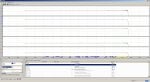
I have a question about Mark VI e , when we go to analyze our trend when select the desired signals , how can we configure to get that selected signal in the same graphes emerged , not separated like showed in the pic .
Thanks for answering as soon as possible .
 
I think (I don't have a copy of ToolboxST at the present moment) that if you click on one of the options on the Menu bar at the top of the Trender display (View, if I recall correctly) that you can chose to have "stacked" traces (which is what the photo you sent is displaying) or not. But you can check each of the options.

You can also try using the 'Help' feature and look for "stacked traces."

Please write back to let us know what you discover.
 
From GEI-100795V
5 Graph View
The Graph View can display data on either a single graph or a set of stacked graphs. Single Trace mode displays all traces on the same graph, while Stacked Trace mode displays each trace on an individual graph. In both modes, all traces share the same time axis, but each trace maintains its own vertical axis.
Note When a trend is first opened in Single Graph mode, the vertical axis corresponds to the first trace listed on the Traces tab. Each trace is drawn according to its own scale. Traces other than the first trace may not correspond to the displayed vertical axes.
If there are too many traces to display stacked graphs effectively in the available space, Trender may revert to Single Trace mode even if you have selected Stacked Trace mode.
 
I think (I don't have a copy of ToolboxST at the present moment) that if you click on one of the options on the Menu bar at the top of the Trender display (View, if I recall correctly) that you can chose to have "stacked" traces (which is what the photo you sent is displaying) or not. But you can check each of the options.

You can also try using the 'Help' feature and look for "stacked traces."

Please write back to let us know what you discover.
This is absolutely correct!
 
@SADI RAYAN,

I want to add that you can drag a cursor (denoted by the diamond at the upper left corner of the upper-most chart on the screenshot) for each individual chart to see what the value is for that chart at any instant in time. You can do this for all the charts, essentially lining them up vertically. This tool is SOOOO powerful. You can't hurt a running turbine using, and you can--and SHOULD--"play" with Trender/Trend Recorder to get a feel for how it works. AS LONG AS you don't save anything when you exit Trender/Trend Recorder if you feel you make some kind of error or mistake the error/mistake won't be saved, so the next time the .dca or .trn file is opened all the data will still be there.

I know--"playing" with things on a HMI on a running machine makes some people EXTREMELY nervous, but in this case it's really the only way to get familiar with (get a feel for how) Trender/Trend Recorder works. It's a FREE and EXTREMELY powerful tool, and has LOTS of options and possibilities.

If the .dca/.trn file is on a particular HMI (or can be copied to another HMI not being used to monitor/control a running machine) you don't have to connect ToolboxST to the Mark* VIe to look at the file contents and get them to display in a useful and easy-to-read graphical format. You can change vertical scales and pen sizes and colors; you can change horizontal scales. You can temporarily remove data from the chart(s) (as has been done in the screenshot).

Technicians SHOULD be recording--learning how to record trends--during start-up, and during shutdown, anytime during normal operation. Look at all the options on the configuration screens; use the Help feature (if you don't want to refer to a printed manual--the information on the Help screens is EXACTLY what's available in the printed manual!!!) to learn about and understand various options and then practice using them. Recording normal, good start-ups and shutdowns is essential to have when there's a problem (real or perceived) that needs troubleshooting or resolving.

Trends can be used for training purposes, not just troubleshooting. They are graphical examples of how things work and are very useful for learning and explaining control schemes.

Trender/Trend Recorder is a very misunderstood and very under-utilized. If it has one shortcoming (and the ONLY one I know of) it's that it's not possible to compare two (or more) different trend files in one Trender/Trend Recorder window. But one can have multiple trend files open in separate windows and the data from them can be exported to .csv files which can be imported into spreadsheet programs (such as MS-Excel) and combined and analyzed. Some (mistakenly) believe this is a fatal flaw and therefor won't use Trender/Trend Recorder--and that's too bad for them because there really isn't any other way to look at high-speed data from a Mark* VI or Mark VIe turbine control system.

[NOTE: On a multi-unit HMI data from multiple machines can be gathered in one .trn file and analyzed!]

Anyway, good question, @SADI RAYAN. And good on you for actually using Trender/Trend Recorder!!!
 
Top