Facebook
 Google
 GitHub
 Linkedin
Dear all, I work with a GT 9E GE MARK VIe (UCSBH4A) TMR combined cycle with a steam turbine through the HRSG with a MARK VIe Dual controller. The two controllers (UCSBH4A) of the HRSG do not boot. We have already downloaded the setup through the toolbox, according to "6700AN" after replacing the controller, unfortunately the boot did not work.
Configuration procedure:
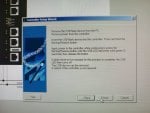
- After completing the "build device", proceed to Device>Download>controller set up wizard > follow the procedure in Windows displays until the download to the USB drive is complete (the download was successful, but when restore to the new controller the boot LED flashes 1 hertz, indicating failure). We have already performed the same setup procedure in previous years on the gas turbine when the UCSBH4A controller did not boot and it worked.
We do not understand why it does not work now if the procedure is the same for GT as well as for HRSG and the controller is the same type (UCSBH4A).
Could it be that the procedure for the HRSG is different? If so, how should it be done?
We ordered the controller from GE for the gas turbine. Could it be that the factory settings for GT do not apply to HRSG, even though they are the same (UCSBH4)?
On the other hand, how do we know that we need to replace the MARK VIe controller because it is broken? Should we conclude that the only solution is to replace it because it does not reboot? At GT, the first time the controller did not reboot, the GE technician came and replaced it, and we have done the same. Is it right to do this?
Note: All 4 times we replaced the controller, it was at GT and it was successful. This is our first time doing it at HRSG and we were unable to do this, although I believe we did it right).
Configuration procedure:
- After completing the "build device", proceed to Device>Download>controller set up wizard > follow the procedure in Windows displays until the download to the USB drive is complete (the download was successful, but when restore to the new controller the boot LED flashes 1 hertz, indicating failure). We have already performed the same setup procedure in previous years on the gas turbine when the UCSBH4A controller did not boot and it worked.
We do not understand why it does not work now if the procedure is the same for GT as well as for HRSG and the controller is the same type (UCSBH4A).
Could it be that the procedure for the HRSG is different? If so, how should it be done?
We ordered the controller from GE for the gas turbine. Could it be that the factory settings for GT do not apply to HRSG, even though they are the same (UCSBH4)?
On the other hand, how do we know that we need to replace the MARK VIe controller because it is broken? Should we conclude that the only solution is to replace it because it does not reboot? At GT, the first time the controller did not reboot, the GE technician came and replaced it, and we have done the same. Is it right to do this?
Note: All 4 times we replaced the controller, it was at GT and it was successful. This is our first time doing it at HRSG and we were unable to do this, although I believe we did it right).
Attachments
-
 114.8 KB Views: 23
 -
 134.8 KB Views: 23