Facebook
 Google
 GitHub
 Linkedin

Hello everyone,
I'm currently working on an electrolyser project and need to measure the power it consumes. We have a Sonnen WM271 power meter, which has an Ethernet port (marked as #9 in the attached photo). I’m trying to figure out if it’s possible to connect the power meter directly to my laptop via Ethernet for monitoring purposes.
Is it feasible to connect the meter directly to my laptop, or would I need an additional device or hardware to facilitate this? If it is possible, what kind of software would I need to properly monitor and record the data?
I’m quite new to this field, so any guidance or suggestions would be greatly appreciated.
Thank you in advance for your help!
here is the link of the full manual
https://www.sonnensupportaustralia....-_manual_-_power_meters_-_kd-401_en_22118.pdf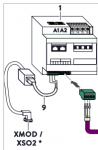
I'm currently working on an electrolyser project and need to measure the power it consumes. We have a Sonnen WM271 power meter, which has an Ethernet port (marked as #9 in the attached photo). I’m trying to figure out if it’s possible to connect the power meter directly to my laptop via Ethernet for monitoring purposes.
Is it feasible to connect the meter directly to my laptop, or would I need an additional device or hardware to facilitate this? If it is possible, what kind of software would I need to properly monitor and record the data?
I’m quite new to this field, so any guidance or suggestions would be greatly appreciated.
Thank you in advance for your help!
here is the link of the full manual
https://www.sonnensupportaustralia....-_manual_-_power_meters_-_kd-401_en_22118.pdf