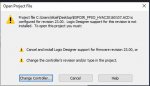
Follow the instructions.
Download V23. ( I assume that you have a current license )
or convert it to V36 by selecting a new controller and firmware and saving it as a separate project.
if you want to deploy it then you will need to make sure that your hardware can be upgraded to the required revision.
There are a lot of things to hate about Rockwell and the way they forces you to waste space on your hard drive for different PLC revisions is just one on the list.
If you change the projects controller to v36 then that requires a firmware update to the controller using controlflash software. This wipes the project and it then has to be downloaded to the controller again.
Check on RA KB site which bugs were resolved from v23 controller firmware and which still exist in v36 (as they may affect you). In my opinion it's better to update the controller and project than install the older versions of studio 5000. Also an old version like 23 may actually be deprecated now and flagged red (not downloadable)
Yeah I know. We have a global RA TS account at work and I have made them give me older versions of some stuff when required (like RS Linx Enterprise 5.8) as when it comes to software it's often a pain to upgrade stuff as it breaks other stuff.

 Facebook
 Google
 GitHub
 Linkedin