Facebook
 Google
 GitHub
 Linkedin
Reduce Motion Control Design Time with Engineering Tools
In a few short video tutorials, Festo engineers show how fast and easy it can be to design electrical and fluid automation systems using free online tools.
Working as an engineer for a machine builder is stressful. Engineers are under pressure to quote new machines at the same time as they are tasked with designing systems that have already been sold. There is pressure to find time to keep up with vendor developments. Then there are meetings, follow-up from meetings, and time away from designing spent on the manufacturing floor.
Take, for example, the task of designing a vacuum gripping system for an end-of-arm tool and then ordering components and accessories. First, vacuum calculations must be made and then the engineer must search for components and accessories. How long will this task take? An hour? Multiple days?
Or take a more complex task of designing and ordering a 3D handling system. Unlike off-the-shelf robots, which are sold ready to install, 3D positioning systems require the integration of diverse components that must be interoperable, including axes, servos, motors, sensors, and accessories. How long would this design task take? Five hours? Ten?
Modern Solutions
Many of these challenges were entirely manual in the past, but digital tools have eased the burden.
CAD systems are a very popular way to accelerate calculations and verify design parameters. Simulators built into these systems can pinpoint many failure points in materials, feature placements, and life cycles before any physical fabrication occurs. CAD tools are available for most mechanical and electrical design stages.
Modular designs are another increasingly common way to prevent incompatibility that creeps up when multiple teams are working with multiple revisions. When a part is customized for one design instance, it’s nearly impossible to change a surrounding feature without going back to revisit the original part, plus all others in between. With the modular design mindset, many parts are interchangeable, so an improper part in one place can be swapped with the assurance that it will be compatible with surrounding features.
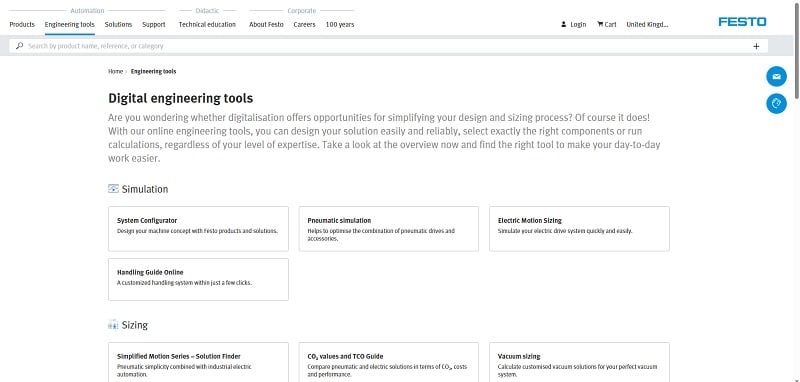
Figure 1. A selection of unique tools to ease design challenges for engineers. Image used courtesy of Festo
Online Design Tools
Festo, one of the world’s leading automation companies, offers a third solution for many electric and fluid motion design situations: online engineering tools that can shorten design time down to mere minutes while also streamlining component selection, ordering, and delivery.
The Festo engineering tools include Electric Motion Sizing for single-axis systems and Handling Guide Online for multi-axis systems. These tools can perform the design and component ordering functions in as little as 20 minutes, providing the user with design options that meet the application requirements but with distinct levels of price and performance differences, from economic to high-performance.
Video Tutorials
Festo Application Engineer John Narup and Segment Manager Mark Walters were interviewed by reporter Steve Sterling, with Narup walking through the use of three common engineering examples. Narup simulates the steps engineers take to specify vacuum components, a mechanical gripper, and a single-axis motion transport for a case packer.
- Tutorial One: Specifying vacuum components to lift boxes out of a magazine.
Figure 2. Festo vacuum component selection tutorial. Video used courtesy of Steve Sterling of Sterling Communications (shared with Control.com)
- Tutorial Two: Specifying a mechanical gripper to lift 2-liter bottles off a conveyor and place them in a case.
Figure 3. Festo mechanical gripper selection tutorial. Video used courtesy of Steve Sterling of Sterling Communications (shared with Control.com)
- Tutorial Three: Specifying a single-axis transport system to move filled cases to a palletizer.
Figure 4. Festo single-axis transport system tutorial. Video used courtesy of Steve Sterling of Sterling Communications (shared with Control.com)
Further Festo Engineering tools
Festo offers an entire library of free online engineering tools grouped within 9 different categories. To locate the entire lineup, go to www.Festo.com. On the top ribbon under automation, select engineering tools. Here is a list and links to these free online engineering tools.
Simulation
- System Configurator – Design your machine concept using Festo products and solutions.
- Pneumatic simulation – Find the optimum combination of pneumatic drive and accessories.
- Electric Motion Sizing – Simulate your electric drive systems quickly and easily.
- Handling Guide Online – Get a customized handling system in just a few clicks.
Sizing
- Simplified motion series – Pneumatic simplicity meets electric automation.
- Vacuum Sizing – Calculate customized vacuum solutions for your vacuum system.
- Gripper Sizing – Get customized gripper solutions for precise and efficient handling.
- Pneumatic Sizing – Calculate the optimum pneumatic control chain.
- Shock Absorber Selection – Choose the right shock absorber for your application.
Calculation
- Flow calculation – Start the flow calculation for your pneumatic system.
- Mass moment of inertia calculation – Calculate mass moments of inertia quickly and effortlessly.
- Rotary indexing table – Choose the right rotary indexing table for your application.
- Feed separator calculation – Determine the ideal feed separator.
- Media resistance – Evaluate the chemical resistance of materials and hoses.
- Cylinder air consumption calculation – Calculate the air consumption of pneumatic cylinders for system optimization.
- Air preparation unit sizing – Select the right air preparation unit for your application.
Configuration
- Configurator for quarter turn actuator units KDFP-DFPD – Choose your specific quarter turn actuator units.
- Configurator for ball valve units KVZB – Configure ball valves with thread, flange, or clamp connections.
- Configurator for butterfly valve units KVZA – Configure the water or lug version of butterfly valve units.
Design
- Festo Design Tool 3D – Create CAD product combinations, complete with a search for accessories for pneumatic cylinders.
- Festo Parts Data Manager – 2D/3D CAD data for more than 33,000 products.
Commissioning
- Festo Automation Suite – Automate the entire drive package from mechanics to the control system.