Facebook
 Google
 GitHub
 Linkedin
Collaborative vs. Industrial Applications: Understanding Robot Differences
Discover the key programming differences between robots used for collaborative and traditional industrial purposes, highlighting ease-of-use versus advanced control in automation tasks.
When comparing robots that are designed for close collaboration with humans, like those from Universal Robots (UR), with traditional 6-axis industrial robots such as Fanuc, one of the biggest differences lies not just in the hardware but in the programming experience. For engineers stepping into automation, understanding how each system approaches tasks is essential for deciding which is the right tool for the job.
To demonstrate this, we’ll walk through two simple programs that accomplish the same pick-and-place task—one created with a UR robot, the other using a Fanuc robot—and explore how the programming mindset and tools differ between the two systems.
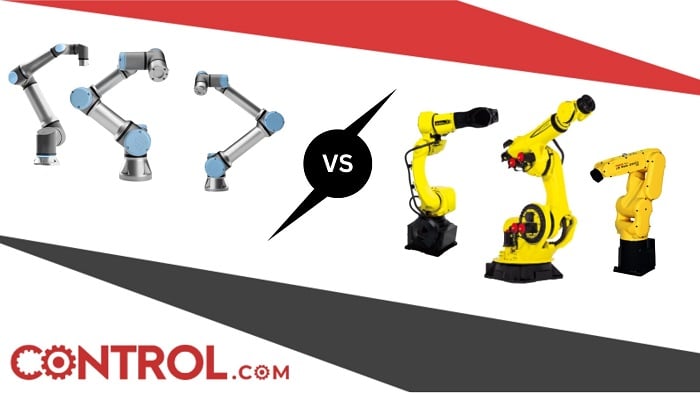
Figure 1. UR robots and traditional 6-axis Fanuc robots. Let the fight begin. Image (modified) used courtesy of Fanuc and Universal Robots
Exploring The Differences
A great way to grasp the differences in programming styles is to walk through real-world examples.
Starting with the UR, let’s break down the pick-and-place code one line at a time.
- Beginning on line two, the robot makes a joint move to an intermediate position just above the object to be picked. A joint move is appropriate here because we’re moving freely in space with no nearby obstructions.
- Then, on line three, the robot performs a linear move directly downward toward the part. This ensures a perfectly vertical movement in the Z-direction, which is critical when aligning with the object.
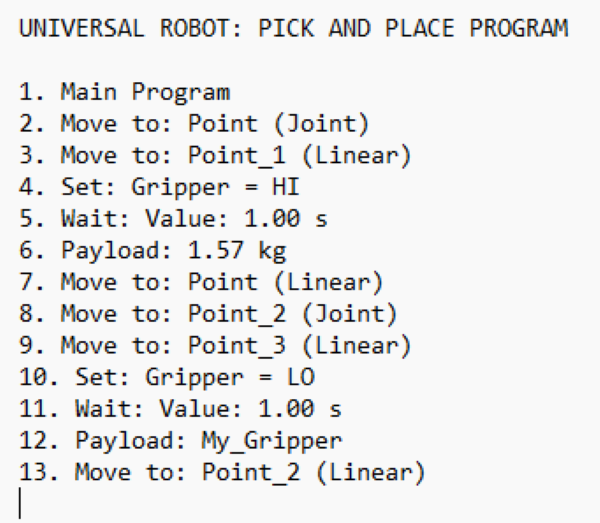
Figure 2. A simple pick-and-place program using a UR robot. Image used courtesy of the author.
- Once in position, the robot triggers the end-of-arm tool (EOAT)—in this case, a gripper—to close by sending a signal high (line 4). It waits for one second to ensure a firm grip, then updates its payload to account for the added part weight.
- After gripping, the robot performs another linear move upward, followed by a joint move across open space to the destination location (lines 7-8).
- Once there, a final linear move places the part, the gripper releases, and the robot returns upward, ending the routine (lines 9-13).
The standout feature of the UR interface is its simplicity. Every command is nested under a “+” icon, which opens up common tasks such as movement, wait commands, I/O signals, and conditional logic. It's a visual system designed to make programming accessible, even for beginners. Pop-up windows guide the user through input fields, and intuitive icons (like a pencil for editing) make it easy to find and adjust program parameters. Think of it like Apple’s design philosophy: minimal, clean, and straightforward.
But First, Let’s Talk Collaborative Advantage
One of UR’s strongest technical advantages comes from how you physically interact with the robot during programming. Unlike traditional 6-axis arms, UR robots support “teach by demonstration.” Instead of manually entering every point, a user can simply unlock the joints, physically guide the robot into the desired position, and then save that position. This not only speeds up the programming process but also reduces errors and guesswork when aligning movements.
For example, during a pick-and-place setup, a user could grab the robot by hand, move it to the pick location, press “Set Position,” and then do the same for the drop-off. There’s no need to spend time jogging axis-by-axis or fine-tuning coordinates from a teach pendant. It also creates a more intuitive experience for technicians and engineers who may not come from a coding background. This tactile approach to programming isn’t just faster, it also makes collaboration and troubleshooting more natural. If a robot is off by a few millimeters, you can physically reposition it, re-save the waypoint, and continue without digging into the code. That physical feedback loop gives UR a massive advantage in rapid prototyping and environments where human-robot interaction is common.
Fanuc Programming Example
Now, let's compare that with a Fanuc robot performing the same task. While the outcome is identical—picking a part from one position and placing it elsewhere—the program's structure differs slightly.
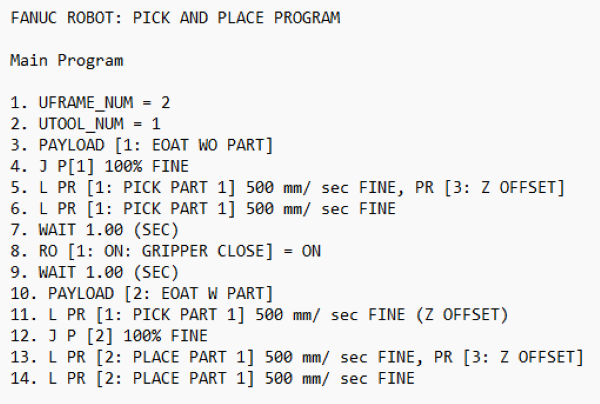
Figure 3. A simple pick-and-place program performed by a Fanuc robot. Image used courtesy of the author
In the Fanuc example, we take a more traditional code-based approach. The robot references defined positions but uses position registers and offsets to simplify the process. For instance, rather than teaching every single point manually, we use a base position—PR[1]—as our reference. Then, instead of creating a second position for moving above the part, we apply a positive Z-offset directly in the code. This means fewer positions need to be saved, which leads to a cleaner program. As all programmers know, a clean program makes for easy troubleshooting.
The offset method is especially powerful in processes like machine tending or palletizing, where movements are repeated with only slight variations. By modifying the offset values, the robot can reach entirely new positions without re-teaching every point. However, this assumes the programmer has a solid understanding of frames, offsets, and coordinate systems.
Structured Programming vs. Flow-Based Programming
One of the most fundamental differences between these two systems is the way they approach programming logic. Fanuc uses structured programming—similar to traditional coding languages—with clearly defined sequences, conditional statements, subprograms, and manual line editing. This is a powerful system that supports complex logic and decision trees but requires familiarity with code structure.
UR, on the other hand, relies on a flow-based visual environment. Programs are created by adding blocks in a logical sequence, similar to building a flowchart. Loops, conditionals, and I/O controls exist, but they’re abstracted through user-friendly icons and drop-down menus. This is perfect for beginners or for engineers who prefer a visual representation of tasks, but it can limit fine control for very complex logic or branching behavior.
Data Handling and Variables
Another key difference lies in how the two systems handle data. Fanuc allows users to define a wide variety of variables like integers, reals, strings, and position registers. These can be manipulated through mathematical expressions, logic checks, or even external feedback. It gives users complete control over program behavior and makes it easier to create dynamic routines based on live data.
UR supports variables, too, but they are slightly more limited in type and scope. Typically, users deal with booleans, numbers, and pose data, and these are accessed visually rather than through lines of code. This keeps programming accessible but limits complexity when you need to do things like advanced math operations or condition-heavy routines. That said, UR's system still supports dynamic values and can be extended with scripts, but for general use, it's simpler by design.
So, Traditional or Collaborative?
Both robots can achieve the same physical tasks, but the real variation is how you get there. Universal Robots (and most other collaborative brands) focuses on ease of use, intuitive design, and collaborative safety—all wrapped in a drag-and-drop interface perfect for small shops, prototypes, or teams without deep robotics experience. Fanuc, on the other hand, offers a more advanced toolkit for developers who need precision, modularity, and full control. Again, this is similar for all traditional industrial robots.
In the end, the right choice depends on the user and the job. But when it comes to programming, the experience with UR and Fanuc highlights a broader conversation in robotics: the constant struggle between accessibility and depth, simplicity and control.
Related Content