
 Facebook
 Google
 GitHub
 Linkedin
Remote Networking: Explaining VPNs for Control Engineers
It can be risky to adopt unknown technology; it poses serious security concerns if misused. The Control.com engineering team contacted our friends at OnLogic to gain some insight into VPN technology.
There’s no doubt you’ve heard the acronym ‘VPN’ many times. It stands for virtual private network, and it’s fairly well understood in IT circles. But what does it actually mean to a control engineer dealing with PLCs, HMIs, and robots on the factory floor?
VPNs, along with many other networking concepts, can be confusing, especially when you're more comfortable working with physical hardware and wiring. The Control.com engineering team reached out to the experts at OnLogic to demystify VPNs and explain their relevance in modern industrial automation.
Challenges of Machine Connectivity
Remember the days of serial cables and dial-up modems for programming PLCs? We've come a long way.
From serial to USB, then to Ethernet, and now wireless connections like Wi-Fi and Bluetooth… The way we connect to machines has evolved over the years. While these advancements offer convenience, they also introduce security risks.
- Hardwired connections: While generally secure within a local network, they can be vulnerable to physical tampering and unauthorized access if the network itself is compromised.
- Wireless connections: Wi-Fi and Bluetooth offer flexibility but are inherently more susceptible to eavesdropping and attacks if not properly secured.
These traditional methods often limit user access. Imagine needing to be physically present at a factory to troubleshoot a PLC or download a program. Not very efficient, is it?
How Does a VPN Work in an Industrial Setting?
The basic concept of a VPN is honestly quite simple. Think of a VPN as a secure tunnel through the internet. It allows you to connect to a device or network remotely as if you were physically there.
In more formal terminology, we might say that a VPN is a private network constructed within a public network infrastructure, such as the global Internet. Businesses can use a VPN to securely connect remote facilities and remote users using cost-effective, third-party internet access instead of expensive, dedicated WAN links or long-distance remote dial links.
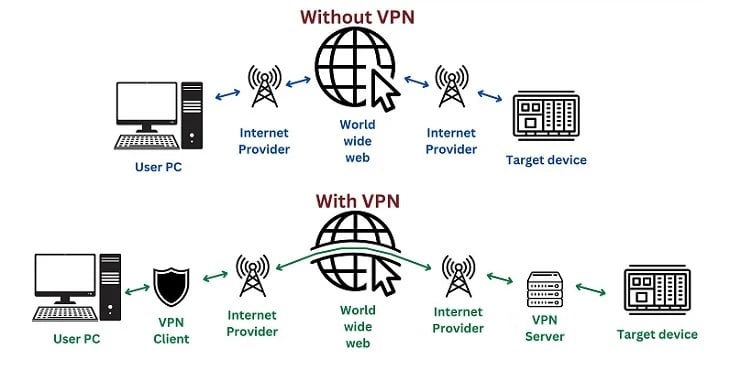
Figure 1. VPNs add another layer of security in the virtual connectivity world. Image used courtesy of the Control.com engineering team
Controlling Equipment and Operations via VPN
VPNs allow engineers to remotely control a wide range of equipment and operations within industrial settings.
Programming and maintenance: VPNs enable remote access, allowing engineers to program, diagnose, and troubleshoot machines from anywhere in the world. This reduces downtime and travel costs.
Data collection: Securely collect data from PLCs and other devices for real-time monitoring, historical analysis, and process optimization.
Other use cases: Remote firmware updates, secure communication between different factory sites, and integration with cloud-based SCADA systems.
Some devices and systems are more commonly accessed with VPN connections for specific purposes, including the following:
- PLCs and HMIs: Access and program PLCs, monitor process variables, and troubleshoot issues remotely.
- Robotics: Control and monitor articulated arms and other robotic systems, including adjustments and reprogramming.
- SCADA Systems: Monitor and control large-scale industrial processes, such as those in power plants, water treatment facilities, and oil refineries.
- Remote I/O: Access and configure remote I/O modules to control field devices like sensors, actuators, and valves.
- Machine Tools: Monitor and control machine tools, including CNC machines, lathes, and milling machines.
- Building Automation Systems: Manage building systems like HVAC, lighting, and security systems.

Figure 2. Cyber security is important for any connected system, even if it’s in the same geo location as the end device. Image used courtesy of Adobe Stock
Considerations for Remote Control Using VPNs
- Security: Prioritize strong security measures to protect sensitive data and prevent unauthorized access.
- Latency: Ensure low latency for real-time control and monitoring.
- Network Reliability: Choose a reliable VPN provider or set up a robust VPN server to minimize disruptions.
- User Access Control: Implement strict user access controls to limit access to authorized personnel only.
- Emergency Procedures: Have clear emergency procedures in place for disconnecting from the VPN in case of unexpected issues.
Setting up a VPN for Industrial Control
With our new solid foundational understanding of the benefits provided by a VPN, we move on to understanding how the system is acquired and configured. It can be very helpful when this process is understood by both the IT department (the managers) and the engineers (the users).
Establishing the Connection:
- Choose a VPN Provider or Set Up a VPN Server:
- Option 1: VPN Provider. Sign up with a reputable VPN provider that offers business-grade VPN services with robust security features and reliable performance. They will provide you with VPN client software to install on your devices.
- Option 2: VPN Server. Set up your own VPN server on-premises at the factory. This requires technical expertise and involves configuring a VPN server appliance or software, such as OpenVPN or IPsec, and setting up secure network connections.
- Install the VPN Client: Download and install the appropriate VPN client software on the computer that will be used remotely, like your laptop, desktop, or mobile device. The client will vary depending on your chosen VPN provider or server setup.
- Configure the VPN Connection: Open the VPN client and enter the necessary connection details, such as the server address, username, and password. You may also need to configure additional settings, such as encryption protocols and authentication methods.
- Establish the Connection: Click the "Connect" button in the VPN client to initiate the connection. The client will establish a secure encrypted tunnel to the VPN server.
- Verify the Connection: Once the connection is established, you should see a confirmation message in the VPN client. You can also check your network settings to verify that your IP address has changed to the VPN server's IP address.
Encrypting the Data:
Once connected, all your network traffic is encrypted. This means any data you send and receive is scrambled and unreadable to anyone intercepting it. This is crucial for protecting sensitive industrial data and control commands.
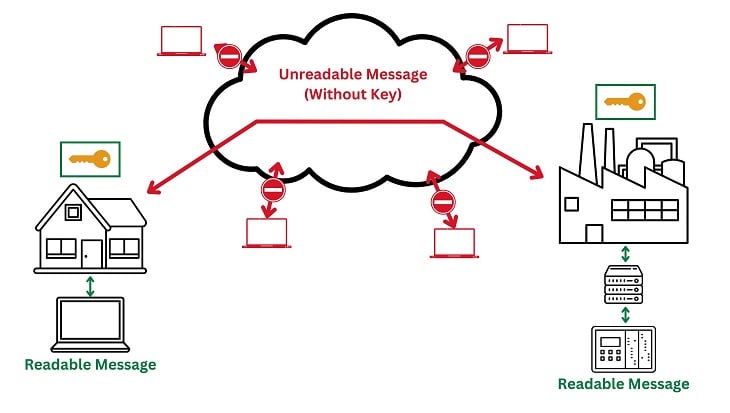
Figure 3. The encryption key allows the unreadable data to to be used only at certain authorized end points. Image used courtesy of the Control.com engineering team
Here's a closer look at some of the key components of VPN encryption:
Encryption Algorithm: The VPN client and server use a strong encryption algorithm, such as AES (Advanced Encryption Standard), to scramble the data. This algorithm uses a mathematical formula to transform the data into a seemingly random string of characters.
Encryption Key: The encryption process involves a key, which is a secret code that determines how the data is scrambled and unscrambled. The key is shared only between the client and server and is essential for secure communication.
Encryption Process: When you send data through the VPN, the client encrypts it using the encryption key and the chosen algorithm. The encrypted data is then sent over the internet to the VPN server.
Decryption Process: The VPN server receives the encrypted data and decrypts it using the same encryption key. The decrypted data is then forwarded to the destination device on the factory network.
By encrypting the data, VPNs make it extremely difficult for unauthorized individuals to intercept and understand the information being transmitted.
Other Security Considerations
Your business details and property can never be safe enough, so here are some best practices for securing a VPN connection in an industrial setting:
- Prioritize strong security measures, such as robust encryption protocols and multi-factor authentication, to protect sensitive data and prevent unauthorized access.
- Ensure low latency to enable real-time control and monitoring of industrial processes.
- Choose a reliable VPN provider or establish a robust on-premises VPN server to minimize disruptions and ensure consistent connectivity.
- Implement strict user access controls to limit VPN access to authorized personnel only, which reduces the risk of unauthorized access and potential security breaches.
- Develop clear emergency procedures for disconnecting from the VPN in case of unexpected issues or security incidents, enabling swift response and mitigation.
Other Important VPN Considerations for Automation
VPN client location: The client can be installed on a laptop, a dedicated engineering workstation, or an industrial PC (IPC) on the factory floor. OnLogic is a manufacturer of IPC technology for applications across many applications and industries.
Bi-directional communication: Modern VPNs are bi-directional. This means you can access devices for maintenance and programming, and the devices can simultaneously send data to cloud platforms for IIoT applications.
PLC integration: While some PLCs may have the capability to run a VPN client directly, it's more common to have the client on an IPC or gateway device that communicates with the PLC.
The Ultimate Value of VPNs for Automation
VPNs are becoming essential tools for control engineers in the new era of technology. They provide secure remote access, facilitate data collection, and enable new possibilities for industrial automation. By understanding the basics of VPN technology and setting themselves up for success by considering security and the goals of the VPN implantation, control engineers can leverage the benefits to improve efficiency, security, and productivity on the plant floor.
Once again, our sincerest thanks to the OnLogic team for taking the time to provide us with insights and answers to this common concept that steps between the IT and OT worlds in modern manufacturing.
Related Content












There is an error in Figure 1. The VPN Server should be between the Internet Provider and the Target device, otherwise the Target device would be transmitting unencrypted data across the Internet.
If you actually have a remote VPN Server (not a great idea) you should have another VPN Client in front of the Target device.