The specific steps are described in section 7.1 Reading Max / Min Demand of the manual you attached.
You will need to convert the Start Reg (Hex) from hexadecimal to decimal and add 1 before entering the register address in ModScan.
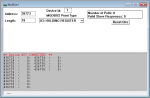
For example, this would be the configuration for the Max / Min Demand Header:
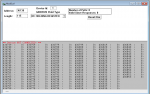
And this would be the configuration for the Max / Min Demand Data block 1:
One thing I noticed, though, on page 28 of the manual you attached, the Start Reg (Hex) values for Channel 8 don't seem right. If Channel 1 data starts at 8F85 and each channel has 14 total registers, Channel 8 should start at address 8FE7, not 8FDE as documented. I believe the documentation is wrong.
Thanks for your input. Could you please tell me the step-by-step procedure to execute? I'm not able to get any data even though the communication is good.i think not exceuting in a proper way.
I'm sorry, but the only information I have is what is in the manual. I don't have one of these units that I can test with and provide a step by step tutorial.
There is no such thing as "no data" when communications is successful. Perhaps the data is not what you expect, such as a value of 0 or 255, but these are still both data values.
Please provide the exact steps you're performing, including screenshot if possible, and detail the behavior and register values you're seeing from the meter at each step.

 Facebook
 Google
 GitHub
 Linkedin