Sometimes the unit fluctuates in the preselected mode and the control voltage and gas fuel of the unit fluctuates, and this fluctuation causes pressure fluctuations between Gcv, SRV, and GCV itself, and exactly 72 minutes after the start of the fluctuation, the unit returns to normal. So that the run status goes from 14 preselected mode to 18 unloading.
Sometimes the unit fluctuates in the preselected mode and the control voltage and gas fuel of the unit fluctuates, and this fluctuation causes pressure fluctuations between Gcv, SRV, and GCV itself, and exactly 72 minutes after the start of the fluctuation, the unit returns to normal. So that the run status goes from 14 preselected mode to 18 unloading.
Fault in the excitation system of the Mark 6 Simplex model unit. The unit is synchronous and at full load. Suddenly the unit is unloaded with the following alarms and the excitation system is removed. Does anyone have any information on this?
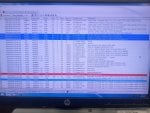
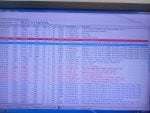
The WorkstationST Alarm Viewer display photos are extremely difficult to examine--mostly because the rows are not sorted chronologically. Diagnostic Alarms and SOEs and Process Alarms are all mixed together in the displays and nothing is in chronological order. So, it's really difficult for us to say with any degree of certainty what might have happened or what was happening prior to the event (which isn't really clear--did the generator breaker trip but the machine remained running, or did the fuel get shut off at the time the load disappeared???).
If the generator breaker tripped but the machine did not (meaning it remained running (burning fuel) at FSNL (Full Speed-No Load), then it would seem that the 86G lockout relay function was activated. Normally, when one of the generator protection relay functions detects a problem with the generator that doesn't affect the turbine, or sometimes the generator step-up transformer, the 86G lockout relay is unlatched (electrically). Some 86G lockout relays actually trip the turbine, and it all depends on what the OEM and/or the purchaser agreed to during configuration of the machine. Sometimes it's not necessary to trip the turbine on some electrical faults and if they can be cleared quickly the machine can be resynchronized quickly without having to wait for the machine to coast down and be restarted, which can take a lot of time.
So, as we don't really understand what exactly happened AND we can't properly see the chronological sequence of alarms we can't say too much more. Many times when the 86G lockout relay is activated (unlatched) it does also trip the machine, but, again, that's a decision made during the configuration of the machine as its being built.
WorkstationST Alarm Viewer can be extremely powerful tool for troubleshooting and it has a very powerful array of options and features, including using filters to sort many different ways. Unfortunately, if an operator clicks on one of the columns at the very top of the window the filtering/sorting will change and can really make using WorkstationST Alarm Viewer difficult and seem unintuitive and unfriendly. There is a GEH on using and configuring WorkstationST Alarm Viewer which can usually be found in at least one location on the GE Mark* HMI along with tens of other really useful GEH and GHT (GE How To's). Also unfortunately, the file names of the pdf files of all these instructions and how-to's don't always have the full title in the filename which means one has to use the MS-Windows Explorer search/find function to find documents with the proper terms (such as "WorkstationST Alarm Viewer" (WITH the double quotation marks to search for those terms exactly as entered)).
Learning to use WorkstationST Alarm Viewer requires several hours sitting in front of the HMI after having had at least a quick read of the manual AND first learning how to save a configuration and recall it!!! (HINT!! HINT!! HINT!!), AND then trying out some of the various filters and configurations. It's almost too powerful, but once one gets familiar with it and can help others understand and learn basic functions it will become an integral part of operation and troubleshooting. Becoming familiar with and using even just a few of the basic functions is time well spent.
The 'Help' feature of WorkstationST Alarm Viewer is really just the same as the manual, for the most part, so if you don't want to read or print the pdf file of the WorkstationST Alarm Viewer manual (printing a copy of the manual allows one to highlight sections and make notes!!!) then at least learn to use the 'Help' feature of WorkstationST Alarm Viewer.
One of the most useful functions of WorkstationST Alarm Viewer is to use it to display a time period from a recent day in the past (the log of alarms is usually a rolling period, say seven days, for example, and any information older than seven days, for example, gets deleted/overwritten). It's also one of the features that at least technicians and operations supervisors should become very familiar with. I believe the information from such a search can even be saved to an electronic file somewhere on the GE Mark* HMI for future reference and recall (another very useful feature, especially since ALL alarms are not saved FOREVER).
Anyway, there really isn't enough information here and there is NO description of what was happening at the time--such as were there electrical problems on the grid (frequency fluctuations; voltage fluctuations; MVAr or power factor oscillations at the generator terminals prior to the loss of load; what was the system (grid) voltage at the time--was it higher or lower than normal?)--anything that can help us understand what was going on prior to the event--which also isn't very clear--did the fuel get cut off as in a machine trip or not?). The photos of alarms (Process and Diagnostic) and SOEs can't really be analyzed because, again, it's not clear how the displays are sorted--but it is clear they are not sorted chronologically. So, we really can't give you any more information than what we have as we don't really know a lot about the configuration of the machine and the grid connection and many other details which might give us a clue about what might have been happening.
Many times when problems like this occur someone "saw" something (or didn't see something they expected to see) and attribute the cause to that. But without concrete data, such as from the Trip History which includes Process Alarms, such an attribution can be wrong and mislead others. Actionable data--operational data from the event gathered by the Mark* tools (Trip History; Trender/Trend Recorder) at a relatively fast rate (more than once per second in most cases) is really necessary to make an analysis, especially without any idea what was happening immediately prior to the event in question. These machines and their protection and control systems are pretty complex and us experts need more information than is often provided. Help us to help you by providing as much hard data and alarms (at least sorted chronologically) as possible, along with details about the time immediately prior to the incident, and we can usually provide better help and analysis.
"Notifications" via the Alarm display of GE Mark* turbine controls are organized by a scheme chosen by GE that prioritizes Process Alarms, then Diagnostic Alarms, then SOEs and System Alarms. I just remembered this, and it could explain why things appear to be out of chronological order.
That being said, if someone clicked in the box at the top of the time column it would probably rearrange all notifications in chronological order (if I recall correctly). I think individual columns can be hidden (as in MS-Excel) and then unhidden later (they should always be unhidden later). Sometimes hiding unnecessary columns can also be very helpful when troubleshooting an event or situation.
For me, there are not enough alarms (specifically Process Alarms) shown in the photo snippets to be of help for this post (which should have been its own thread). And without any context, too.
Again, save the Trip History display to a .csv file and post the file to this thread.

 Facebook
 Google
 GitHub
 Linkedin