Mark V generator synchronization interface disappears

Hello, friends of Control.
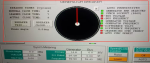
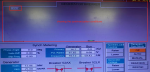
Our on-site gas turbine control system uses Mark V HMI, and the operation monitoring screen HMI uses CIMPLICITY 5.5. There was a screen showing the synchronization conditions and status on our generator synchronization operation screen, but for some reason this screen disappeared. It is still the same after restarting the computer. It shows ERROR at the original screen location.
May I ask what caused the screen to disappear? It seems that a small program affects this screen. Which small program is affecting this screen?
1721921178315.png
 
@ DGY,

I want to say first--and foremost--that I'm not a CIMPLICITY expert, and that was a personal decision made decades ago.

HOWEVER, I understand some of the basics of CIMPLICITY screen make-up, especially with the older versions such as VIMPLICITY 5.5.

Based on the photo--not on the information provided (because there are a lot of questions to be answered)--it would appear that someone has been trying to edit this or one of a group of displays that can make up the normal HMI displays for a Mark* V. I say that because it appears to me that something is "blocking", or "on top of", that section of the Synch Display--preventing the display from being visible.

So, the questions begin (and answers to all of them would be most helpful!):

1) Are there multiple HMIs at the installation where this machine and this particular HMI are? If there ARE other HMIs, is only one HMI having problems?

2) WHEN DID THIS PROBLEM WITH THE SYNCH DISPLAY BEGIN? Was it after a maintenance outage when someone might have been searching through files on the HMI? Could it be that someone tried to copy a display file from one HMI to another? Could someone have been trying to add something to the Synch Display--or one of the other displays if the display file is a "frame container"? (For several years it was common for there to be only one CIMPLICITY display file which had a bunch of variations available through a feature called a "frame container." It was nice that there was only one CIMVIEW display file, but editing that file--or even "searching" that one file could cause a lot of unintended problems if not done properly and with care. So, to the best your ability please try to think back to when this problem was first observed, and what was happening just prior to the problem being observed. Because it might be helpful to understand what happened before the problem began and to rectify it sooner.

3) Do you know how to use CIMEDIT? (CIMEDIT.exe is the program/application that is used to create and edit CIMPLICITY displays. CIMVIEW.exe is the program/application that is used to show the CIMPLICITY displays on the HMI monitor AND to make them accept commands and display data for the operators and technicians and supervisors.

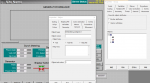
So, again--it appears to me that something is "on top of", or preventing the full Synch portion of that display.

And here's what makes me say that:

1721995085520.png

It appears there is something "behind" or "underneath" something which is preventing the entire display from being visible.

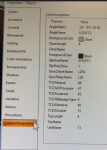
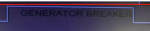
Also, this:

1721995198335.png

In my experience and recollection, the title of the upper portion of this display is "GENERATOR SYNCHRONIZATION" or something similar. There is USUALLY an animaged graphical representation of the generator breaker that changes color to indicate an open or closed generator breaker. And the font size is usually not as big as is shown in the picture you posted.

Combined with the first snippet above this leads me to believe: 1) something is blocking the main portion of the Synch Display, and, 2) someone has been mucking around in this display file using CIMEDIT and didn't properly exit the file when they were finished.

Anyway, without actually being on-site or without having a LOT MORE information, that is my observation. Your answers to the above questions might be helpful to me, but they will probably be more helpful to other potential respondents who have a LOT more experience with CIMPLICITY 5.5 than I do.

Finally, around the time of CIMPLICITY 5.5 GE had a couple of different types of HMIs: Servers and Clients. Is this one one of those types of HMIs at your site--and which type (Server or Client)?
 
When the Mark V generator synchronization interface disappears, it can disrupt the synchronization of generators in a power plant. This issue may arise due to hardware failures, software glitches, or communication problems between the generator control systems. Troubleshooting involves checking connections, verifying software configurations, and inspecting system logs for error messages. Ensuring that all firmware and software are up to date and recalibrating the interface may resolve the problem. It’s crucial to address synchronization issues promptly to maintain stable power distribution and avoid system outages.
The Mark V generator synchronization function was not affected after the synchronization interface disappeared. The unit has been started and stopped several times after the synchronization screen disappeared, and it can be synchronized normally.
 
@DGY,

Your reply is to an AI-generated response--which actually provides only general statements about safety and operation. And, as you well know, the interface requires no calibration....

AI-generated responses can be very helpful for many applications, but they are proving relatively useless for technical applications, particularly when it comes to heavy duty gas turbine operation and purpose-built control systems, including the operator interfaces of the turbine control systems.
 
Dear WFT,Thank you very much for your patience in restoring.
1. There is a gas turbine on site, with two HMI servers, one called GT1_SVR and the other called CRM1_SVR. During the shutdown and maintenance, the GT1_SVR server located in the local gas turbine control room failed after a sudden power outage. The server CRM1_SVR located in CCR was moved to the local gas turbine control room. Note that when the server suddenly lost power, Mark V also lost DC power, causing Mark V to shut down.
2. After restarting CRM1_SVR, the IO configuration was checked. Since each time the IO configuration was modified in GT1_SVR, the parameters of the IO configurators of the two servers were different. The latest Unit1 folder backed up before replaced the content of Unit1 in CRM1_SVR, and the IO configurator of CRM1_SVR was modified and the IO configuration was loaded. Then the R, S, and T controllers were restarted. Later, it was found that the time of the HMI had changed to 1980. At this time, the GE engineer was still on site. He tried to do some work. I don’t know the specific work. It should be something related to the same time, but it was unsuccessful. Later, when the unit was started and needed to be connected to the grid, it was found that the upper part of the synchronization interface disappeared. However, the unit's grid-connected synchronization function was normal.
3. No one has operated CIMEDIT。
 
When the faulty GT1_SVR is restored to normal and put into operation, the time of CRM1_SVR automatically returns to normal. The synchronous screen of GT1_SVR is always normal, but the synchronous screen of CRM1_SVR still does not return to normal. The following is a normal synchronous screen.1722221733462.png
 
@DGY,

In the folder/directory G:\EXEC there was a command to send time to the Mark* V; I think it was called TIMESET.EXE.

From any command prompt (DOS window) in any drive/folder, simply type the command:

TIMESET /?

and then press ENTER.

This should pop up a little help dialog which will provide the format of the command and the options/switches available. And, just bringing up the help dialog won't hurt anything even if the unit is running.

While the unit is at zero speed or on Cooldown (I wouldn't recommend trying this when the unit was running and under load...) you can use the TIMESET command to send the time to the Mark* V from the HMI over the StageLink. If I recall correctly, and it's been a LONG time since I've had to do this, the command writes to <C> which then updates the control processors.

If there's no TIMESET.EXE in G:\EXEC, you can search that folder for anything similar from Windows Explorer or using the DIR command from any command prompt. (For example, type the command DIR G:\EXEC TIME*.* and then press ENTER and the folder G:\EXEC will be searched for any filename that begins with TIME followed by any characters and with any filename extension.)

I want to raise a couple of issues that should be considered when formulating a response to a similar event (loss of "power" in the PEECC in the future). The Mark* V receives power (first and foremost) from the 125 VDC battery that powers the emergency pump motors and the fire detection and protection system). Those batteries should last a couple of hours at least without AC power for the battery charger(s) (some machine have two redundant 125 VDC battery chargers). AT LEAST! If the batteries at the site did not last at least a couple of hours then the battery needs to have someone perform some testing and maintenance to identify issues (low water level; build-up of sediments in the bottom of the battery shorting plates together; low specific gravity; corrosion on battery terminals; etc.). These batteries are industrial flooded lead-acid batteries that, while they share a chemistry with automobile batteries they are VERY different in their ability. AND, very often, with proper procedures they can be restored from most of the above conditions with time. Methods include intense charging (called "equalizing"), pulse charging (a separate pulse charger is required; adding battery acid to the cells to improve specific gravity; etc.

Next, while many Mark* turbine control panels have some sort of AC-to-DC converter to act as a redundant source of DC power for the turbine control panel in the (hopefully unlikely) event DC power to the turbine control panel is lost, it's NOT recommended to operate the machine (full speed, loaded operation for extended periods of time) without power from the batteries--for many reasons.

If AC power is lost to the 125 VDC battery charger(s) (and possibly to the HMI) and the length of time to restore power is not known (several hours or more) a plan should be undertaken to begin an orderly process of shutting down the Mark* and unplugging the HMI from its AC power source. (A lot of what's happened at your site could probably have been avoided had this been done. And it should be used as an opportunity to develop a procedure for future events in order to prevent the problems experienced during this most recent event.) Further, many sites purchase and install a UPS (Uninterruptible Power Source) to provide power to the HMI and monitor in the event of loss of AC to the HMI and monitor. UPSs come in all sizes and can be used to power the HMI in the event of loss of AC for anywhere from 10 minutes to a couple of hours. (Many UPSs are also very good surge suppressors and low-voltage ride-through devices.) But, if it looks like AC isn't going to be restored before the UPS runs out of its battery power, then the HMI should be manually shut down in an orderly fashion to protect it from low voltage, and surges when power is restored.

A failure to plan is a plan to fail (as a former colleague used to say).
 
Thank you, WTF?
Your suggestion is very good. Our accident was caused by the failure of preventive measures, which led to the sudden power failure of the computer and the hard disk failure.
 
@WFT?
The TIMESET command has not been tested.
After the hard disk of the gas turbine GT1_SVR computer failed, the time of the HMI in another computer CRM1_SVR changed to 1980. Even after the computer time was changed to the current time, the time in the HMI was still 1980. At the same time, it was found that there was no data in the historical curve. After checking, it was found that the historical curve showed the computer time. Since the computer time has been changed to the current time, the vertical line of the cursor on the historical curve screen is still the current time even if it is placed on the far right. Since the time in the HMI is 1980, there is no data in the current 2024. Later, after the computer time was changed to be consistent with the HMI time, data appeared in the historical curve.

Later, when GT1_SVR returned to normal, the HMI time was also 1980. When the site file in the GT1_SVR that was just restored was replaced with the content in the site folder of the original GT1_SVR backup, the HMI time was consistent with the computer time after the computer was restarted. It was found that the HMI and computer time of CRM1_SVR were also normal.
 
The synchroscope for this vintage of HMI would have been an ActiveX Object and is specifically described in GEH 6126A, page 5-2 (attached). I don't know what maintenance activities have been going on with these HMI's but it sounds like they are old and limping along. These HMIs most likely have a single .cim file that uses the "frame container" function to pack all of the individual screens into one .cim. Newer HMIs use a .navbar and single .cim screens for every individual screen. If you know enough about frame containers and the procedures written to call up individual "screens" within the frame container, you may be able to change the procedure to call up the synch "viewer" rather than the synchroscope ActiveX object. I'm not going to describe how to do that as I don't want you messing up the entire .cim file based on my suggestion. However, GEH-6126A Vol 1 is again attached for your reference.
 

Attachments

Thanks for your help. I tried opening the frame container, but still couldn't find the parameter setting section mentioned in the document.
1722849445534.png
 
@DGY,

Some functions on a GE Mark* HMI (running some version of MS-Windows and some version of CIMPLICITY or PROFICY MACHINE EDITION) don't work well if the Mark* V time and the HMI time are not the same. This is because, usually, there is Mark* V time (the time visible in the LCC/SLCC keypad display), HMI CPU (HMI microprocessor BIOS) time, and if I recall correctly there is also TCI (GE's proprietary Turbine Control Interface) time. And, while they all don't HAVE to be EXACTLY the same, the closer the three are to each other the better.

It appears thread is related to a previous thread: CIMPLICITY CimView cannot start screen | Automation & Control Engineering Forum

@White, The "maintenance" activities began when a loss of AC power to the PEECC (it's presumed it was to the PEECC) caused the hard drive of the HMI CPU to fail. It seems the loss of AC continued for some period of time--long enough for the 125 VDC battery to drop below about 90 VDC which would cause the Mark* V processor power supplies to be unable to provide power to their cores/associated I/O cards (and the Protective Processors (<X>, <Y> & <Z>). And it appears that the site have been rather successful at sourcing a new HMI CPU and/or a new hard drive and basically copying the contents of another HMI at the site (CRM1_SVR) to this "new" GT1_SVR HMI CPU. It also appears that a GE field service person was on site possibly helping with the set-up/configuration of the new GT1_SVR HMI CPU and may have been mucking around in the CIMPLICITY configuration (Workbench?). I thought I read somewhere that after restoration of the AC power and 125 VDC power to the Mark* V turbine control panel that the Mark* V date reverted to 1980 and the time "began" after the processors were successfully powered-up.

Some card-swapping ensued, and someone felt it necessary to use an "unverified" IOCFG_Q.AP1 (because the two HMIs had not been properly updated after changes to I/O Configuration were done (most likely LVDT calibrations).

So, there's been a lot going on at this site over the past few weeks.

I bring up the various times on the GE Mark* V system because it has been my (repeated) experience (and even with early versions of Mark* VIe) that when the times on the GE Mark* V system aren't nearly the same (they can be off by a couple of hours, but not a couple of days or years) that things sometimes get a little "screwy" (for lack of a better term). The Mark* V usually operates just fine, but it's the HMI that has troubles. It's my recollection that some of the early GE Mark* V HMIs displayed "time" in the same location of the monitor (upper right-hand corner) BUT sometimes (most often) the time was what was being transmitted by/received from <C>, and other times it was the HMI CPU time, and sometimes it was the TCI time. VERY confusing. Things like trend displays, and GE Mark* HISTORIANs also didn't work very well, and in some cases, not at all.

I don't know if TIMESET is the proper command to send a time command from the HMI CPU to the Mark* V. I also don't know if this site has NTP and a remote time signal that can be used to synchronize all of the nodes on the StageLink, or if NTP was enabled on one HMI CPU (probably CRM1_SVR--but who knows with GE...) and sent to all nodes on the StageLink. AND, it seems the site hasn't tried the TIMESET command (if, in fact, the Mark* V time as displayed on the LCC/SLCC keypads is correct/incorrect). So, we don't know where the time came from or comes from. And since the GT1_SVR HMI/CPU was "derived" from CRM1_SVR it might even be possible that NTP is confused--and could be causing a problem with the object that is being used for the GENERATOR BREAKER synch display.

This site also seems to have the ability to synchronize at least two breakers (the generator breaker and a utility tie-line breaker???) and the utility tie-line breaker synch display is working fine, but the generator breaker synch display is not working well.

I'm still saying something is wrong with the "overlay" of the Generator Breaker synch display. Why it was edited to begin with (prior to or during commissioning) isn't clear. (It would help (me, at least) to see a clear photo of the working Generator Breaker synch display from CRM1_SVR.

But as I said before--I'm NOT a CIMPLICITY expert (and that's by conscious choice, since GE Salem changed things so often and didn't document any of the changes and many displays, even to this day, have a toxic mix of different button types and display types, and many commissioning field personnel added their "personal touches" to a LOT of CIMPLICITY displays making troubleshooting them difficult or impossible). There's something unusual about this Generator Breaker synch display, or somehow either the ActiveX Object was somehow edited or corrupted or with the change of HMI/CPU and possibly the video driver of the new HMI is causing a problem with the scaling of this object (which has happened to me before). I'm keen to learn what the problem is, but there's also a lot we don't know about the configuration of the site infrastructure (NTP; TimeSynch; etc.) and what was done by the GE field service person that was brought in to assist with the issue(s) but seemingly left before it was discovered the Generator Breaker synch display wasn't working.

Hopefully the root cause will be discovered and shared with everyone who is following this thread or reads it in the future.
 
Interesting. Below is a much newer HMI version where the synchobj ActiveX settings are in the "Control Properties" tab. I honestly haven't had to deal with that old a version of Cimplicity in quite a few years. As WTF has said, a lot of changes have happened over the years, most poorly documented or not documented at all. There aren't many things in a Cimplicity screen that are unit specific, but the synchroscope is definitely unit specific (down to the object settings). That's why when you dig into some random analog value presented on screen you'll find {UNIT}DWATT, for example. That screen can be used across multiple units and the unit name variable {UNIT} will get called up from elsewhere depending on the unit being observed. When you look at Unit 2, {UNIT} now becomes T2.DWATT. That was done so that we wouldn't have to maintain a whole mess of different screens and projects. Synchroscope is not like that, even now on the most modern versions of HMI if I have 4 units onsite I've got 4 unique synch screen .cim files (gt1_synch.cim, gt2_synch.cim, etc etc). Modern HMIs don't use frame containers either. Now the screens folder is a mile long, but again I'll only have one gt_motors.cim file for instance regardless of how many units are onsite using the {UNIT}XYZ method.

For your scope object, are there any setting under color animation for "Visibility Expression"? Maybe someone accidentally made the scope object invisible? Now I'm grasping but anything is possible
synchobj.PNG
 
DISCLAIMER: ONLY DO THIS WITH A COPY OF A .CIM FILE, NOT YOUR RUNNING FILES.

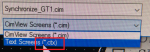
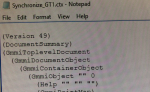
You can save .cim files to interrogate in a text editor by saving it as a .ctx file extension. Right click the COPY .cim file and select edit. Now in Cimedit, save as. Once its .ctx format you can open it with any text editor such as notepad. This might be an issue with a huge .cim file like the old style frame container where everything is in the same .cim (might be too large for notepad). I'm only showing a very small portion of a .cim that I converted to .ctx just for this example. You might do this to find that your GT1 project based .cim is looking for a different project altogether, like CRM1. You could also .ctx the "bad" screen, .ctx the "good" screen, and use a text comparator tool to find the differences between them.

Remember, Cimplicity isn't just for turbines. This is the way to go when you have hard coded screens and you need to replicate things many times over. For instance if I had unit specific screens that were hard coded to T1.XYZ, T1.ABC, etc etc and I need to replicate that for T2. CTX it, find T1., replace with T2. A lot of project based Cimplicity screens got hard coded rather than variable based, particularly when GE Automation (rest their souls) was involved. This is how you do it when its Friday beer o'clock. When it's double time pay, do it manually the hard way in Cimedit.
CTX.PNG
CTX2.PNG
 
Thanks to WTF? and White, you have put forward many good ideas for dealing with problems. Since I have only been in contact with GE systems for a short time, and only have one year of experience, I often don't know where to start when encountering problems. Fortunately, the expert friends of Control have shared many ways to deal with problems. Thank you.
Back to the problem on site, no one changed the HMI configuration file before the problem occurred on the generator synchronization screen. Now some of the attempts and checks I have made are also carried out on my own computer. Since the unit has been running continuously, many attempts have not been carried out on the on-site computer. After the GT1_SVR failed, the HMI screen time of CRM1_SVR changed to 1980. At that time, I was not familiar with the Mark V system, so I did not check whether the display screen time on the Mark V system panel had changed. The display time is restored to normal. As I mentioned in this post, after restoring GT1_SVR, the files in the site folder of the original backup GT1_SVR are replaced with the restored GT1_SVR (note that GT1_SVR uses the backup of CRM1_SVR). After restarting the computer, the time of the HMI screen is automatically restored to the computer time of GT1_SVR, and the computer and HMI screen of CRM1_SVR are automatically changed from 1980 to the computer time of GT1_SVR. I checked the display screen of the Mark V control panel today, and the time displayed here is consistent with the time displayed on the HMI screen. As for the reason why the time automatically changes, I am not clear at present.
Back to the problem of generator synchronization grid connection, I believe that no one has changed the HMI screen. Now I suspect that some reasons have caused the abnormal OLE function of the generator synchronization grid connection screen. Maybe it was already like this when the HMI screen time was incorrect, but when the HMI screen time was restored to normal, the synchronization grid connection screen did not automatically return to normal. Since the CIMPROJ file backup of the previous HMI screen was saved in the C drive partition of the CRM1_SVR computer, by chance, I tried to use CimView to open the Unit_Control.cim file in the backup CIMPROJ folder on the CRM1_SVR computer, and found that all the screens were normal, including the generator synchronization screen, and the OLE screen was displayed normally.
 
Top