mebay generator controller modbus

Please try using Modbus Poll on your PC:
https://www.modbustools.com/modbus_poll.html

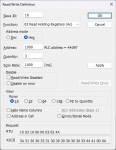
Setup the Read/Write Definition as follows to read the speed value, battery voltage, and charging voltage from the generator controller (note the below assumes the Modbus slave address of the generator is 10H, i.e. 16 decimal):
1722260217792.png

In the connection window, use the following settings:
Connection: Serial Port
19200 Baud
8 Data bits
None Parity
1 Stop Bit
Mode: RTU

If you still have issues, open the communication window (Display->Communication...) and post the communication traffic you're seeing.
 
Timeout errors are typically caused by either incorrect wiring or mismatched communication settings. Since you stated the communication software works successfully over RS-485, wiring is likely not the issue (assuming you are using the same USB to RS-485 adapter, wiring connections, etc.). Do you know what communication settings the communication software uses when it connects?

Please double check your baud rate, parity, and slave address settings. It's possible these settings were changed on the controller. If necessary, you may have success using the Discover feature in the CAS Modbus Scanner software to scan slave addresses at a given baud rate (I recommend setting the Timeout setting to the lowest value of 1 second, but even with this, it will still take a while to scan):
https://store.chipkin.com/products/tools/cas-modbus-scanner
 
Timeout errors are typically caused by either incorrect wiring or mismatched communication settings. Since you stated the communication software works successfully over RS-485, wiring is likely not the issue (assuming you are using the same USB to RS-485 adapter, wiring connections, etc.). Do you know what communication settings the communication software uses when it connects?

Please double check your baud rate, parity, and slave address settings. It's possible these settings were changed on the controller. If necessary, you may have success using the Discover feature in the CAS Modbus Scanner software to scan slave addresses at a given baud rate (I recommend setting the Timeout setting to the lowest value of 1 second, but even with this, it will still take a while to scan):
https://store.chipkin.com/products/tools/cas-modbus-scanner
the software only require slave address and password for the controller for it to connect, what i notice is only when the password is entered i can see the comunication rx and tx light fashing
 
What slave address do you enter in the software to achieve successful communications? Does entering a different slave address result in a connection error, or similar, in the software?

According to the documentation you attached, the controller has a Password (register 2000H), but this appears to only be necessary when writing to the Key command (register 2001H), as both registers must be written together in a single request. Perhaps the software just doesn't attempt to communicate with the controller if you do not enter a password.
 
Perhaps the software just doesn't attempt to communicate with the controller if you do not enter a password.

you are correct, if i enter a different address it does not connect
and it only communicate after entring a valid password
 
Does the controller's configuration menu have baud rate, parity, or number of stop bits settings available, or at least a way to view what baud rate, parity, and number of stop bits it's actually using?

Have you tried different parity and stop bit combinations, such as even 1 stop bit, odd 1 stop bit, or none 2 stop bits?

If it comes to this, you may want to get another USB to RS-485 adapter and connect them both to the controller in order to sniff the Modbus communication traffic between the communication software and controller. Maybe that controller is calculating the CRC incorrectly so communications only works with their own software.
 
Would you be able to post a few example transmissions from the communication software and responses from the controller showing the incorrect CRC?

Also out of curiosity, what sniffer software are you using?
 
Would you be able to post a few example transmissions from the communication software and responses from the controller showing the incorrect CRC?

Also out of curiosity, what sniffer software are you using?
 

Attachments

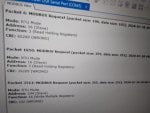
Those images of the monitoring software don't seem like it's decoding the packets properly. The lengths are all wrong and it's only showing requests, no responses. A Modbus RTU request to read holding registers is always 8 bytes in length.

Also from the connection settings image it seems to have 5 for Data Bits, this should be 8. And the Stop Bits should be 1, not 2.

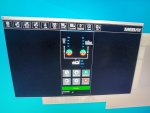
For the Mebay software, how do you know communication is successful? It seems all values are 0 in that image.
 
the reason everthing is zero because i have the conrtoller on my table in my office and in the photo of the software you can see it says standby
the reasen why i know its working abter i put in the password i can see the voltage of the battery and i can navigate the menu
the reason the communication settings is like that i was trying everthing to see if i can get it working
 
Those images of the monitoring software don't seem like it's decoding the packets properly. The lengths are all wrong and it's only showing requests, no responses. A Modbus RTU request to read holding registers is always 8 bytes in length.

Also from the connection settings image it seems to have 5 for Data Bits, this should be 8. And the Stop Bits should be 1, not 2.

For the Mebay software, how do you know communication is successful? It seems all values are 0 in that image.
 
the reason everthing is zero because i have the conrtoller on my table in my office and in the photo of the software you can see it says standby
the reasen why i know its working abter i put in the password i can see the voltage of the battery and i can navigate the menu
the reason the communication settings is like that i was trying everthing to see if i can get it working
20240730_210947.jpg
 

Attachments

Top