Modbus gateway RS232 -> TCP/IP

Hello! I'm high level delevoper and newbi to automation and so to modbus communication...
My first project was making communication between pymodbus (raspberrypi) and a Siemens PLC and it worked well...
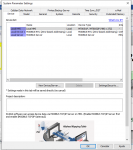
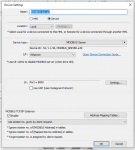
Now I have the situation where I have a HMI that communicates via modbus RTU with a board. I don't have a PLC. And I want to make de communications in a way I can monitor and control the board by a raspberrypi using modbus. I watched a lot of videos saying that I had to configure two devices in Easy Builder: one as RTU and one as a modbus Server TCP/IP enabling Gateway... But it simply doesn't work.
Anyone could help me with a situation like that?
 

Attachments

I had a lot of problems using Weintek touchpanels and EasyBuilder. Pro-face with GP-Pro EX is much easier to work with an more reliable.
A few months ago a customer of mine also tried using Weintek touchpanels and after struggling for weeks switched over to Pro-face GP4116 touchpanel with GP Pro EX from Pro-face: he had it working in minutes.
Just my experience.
But maybe the people from Weintek can give support, you never know.
 
Can you elaborate on what exactly you're trying to do, the equipment involved, and the type of Modbus connections (Ethernet, RS-485, RS-232, etc.) between each device?

Do you have 3 pieces of equipment (HMI, "a board", and Raspberry Pi)? Is the HMI is connected to "the board" via RS-232 (or is this RS-485?) using Modbus RTU? Is the Raspberry Pi communicating to the HMI via Ethernet using Modbus/TCP?

Please clarify.
 
Yeah... There is this "board" (I know nothing about it) and it is connected with my hmi via RTU RS-232. My HMI can control it e read data... everything is working. I aim to connect my raspberrypi via pymodbus and read the same data my hmi is reading, via pymodbus tcp/ip... I was thinking to make de hmi receive requests from my raspberrypi via tcp and send this requests to this board... since the only device my Pi can comunicate is the HMI...
HMI: Weintek mt8052ip
 
Thank you for clarifying. I don't know anything about the capabilities of the Weintek HMI, other than the images you show and what I can find online, but in general, this may be able to be accomplished two ways.

1. Read the data (tags, registers, etc.) from the HMI directly from the HMI's internal memory via Modbus/TCP. The HMI is already reading data from the board and storing it in its internal memory. If it's possible for the Modbus/TCP Server functionality of the HMI to make those internal memory locations available to a Modbus/TCP client (typically there is a default mapping of registers to internal memory locations), then you could access the data this way from your Pi. This document (https://dl.weintek.com/public/EBPro...Chapter_19_Configure_HMI_as_MODBUS_Server.pdf) seems to imply the default mapping is as follows:

0x/1x (1 ~ 12800)LB (0 ~ 12799)
3x/4x/5x (1 ~ 9999)LW (0 ~ 9998)
3x/4x/5x (10000 ~ 65535)RW (0 ~ 55535)

In other words, Coils (0x) and Discrete Inputs (1x) 1 - 12800 map to LB 0 - 12799, Input Registers (3x) and Holding Registers (4x) 1 - 9999 map to LW 0 - 9998, and Input Registers (3x) and Holding Registers (4x) 10000 - 65535 map to RW 0 - 55535. Note that, most likely, the Coil (0x), Discrete Input (1x), Input Register (3x) and Holding Register (4x) numbering used here is 1-based. I believe PyModbus uses 0-based addressing, so you would need to subtract 1 (i.e. 3x/4x/5x 0 ~ 9998 <=> LW 0 ~ 9998).

2. Use the HMI as a Modbus/TCP to Modbus RTU gateway. In order to do this, you will need to know information about the board, including its Modbus registers. Your Pi would make a Modbus/TCP request to the HMI to read Modbus registers on the board (note that the Unit ID field would need to target the board's slave address). The HMI's Modbus/TCP Server functionality would receive the requests from the Pi and the HMI's Modbus Gateway functionality would translate the Modbus/TCP request into a Modbus RTU request and send it to the board. The board would respond and the HMI would translate that Modbus RTU response into a Modbus/TCP response and send it to the Pi.

If you don't require any additional data that the HMI is not already requesting from the board, Option 1 above will likely be the simpler and easier to implement option.

As a general comment, I'm not sure exactly what that Port = 8000 is for in your device settings, but Modbust/TCP uses port 502, so if that's the Modbus/TCP port for the HMI, you should change it to 502.
 
Thank you for your insights, man! I've tried everything I could and could't make it work as a server...
The way I found to make it work was building a pymodus server that works as a slave for the hmi. Througth Data Transfer, HMI reads RTU modbus address, transfer to HMI LB address then transfer again to TCP/IP modbus address (theslave that I've created).
Once the slave receive data from HMI, I can read data from the slave with a pymodbus client.
 
I'm glad to hear you got it working with your Pi as the server and the HMI as the client. Although, if that is successful, it should be possible to have the Pi be the client and the HMI be the server. It's likely that there are still some incorrect configuration settings on the HMI when configuring it as a server.

Have you tried following any of Weintek's tutorial videos, such as this?

Perhaps Weintek technical support could walk you through setting up the HMI as a server to communicate with a PC-based Modbus client such as ModScan, Simply Modbus, or Modbus Poll.
 
Top