Are you making a direct connection between your computer and the REX640 (i.e. just an Ethernet cable connecting the two) or are you using an Ethernet switch (potentially with other devices on the network)?
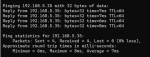
If it's the latter, does the ping still work if you disconnect the REX640 from the network? If so, you have duplicate IP addresses on your network and need to change the REX640 to an unused IP.
Otherwise, it seems Modbus/TCP is not actually enabled on the REX640. Note that some devices require a power cycle for new communication settings to take effect. So if you haven't done so already, try power cycling the REX640.
Are you making a direct connection between your computer and the REX640 (i.e. just an Ethernet cable connecting the two) or are you using an Ethernet switch (potentially with other devices on the network)?
If it's the latter, does the ping still work if you disconnect the REX640 from the network? If so, you have duplicate IP addresses on your network and need to change the REX640 to an unused IP.
Otherwise, it seems Modbus/TCP is not actually enabled on the REX640. Note that some devices require a power cycle for new communication settings to take effect. So if you haven't done so already, try power cycling the REX640.
Are you making a direct connection between your computer and the REX640 (i.e. just an Ethernet cable connecting the two) or are you using an Ethernet switch (potentially with other devices on the network)? - using ethernet cable connecting my pc and the relay.
If it's the latter, does the ping still work if you disconnect the REX640 from the network? If so, you have duplicate IP addresses on your network and need to change the REX640 to an unused IP. - I'll try this one
Otherwise, it seems Modbus/TCP is not actually enabled on the REX640. Note that some devices require a power cycle for new communication settings to take effect. So if you haven't done so already, try power cycling the REX640. - there's a possibility that it's not enabled.
Thank you, I'll try your suggestion once I returned to site and be able to access the REX640. I'll give you feedback once I tried.
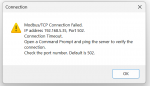
The STATUS would be expected to be false because we already know you are unable to establish a connection. The end goal is to establish a connection, and in turn, the STATUS will show true. But we need to figure out why the connection is not succeeding.
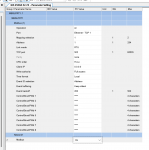
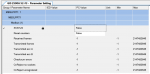
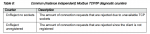
What do the "CnReject no sockets" and "CnReject unregistered" counters show?
The STATUS would be expected to be false because we already know you are unable to establish a connection. The end goal is to establish a connection, and in turn, the STATUS will show true. But we need to figure out why the connection is not succeeding.
What do the "CnReject no sockets" and "CnReject unregistered" counters show?
I'm not sure what the -1 value means. If I were to guess, it may just be the value that all counters are initialized to, indicating counting has not begun.
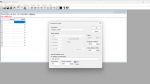
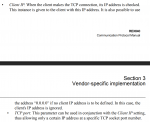
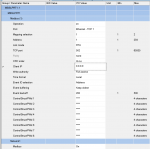
From your screenshots it seems that you have configured Modbus Slave Port 1 and are using Ethernet TCP 1. Does this device have multiple Ethernet ports (either physical or virtual)? Perhaps you configured the wrong port? For example, is there a Modbus Slave Port 0 or Modbus Slave Port 2?
Also, just to double check, did power cycling not make any difference?
Does this device have a built-in web page that you can access? If you also can't access its web page (assuming it has one), there may be some other, higher level settings that need to be modified.
I'm not sure what the -1 value means. If I were to guess, it may just be the value that all counters are initialized to, indicating counting has not begun.
From your screenshots it seems that you have configured Modbus Slave Port 1 and are using Ethernet TCP 1. Does this device have multiple Ethernet ports (either physical or virtual)? Perhaps you configured the wrong port? For example, is there a Modbus Slave Port 0 or Modbus Slave Port 2? - I'll check this on site tomorrow
Also, just to double check, did power cycling not make any difference? - It did not make any difference
Does this device have a built-in web page that you can access? If you also can't access its web page (assuming it has one), there may be some other, higher level settings that need to be modified. - The web page is accessible
I'm not sure what the -1 value means. If I were to guess, it may just be the value that all counters are initialized to, indicating counting has not begun.
From your screenshots it seems that you have configured Modbus Slave Port 1 and are using Ethernet TCP 1. Does this device have multiple Ethernet ports (either physical or virtual)? Perhaps you configured the wrong port? For example, is there a Modbus Slave Port 0 or Modbus Slave Port 2?
Also, just to double check, did power cycling not make any difference?
Does this device have a built-in web page that you can access? If you also can't access its web page (assuming it has one), there may be some other, higher level settings that need to be modified.
I was on the wrong ethernet port, so now I'm connected. The issue now is the modbus address. I see the address in the modbus, but how can I use this address to create a driver so that I can remotely operate the REX640 and know its status.
Also how to know the address in the rex640's equivalent to modbos poll address?
This device seems to be quite complicated in that all data is freely mappable to Modbus, so it seems you either need to create a mapping yourself using ABB's software or select a pre-configured mapping (if that exists). I would encourage you to contact ABB's technical support if you still don't understand the Modbus mapping for this device, as this goes above and beyond general Modbus advice that we can offer here.
Perhaps there is another member familiar with the REX640 and its Modbus functionality that will chime in and provide guidance, but I think your best bet would be to contact ABB directly.
This device seems to be quite complicated in that all data is freely mappable to Modbus, so it seems you either need to create a mapping yourself using ABB's software or select a pre-configured mapping (if that exists). I would encourage you to contact ABB's technical support if you still don't understand the Modbus mapping for this device, as this goes above and beyond general Modbus advice that we can offer here.
Perhaps there is another member familiar with the REX640 and its Modbus functionality that will chime in and provide guidance, but I think your best bet would be to contact ABB directly.

 Facebook
 Google
 GitHub
 Linkedin