Virtual Serial Port Emulator for Straight Through Cable

I am developing a software program that communicates with an MKS PDR900. It connects to a computer with an RS232 straight though cable from the controller. I need to test the software but I don't have the controller physically connected to my computer. I have also created a mock program that simulates the PDR900. The 2 programs need to communicate with each other through a com port. My problem is the com port emulators I have tried are all null modem (cross over) and I need straight through. Does anyone know of an emulator that can be configured as straight through cable?
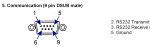
Screenshot 2023-06-18 051750.pngScreenshot 2023-06-18 051833.png
 
Since you're just trying to test your software, don't focus too much on the hardware connection (serial cable). There is no such concept as configuring software to be straight-through vs. crossover, this is a hardware-only concept and just dictates how the cable is wired. In software (i.e. virtual COM ports), the ports are simply linked together such that they can communicate with one another

In your real application using a PC and the PDR900, you are correct, you do need a straight- through cable, as the PC is a DTE while the PDR900 is a DCE. When connecting a DTE and DCE, you must use a straight-through cable.

But in your test scenario, you have two PC programs that you want to communicate together. Remember, a PC is a DTE and when connecting DTE to DTE (or DCE to DCE), you must use a crossover cable.

Now this would apply to a PC with two physical COM ports (i.e. USB to RS-232 adapters) that you connect together using a crossover cable, but keep in mind there are software tools available that can create and link virtual serial ports on your computer, no physical COM ports or cables required. In this case, the virtual connection made would technically be a crossover connection in order to work, but I'm not sure if these types of software even state this or make that distinction, since all you need to care about is that the two ports are linked together.
 
Excellent point about the DTE to DTE. The application I am developing and the mock PDR900 application are on the same computer so if I connect my application to COM1 (DTE) and the mock PDR900 to COM2 (DTE) on the same computer using a virtual serial port crossover software they should be able to communicate with each other. The problem I am having is that they aren't. I was stuck on the cable type as causing the issue. Now I need to take a closer look at both of my software applications and find why they aren't communicating. Thanks!
 
I'd suggest simplifying your setup and working up from a basic proof-of-concept. First, run two instances of a terminal emulator program, such as PuTTY. Configure the virtual serial port crossover software you're using to link two COM ports, connect the PuTTY instances to each COM port, and try typing in each terminal to see if what you type shows up in the other terminal. If it does, move on, if not, there's something wrong with how you're using or how you've configured the virtual serial port crossover software.

After confirming the above test, move on to your own programs. Start simple with "Hello World" style programs, where one simply listens on its COM port (printing anything received out to the console, or similar), while the other sends the text "Hello World" to its COM port.

Another thing to consider, does your application (or the PDR900) use hardware handshaking? If so, you'll need to make sure your programs and the virtual serial port crossover software support hardware handshaking/signaling.
 
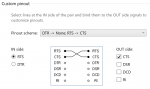
Thank you for the advice. Both programs are communicating with each other now. I had to try different virtual serial port settings. What finally worked was a custom pinout on the VSPD software. I also had to step through the code of the mock PDR900 application and found that it wasn't parsing the command received from the MKS PDR900 application correctly which meant that the mock PDR900 wasn't responding at all much less replying with the correct response. All is working (for now :) ) and part of the fun/challenge.

1687246436400.png
 
I actually just dealt with a similar situation while testing software for a device that used an RS232 straight-through cable for communication. In my case, I was developing software to interface with a different type of equipment, but like you I didn’t have the actual hardware on hand. Instead I was using a mock program to simulate the device, and I needed both my software and the simulation to communicate through a COM port.
After trying a few options, I found https://www.virtual-serial-port.org/ This tool turned out to be the perfect solution because it allows you to create virtual COM port pairs and configure them as either straight-through or null modem, depending on your needs.
Here’s what I did: I installed Virtual serial port driver and used it to create a virtual COM port pair. In the settings, I made sure to configure the virtual ports as a straight-through connection, which was critical for my testing since I didn’t want the typical cross-over setup. Once the pair was created, I connected one of the virtual COM ports to my software and the other to the mock device program. With that setup, the two programs communicated perfectly through the virtual COM ports, as if they were using a real RS232 straight-through cable. It saved me a lot of time and hassle, especially since I didn’t have the actual hardware available for testing.
 
I am developing a software program that communicates with an MKS PDR900. It connects to a computer with an RS232 straight though cable from the controller. I need to test the software but I don't have the controller physically connected to my computer. I have also created a mock program that simulates the PDR900. The 2 programs need to communicate with each other through a com port. My problem is the com port emulators I have tried are all null modem (cross over) and I need straight through. Does anyone know of an emulator that can be configured as straight through cable?
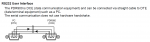
View attachment 3087View attachment 3088
Hi I'm trying to do a similar thing, do you know where I could find the documentation for commands and such. I'm working in python and mostly just trying to receive and record data from the PDR900.
 
Top