Wiring issue for RTD and Vibration Sensors

Hello all,
We have issue with the reading for RTD some times give spike signal and huntting that trip the motor , after trip the reading become normal and measeur the weather temperature.
Also the same happen for vibration sensors.
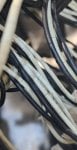
We observed the cables jaket broken in some cables, and not possible to replace the cables as a solution becuse the distance so far to marshaling in Control room.
I need a solution and how to prevent these spike signals.
Or if there another solution can implement it.
 

Attachments

I have postulated the following reasons for intermittent spikes on RTD circuits over the years, but have never had anyone confirm a cause of intermittent RTD spikes.

1. break/fault in wire wound RTD element with intermittent connection

2. Intermittent induced noise through, untwisted, unshielded cable or ground or exposed conductor that intermittently shorts to ground or another conductor.

3. Lack of shielding around the RTD cables

4. damaged/faulty RTD input card

In terms of filtering out a spike, I know that one product had an filter algorithm that allowed the user to pick a delta value. Data was sampled on a fixed sampling interval basis. If the current value was above (bipolar) the delta from the previous value, the current value was discarded and replaced by the previous value. That continued until the current value was less than the delta value at which point the current value was accepted.

The algorithm was intended to filter noise and I know it worked for that, but it should work for intermittent spikes, too.
 
Talal9001

"We observed the cables jaket broken in some cables" that is the problem that needs to be solved first. High quality cables and routing is important as is insuring their protection.
 
How to check the wiring healthy in details ?
Seem to us all are ok.
Also when the unit trip we do not have time to check , we directlly replace RTD or bypass the signal to return the unit to production.
 
You can test your cable continuity, connections, insulation effectiveness.
You also have to check for grounding errors. If not grounded properly, ground faults in the field can affect your signals.
Good luck,
 
"We observed the cables jaket broken in some cables, and not possible to replace the cables as a solution becuse the distance so far to marshaling in Control room." Broken jackets lead to many problems.

Check your instrumentation grounds, as ground faults in your electrical power for motors, can lead to instrument problems.
 
You can test your cable continuity, connections, insulation effectiveness.
You also have to check for grounding errors. If not grounded properly, ground faults in the field can affect your signals.
Good luck,
All are ok
May be the cable jaket is the problem
But the problem the cable distance so far to Cabinets and not possible to replace.
Also the Junction box for RTD ON MOTER BODY
 
It would appear from the photo that there is a high degree of probability of one or both of two possibilities. First, the cable used during construction or installation was not suitable for the environment (UV; Heat). Second, the temperature in the area of the cables has increased above the cable insulation rating.

I would like to know other than replacing the RTD what other troubleshooting has been done, and most importantly what were the results of the troubleshooting (other than, “The problem still persists.).

We don’t know what type of monitor or input card the RTDs are connected to. Have you contacted the manufacturer or local distributor of the monitor/input cards to ask what solutions they might have (like @David_2 has suggested).

You can test the cables any number of ways, but if you discover (as we suspect) the cables are bad, and they can’t or won’t be replaced for whatever reason, it’s possible you might need new input cards/monitor utilizing industrial wireless internet technology. And some kind of converter or different connection to whatever is tripping the motor (such as a 4-20 ma transition method between the new monitor and the motor protection device/system).

And if the cables are not shielded AND/OR the shield drain wires are not properly terminated (an all-too-common construction problem) that’s difficult to remedy. It might be possible to remedy the problem by properly terminating the shield drain wires (which doesn’t require replacing the cables). But we don’t know how long this problem has existed or when it started or how many RTDs are spiking. Lots of missing information.
 
It would appear from the photo that there is a high degree of probability of one or both of two possibilities. First, the cable used during construction or installation was not suitable for the environment (UV; Heat). Second, the temperature in the area of the cables has increased above the cable insulation rating.

I would like to know other than replacing the RTD what other troubleshooting has been done, and most importantly what were the results of the troubleshooting (other than, “The problem still persists.).

We don’t know what type of monitor or input card the RTDs are connected to. Have you contacted the manufacturer or local distributor of the monitor/input cards to ask what solutions they might have (like @David_2 has suggested).

You can test the cables any number of ways, but if you discover (as we suspect) the cables are bad, and they can’t or won’t be replaced for whatever reason, it’s possible you might need new input cards/monitor utilizing industrial wireless internet technology. And some kind of converter or different connection to whatever is tripping the motor (such as a 4-20 ma transition method between the new monitor and the motor protection device/system).

And if the cables are not shielded AND/OR the shield drain wires are not properly terminated (an all-too-common construction problem) that’s difficult to remedy. It might be possible to remedy the problem by properly terminating the shield drain wires (which doesn’t require replacing the cables). But we don’t know how long this problem has existed or when it started or how many RTDs are spiking. Lots of missing information.
Thanks for reply
The input card is DCs RTD MODULE (Read ohm from RTD)
And have 14 signals .
So , we ignore the problem from the card
If assuem there is problem in card so all signals will be effected.
Also we did not see any dain wires only there are 3 wires can be connected to RTD -3 wires.
 
@Talal9001,

Because the circuitry most commonly used for RTD monitoring is considered low voltage (sometimes called low level) the cable/wiring used to connect RTDs to monitors is almost always shielded with a foil shield around the conductors along the length of the cable which serves to "capture" and if installed correctly prevent problems with the low level signals in the RTD monitoring cables. There is an unshielded, small conductor called the drain wire which lays against the foil and that wire needs to be connected to ground AT ONE END ONLY. Convention says the shield drain wire is connected to ground at the source of the voltage/current used in the monitoring circuit (also called a loop). If the cable is run in cable trays or conduits or cable trenches in close proximity to cables/conductors carrying higher voltage and high currents there is a high likelihood that unwanted voltages can be induced on the conductors of the RTD monitoring cable(s); this is usually called electrical noise and it can cause erratic readings, often intermittent readings also. And, with testing/diagnostic equipment it is possible to correlate the erratic and intermittent readings with changes in the high voltage and/or high current flowing in the nearby cables.

By terminating the shield drain wire to ground AT ONE END ONLY the induced electrical noise "captured" by the foil shield can be directed to ground AT ONE END ONLY. This reduces (but won't always eliminate) the electrical noise induced in the monitoring cable conductors--because if the nearby cables/wires are too close the foil shield and drain wire isn't going to be able to do enough to limit erratic and intermittent readings on the monitoring cable conductors.

A VERY common mistake made during high-voltage/high-current motor installation is to run the RTD wires in the same cable tray/conduit/trench as the high-voltage motor leads--which is really a very poor practice because even when proper shielded cable is used and the drain wire(s) are properly terminated it won't be able to eliminate the erratic and intermittent readings. And, it IS very difficult to fix this particular problem when it is discovered some time after construction (it should be monitored by the electrical supervisors and engineers during construction to make sure the electrical workers are following established industrial wiring practices--using proper cabling, NOT routing low-level cables in close proximity to high-voltage/high-current wires/cables, properly terminating shield drain wires, etc.).

If the outer jacket (insulation) of the cables is damaged (as it appears to be in the picture) it's entirely possible the insulation of the conductors inside the outer jacket are also damaged. If that's the case, it's possible that from time to time (intermittently) the metal conductors of the individual wires can come into contact with the foil shield, grounding them, and causing erratic readings. We don't know how much vibration there is at the site, and if anything can be done to reduce or eliminate any vibration those cables are subjected to. We don't know if water (from a nearby process or rains) gets into contact with the cables with the damaged outer insulation in the picture and if that could cause erratic and intermittent problems.

As for testing cables, a good test is to use a meggar to check the individual conductors to each other, and to ground. 500V is the usual meggar voltage, AND it is important to disconnect the cable being tested from the monitor so that it doesn't damage the input circuitry or the monitor itself. A simple continuity check won't always turn up these kinds of problems but a meggar is pretty good at doing that. There is also something called a time domain reflectometer which can be rented and used to pinpoint the location of a wire/cable problem along its length. Not an inexpensive device, BUT, if this problem is causing forced outages and loss of revenue it might be worth it. (I do recommend hiring an industrial electrical testing company which has people who are experienced in using a time domain reflectometer.) The issue which I see is this: If the cables can't or won't be replaced, knowing where the problem is along the cable length isn't going to be very useful unless some intermediate junction boxes can be used to cut out the bad section of the cable and use new cable to replace the bad section(s).

Finally, in higher quality industrial equipment it's often very common that input cards with multiple inputs connected to them isolate the circuits as much as possible to prevent one serious problem from causing problems for other inputs on the same card. So, it's not always reasonable to expect that one or more failed input channels will affect ALL the input channels on that card. I know of one manufacturer that has divided the total number if input channels (16) into two groups of eight channels and that helped eliminate a lot of previous problems which damaged or destroyed entire cards. I'm NOT a fan of "card swapping"--but sometimes it does work, though it doesn't always prevent the same problem from occurring in the future if the root cause of the problem isn't identified and resolved.

Sometimes it's helpful to form a team of operators, technicians, engineers and others familiar with this particular piece of equipment to get together and discuss how long this problem has been occurring, when it started, has it worsened over time, what changes have there been to the site (were new high-voltage/high-current cables/wires run in the same cable tray or conduit or cable trench as these RTD monitor cables), what has been done to try to troubleshoot the problem and what the results were. I find often when I get to site for a problem like this that after a day or two one or more site personnel will wander by and offer little bits of information about the problem or changes in the plant (cabling/wiring; now equipment installed nearby; etc.) and that helps tremendously in understanding and solving the problem. Sometimes supervisors and managers and engineers get dragged in to help with resolving a problem like this they aren't aware or made aware of the "history" of this problem, including when it started (after a major plant maintenance outage, for example; or after a nearby fire or similar incident; etc.). So they just kind of flail when trying to develop solutions or work-arounds or recommendations.

And, remember: Troubleshooting is OFTEN a process of elimination. A team of people can often come up with a list of possible causes, and then prioritize that list into what is easiest and most likely to be the cause and what is the least likely and/or most difficult cause(s) and then develop a plan of checking off the items on the prioritized list one by one until the actual cause is found and resolved. Things like water spray from a nearby process or new cables/wires run in the same conduit/tray/trench were added recently, about the time the problem started. It would be great if someone with a lot of knowledge and experience could point to the cause and it could be solved relatively easily and quickly. But, that doesn't always happen so by testing/checking possible causes one at a time it's possible to eliminate some causes until the root cause is identified and then a plan to resolve the problem can be developed and implemented. Sometimes a problem left unresolved for a long period of time can have more than one cause--and that can be very difficult to find and resolve. But, again, an organized and prioritized list can help with resolving multiple problems. It just takes a logical process of understanding the problem, the equipment involved. the history of when the problem started and how long it's been happening, what's been done in the past to resolve the problem, working to prioritize a list of possible causes and then systematically and logically working through that list will very often yield a resolution.

We aren't there with you. We can only suggest a small number of possibilities--and I think we've done a good job of that based on the little information you have provided (we don't even know the manufacturer/model number of the RTD monitor or the motor protection device the RTDs are connected to, in addition to all of the other things I've listed in my responses)--there's a lot we don't know but if we knew it we may have been able to offer more suggestions. Sometimes contacting the manufacturer or local representative selling the motor protection device the RTDs are connected to can offer some insight and help with the problem. (They're usually called application engineers and sometimes they work with sales representatives to troubleshoot and resolve problems and can be very helpful because they can usually contact someone in the manufacturing/engineering facility for answers and suggestions. A good local representative won't always just try to sell you something new--they want to develop a relationship with the site/plant personnel so that when something is needed in the future they will get the call to provide the new equipment.

Anyway, that's all I got for this thread. Best of luck! It would be very appreciated if you could write back in the future to let us know what was found and how the problem was resolved.
 
@Talal9001,

Because the circuitry most commonly used for RTD monitoring is considered low voltage (sometimes called low level) the cable/wiring used to connect RTDs to monitors is almost always shielded with a foil shield around the conductors along the length of the cable which serves to "capture" and if installed correctly prevent problems with the low level signals in the RTD monitoring cables. There is an unshielded, small conductor called the drain wire which lays against the foil and that wire needs to be connected to ground AT ONE END ONLY. Convention says the shield drain wire is connected to ground at the source of the voltage/current used in the monitoring circuit (also called a loop). If the cable is run in cable trays or conduits or cable trenches in close proximity to cables/conductors carrying higher voltage and high currents there is a high likelihood that unwanted voltages can be induced on the conductors of the RTD monitoring cable(s); this is usually called electrical noise and it can cause erratic readings, often intermittent readings also. And, with testing/diagnostic equipment it is possible to correlate the erratic and intermittent readings with changes in the high voltage and/or high current flowing in the nearby cables.

By terminating the shield drain wire to ground AT ONE END ONLY the induced electrical noise "captured" by the foil shield can be directed to ground AT ONE END ONLY. This reduces (but won't always eliminate) the electrical noise induced in the monitoring cable conductors--because if the nearby cables/wires are too close the foil shield and drain wire isn't going to be able to do enough to limit erratic and intermittent readings on the monitoring cable conductors.

A VERY common mistake made during high-voltage/high-current motor installation is to run the RTD wires in the same cable tray/conduit/trench as the high-voltage motor leads--which is really a very poor practice because even when proper shielded cable is used and the drain wire(s) are properly terminated it won't be able to eliminate the erratic and intermittent readings. And, it IS very difficult to fix this particular problem when it is discovered some time after construction (it should be monitored by the electrical supervisors and engineers during construction to make sure the electrical workers are following established industrial wiring practices--using proper cabling, NOT routing low-level cables in close proximity to high-voltage/high-current wires/cables, properly terminating shield drain wires, etc.).

If the outer jacket (insulation) of the cables is damaged (as it appears to be in the picture) it's entirely possible the insulation of the conductors inside the outer jacket are also damaged. If that's the case, it's possible that from time to time (intermittently) the metal conductors of the individual wires can come into contact with the foil shield, grounding them, and causing erratic readings. We don't know how much vibration there is at the site, and if anything can be done to reduce or eliminate any vibration those cables are subjected to. We don't know if water (from a nearby process or rains) gets into contact with the cables with the damaged outer insulation in the picture and if that could cause erratic and intermittent problems.

As for testing cables, a good test is to use a meggar to check the individual conductors to each other, and to ground. 500V is the usual meggar voltage, AND it is important to disconnect the cable being tested from the monitor so that it doesn't damage the input circuitry or the monitor itself. A simple continuity check won't always turn up these kinds of problems but a meggar is pretty good at doing that. There is also something called a time domain reflectometer which can be rented and used to pinpoint the location of a wire/cable problem along its length. Not an inexpensive device, BUT, if this problem is causing forced outages and loss of revenue it might be worth it. (I do recommend hiring an industrial electrical testing company which has people who are experienced in using a time domain reflectometer.) The issue which I see is this: If the cables can't or won't be replaced, knowing where the problem is along the cable length isn't going to be very useful unless some intermediate junction boxes can be used to cut out the bad section of the cable and use new cable to replace the bad section(s).

Finally, in higher quality industrial equipment it's often very common that input cards with multiple inputs connected to them isolate the circuits as much as possible to prevent one serious problem from causing problems for other inputs on the same card. So, it's not always reasonable to expect that one or more failed input channels will affect ALL the input channels on that card. I know of one manufacturer that has divided the total number if input channels (16) into two groups of eight channels and that helped eliminate a lot of previous problems which damaged or destroyed entire cards. I'm NOT a fan of "card swapping"--but sometimes it does work, though it doesn't always prevent the same problem from occurring in the future if the root cause of the problem isn't identified and resolved.

Sometimes it's helpful to form a team of operators, technicians, engineers and others familiar with this particular piece of equipment to get together and discuss how long this problem has been occurring, when it started, has it worsened over time, what changes have there been to the site (were new high-voltage/high-current cables/wires run in the same cable tray or conduit or cable trench as these RTD monitor cables), what has been done to try to troubleshoot the problem and what the results were. I find often when I get to site for a problem like this that after a day or two one or more site personnel will wander by and offer little bits of information about the problem or changes in the plant (cabling/wiring; now equipment installed nearby; etc.) and that helps tremendously in understanding and solving the problem. Sometimes supervisors and managers and engineers get dragged in to help with resolving a problem like this they aren't aware or made aware of the "history" of this problem, including when it started (after a major plant maintenance outage, for example; or after a nearby fire or similar incident; etc.). So they just kind of flail when trying to develop solutions or work-arounds or recommendations.

And, remember: Troubleshooting is OFTEN a process of elimination. A team of people can often come up with a list of possible causes, and then prioritize that list into what is easiest and most likely to be the cause and what is the least likely and/or most difficult cause(s) and then develop a plan of checking off the items on the prioritized list one by one until the actual cause is found and resolved. Things like water spray from a nearby process or new cables/wires run in the same conduit/tray/trench were added recently, about the time the problem started. It would be great if someone with a lot of knowledge and experience could point to the cause and it could be solved relatively easily and quickly. But, that doesn't always happen so by testing/checking possible causes one at a time it's possible to eliminate some causes until the root cause is identified and then a plan to resolve the problem can be developed and implemented. Sometimes a problem left unresolved for a long period of time can have more than one cause--and that can be very difficult to find and resolve. But, again, an organized and prioritized list can help with resolving multiple problems. It just takes a logical process of understanding the problem, the equipment involved. the history of when the problem started and how long it's been happening, what's been done in the past to resolve the problem, working to prioritize a list of possible causes and then systematically and logically working through that list will very often yield a resolution.

We aren't there with you. We can only suggest a small number of possibilities--and I think we've done a good job of that based on the little information you have provided (we don't even know the manufacturer/model number of the RTD monitor or the motor protection device the RTDs are connected to, in addition to all of the other things I've listed in my responses)--there's a lot we don't know but if we knew it we may have been able to offer more suggestions. Sometimes contacting the manufacturer or local representative selling the motor protection device the RTDs are connected to can offer some insight and help with the problem. (They're usually called application engineers and sometimes they work with sales representatives to troubleshoot and resolve problems and can be very helpful because they can usually contact someone in the manufacturing/engineering facility for answers and suggestions. A good local representative won't always just try to sell you something new--they want to develop a relationship with the site/plant personnel so that when something is needed in the future they will get the call to provide the new equipment.

Anyway, that's all I got for this thread. Best of luck! It would be very appreciated if you could write back in the future to let us know what was found and how the problem was resolved.
Thanks alot
Now, We are planning first to replace the jacket of the cables For one motor. And see the results.
We observed when we touch some cables the reading was huntting.
We will try to do this solution.
Thanks again for your feedback
 
Top