 Facebook
 Google
 GitHub
 Linkedin
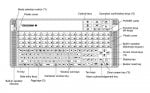
I am working in a fertilizer plant. We have Yokogawa centum VP DCS system. In the Operator station HMI there uses yokogawa operation keyboard (Model: AIP830-111EIM) & the mode of this Operator Station is Operator(S1). The mode selection key remain off position in the keyboard. We want to change the buzzer assignment in the HIS setup tab but the function is disabled. If we change the mode selection key of the keyboard in ON or ENG position can the function enabled?
Attachments
-
 77.9 KB Views: 15