 Facebook
 Google
 GitHub
 Linkedin
New to Scanning Systems? Get a Handle on Basic Parameters
1D and 2D scanning are essential for product manufacturing, storage, and tracking. Each system is unique, but we find many similarities when uncovering the basic configuration details.
On the surface, code scanning doesn't seem like very complex work. We see it all the time when shopping: barcode scanners beeping away to add up our weekly grocery bill, even when bags are wrinkled or the codes are only partially visible. How could someone claim that this requires a complex configuration process?
The main challenge with code scanning isn’t the camera itself, but rather the configuration that tells the camera what to scan, when to scan, and where to send the scan data.
Let’s explore the configuration process using one of the newest scanning products on the market: a sensingCam SEC200 from SICK, designed to be a simple solution for a complex task. I was recently given the chance to explore the sensingCam, and I connected it to a control system to learn a bit more about initial commissioning.
What are “Codes” Anyway?
There are two primary kinds of codes used in inventory tracking and logistics, but there are many variations within these kinds.
1D Codes
In mathematics, a 1-dimensional shape is called a line. In the physical world, we can apply a variable thickness to this line, we might instead call it a bar. So the 1D code consists of a series of vertical lines called a barcode, and it’s very familiar to everyone who has used products over the past 75-ish years.
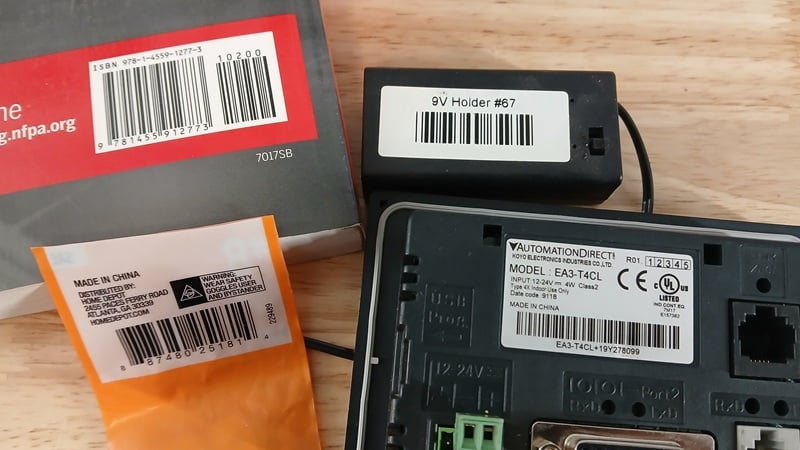
Figure 1. Just a few of the many types of barcodes.
There are four different properties that are leveraged differently across various barcode types.
Primarily, the individual width and spacing between each line are the most common ways that data is encoded.
Additionally, the number of bars and the height of each bar can be used to distinguish between different types of codes.
There are many types of 1D codes (barcodes) in use across the globe. Some of the most familiar in North America include codes for product inventories, package shipping, processing US mail, and tracking special items like books and equipment.
2D Codes
Just as 1D indicates a line, 2 dimensions refers to a shape, like a square or rectangle, that has both height and width. 2D codes can be either a square or a rectangle, but the concept is that it provides some variation in both its x and y directions. The variations appear as small pixels that may fill in each space inside the shape.
Each 2D code includes a few sections to help orient the camera, both in its direction as well as its distance away from the code. Two sides (one side and bottom edge) have a long line to orient the camera, and the other two sides (other side and top edge) have an alternating light-dark-light pattern to give the camera a sense of how many pixels to expect inside the field of the 2D code, and therefore how to scale the image at any distance.
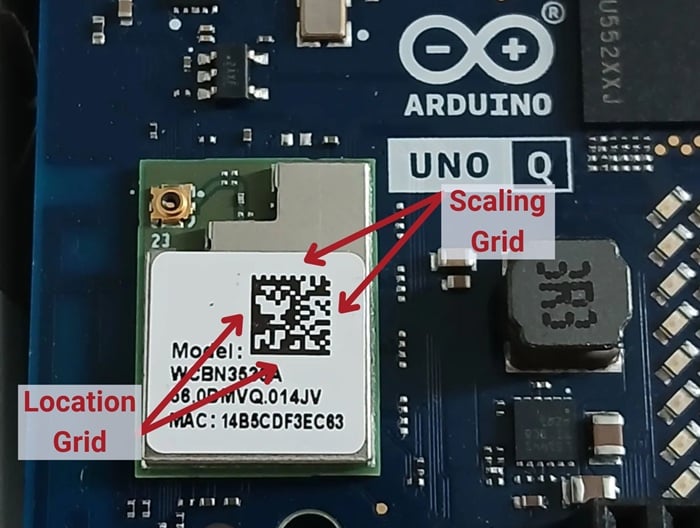
Figure 2. The four edges (left side/bottom, and right side/top) of the 2D code serve different purposes.
There are two common types of 2D codes. First is the matrix code, which provides numbers or character identification data. Next is the QR code, which means quick response, and it’s most often used for website links to forms, datasheets, references, etc.
There are other types of 2D codes for transportation, data storage, and package tracking, similar to barcodes.
Configuring a Scanner
Every manufacturer provides a unique config process, often via PC software, web server software, or buttons right on the camera. A few of the key parameters are shared between cameras.
What: Target Code Types
The camera can be set to detect multiple 1D and 2D types from among the options. Not every camera is designed to detect all possible codes, but some may be preferred in certain settings. Why is this important? Many items have several codes printed on them, and scanning the wrong code may lead to incorrect actions.
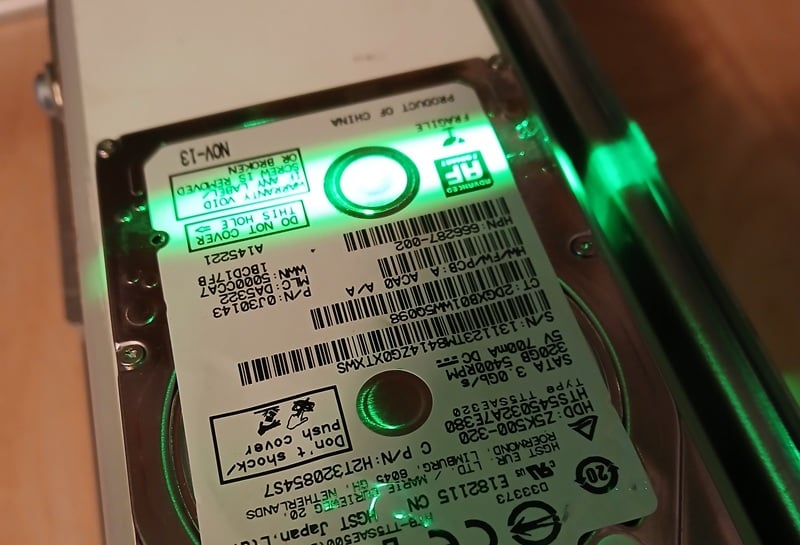
Figure 3. Many products have multiple codes, and the correct code data must be recorded.
When: Scan Timing
Most cameras can be set to detect on a nearly continuous basis, obtaining an image rapidly until a barcode enters the field of view. Alternatively, it might take an image whenever motion is detected, which still takes a lot of pictures, but reduces the burden to just the times when an object is entering or leaving the field of view. In both of these modes, only images with valid codes are saved.
Finally, images can be coordinated with a sensor or trigger from a controller, maintaining harmony with a motion system (like a conveyor belt) and the detected objects.
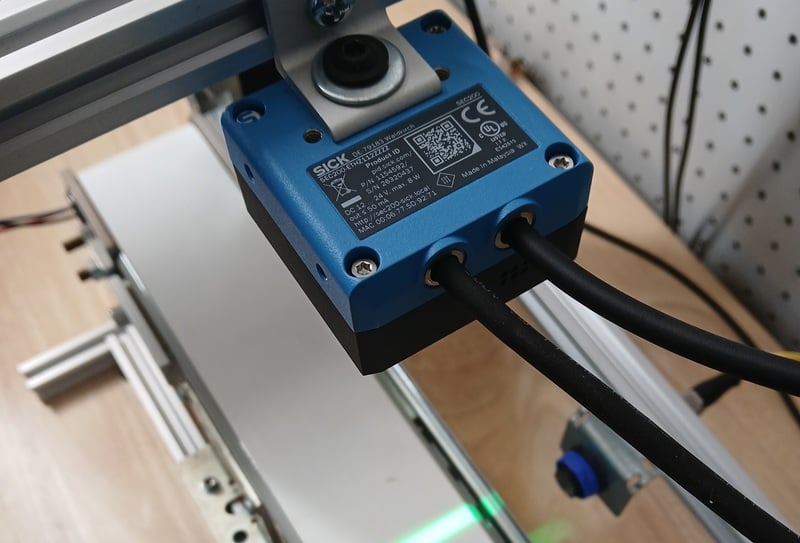
Figure 4. This camera is triggered by a sensor from the control system.
Where: What to Do With the Data
The data uncovered in the code needs to be transmitted to an inventory management system to report the product ID, location, or some other property. This is usually sent over a TCP/IP system or by serial connection to a PC (perhaps USB). The target is a local or cloud server that stores the information for thousands or millions of individual products.
The control system, in contrast, doesn’t need the code data itself. However, it does need to be alerted in the case of good/bad code reads, so that it can retry the scan or progress to the next item as quickly as possible. Industrial scanners provide digital signal outputs to provide this event-driven information to the PLC. The physical connection is usually through an M12 connector with multiple wires for camera power and I/O.
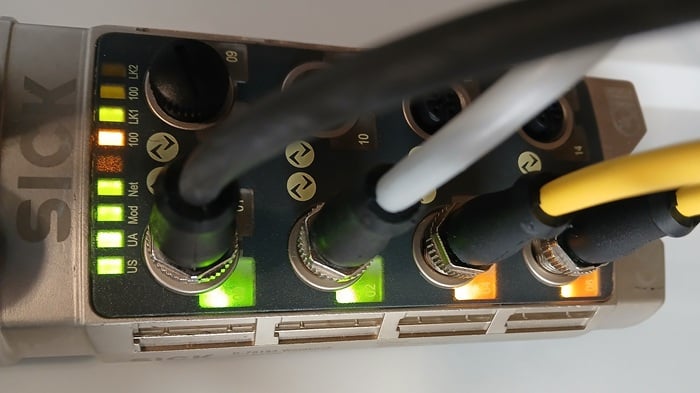
Figure 5. When a good or bad code is scanned, the signal may be valuable to the control system (this camera is attached to the third IO-Link input)
Code Scanning for Beginners
This article doesn’t specifically provide a tutorial for the configuration of any one brand, but it does provide some insight into what factors need to be considered when setting up a code scanning project.
All images used courtesy of the author.