Facebook
 Google
 GitHub
 Linkedin
Working With Data: Looping Through Arrays In A PLC
Arrays can handle large amounts of data, but when you need to extract a portion of that data, you might need to execute a loop. Learn a few examples and tips for creating loops in PLC logic.
A common technique in PLC programming is creating loops, which are program structures that cycle through a portion of code a certain number of times. This technique is often used for searching through arrays. These common PLC tags are a cohesive set of identical data types (like INT, REAL, etc.) all bundled into a single tag with a name and a pointer (index) for each of the entries in the tag. Loops can increment the pointer value, then use that value to choose a specific index of data.
There are two fundamental ways of looping through a PLC: one is to use the process scan of the PLC logic, while the other uses jumps and labels.
If executed correctly, a loop offers compact code that can search through large data structures with ease. However, if not executed correctly, the loop can cause processor faults that will halt all program scanning and may even result in equipment damage.
In this article, I’ll showcase a couple of homegrown loop solutions along with some built-in function blocks. I’ll also share some tips that will hopefully prevent a processor fault.

Figure 1. Developing code that needs to loop through data. Image used courtesy of Unsplash
Looping With a Processor Scan
The PLC logic is always scanned from top to bottom and left to right. We can use the known scan order to increment our pointer and execute some logic along the way. I prefer this style of looping as it can be easier to debug, and there is no risk of slowing down the processor.
Let’s say we have an array that is ten indexes long, so Array1[0..9]. For every scan of the PLC, we want to evaluate the contents of the array at the pointer index, then increment our pointer.
We set up our logic with indirect addressing of our evaluation logic using our pointer, see figure 3. For every increment of the pointer, we see new data, and any logic we place between the first evaluation and the add block can be placed in a clear, readable order. We will need to reset the pointer once we have reached the end of the array, which can be done with a greater-than-or-equal-to compare block. Using this method, there are no special blocks or functions, and we keep the scan order of the PLC intact.
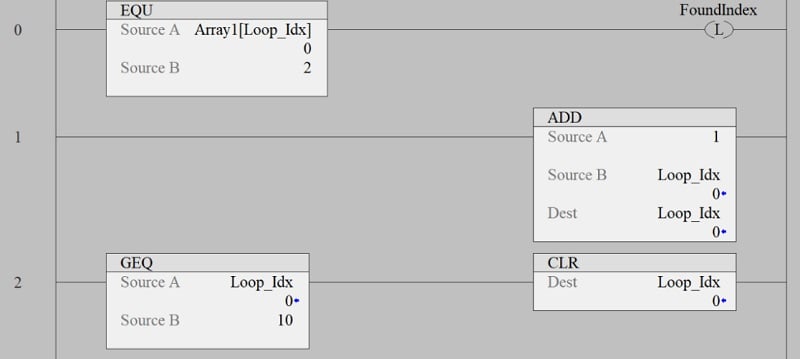
Figure 2. Looping with processor scan.
Scanning With Jump/Labels
A jump is a special function that will alter the scan of the PLC, so it must be used with caution. When the PLC executes a jump, it will move the program pointer to the label of the same name. This label can be forward or backward in the logic. For every jump, there needs to be a corresponding label with the same name. The name of the jump/label is not a tag and doesn’t need to be created, but the label name does need to be unique, and a label must be the first object on a rung.
If we have the same array as before, Array[0..9], we can use the jump/label logic to create a loop that will index our pointer, allowing us to loop through our array. Using the same indirect logic as before, we can evaluate new data with every increment of the pointer; the difference being we don’t have to wait for the scan of the PLC for the next index. Once the evaluation logic is complete and the program pointer has executed the jump, the program pointer will jump back to the label, and the evaluation logic will execute again, this time with the new index position.
In this style of looping, we place a reset at the top, before the label, and we condition our jump with a less-than compare block. So as long as our pointer is in the range of the array size, we keep jumping back.
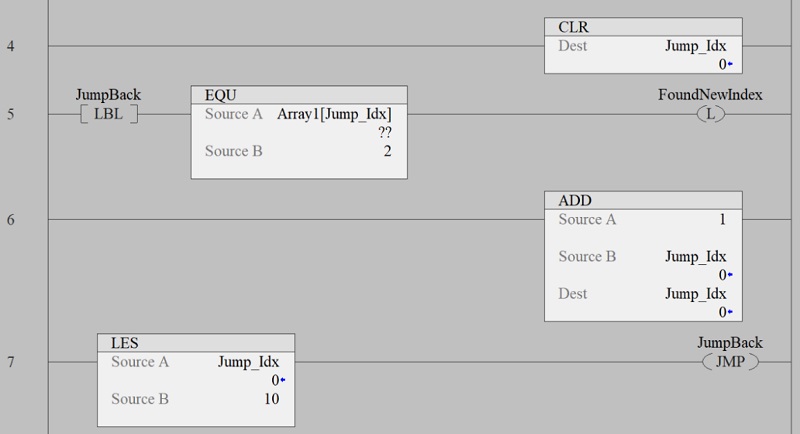
Figure 3. Looping with jumps.
Possible Processor Faults
Whenever you are using indirect addressing on array variables, you run the risk of faulting the processor.
Typically, there are two faults: data overrun and watchdog timer. Both of these faults refer to an issue with your loop instruction, and if you get either of these faults, the PLC program stops executing, and all the outputs turn off.
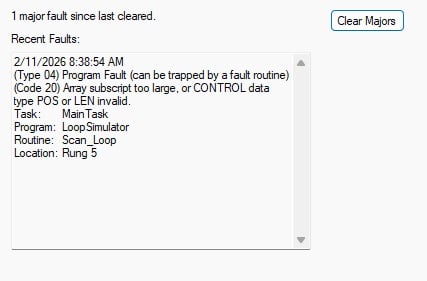
Figure 4. A fault in a scan cycle.
The data overrun faults happen when the pointer is outside of the array length, so in our earlier example (which used an index range of 0 to 9), if the pointer reached 10 and we tried to evaluate an indirect tag, we would receive a processor error.
Loops with jumps are prone to watchdog faults. This happens when the scan time of the PLC has been slowed down beyond a threshold. This can happen if you have too many loops in a routine or you have multiple nested loops with no exit condition, creating an endless loop. While a processor fault doesn’t sound horrible, they can cause damage if the conditions are just right.
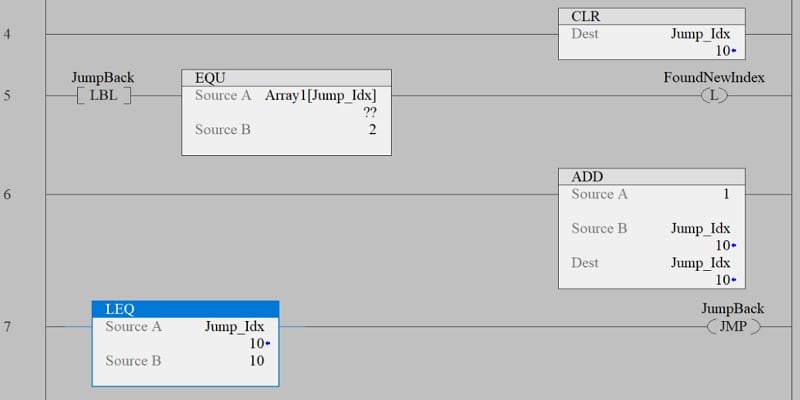
Figure 5. This is a loop that would cause a fault.
Tips and Tricks for Looping
- One of the simplest tricks is to add extra placeholders in your arrays. If you only need five indexes, make the array seven or even ten in length. A couple more indexes will occupy more memory, but might save you from a process or error.
- Another tip is to limit your nested loops; it is easier to debug multiple loops than nested loops. Try to move multidimensional array data into an intermediate array to prevent nested loops.
- Keep your index increment above your compare block. This way, you always add one to your index and then compare if you are outside of the array, and the actual size of the array can be used when comparing instead of the zero-based size of the array.
- To help with reading your logic, use a suffix like “_Idx” or “_Pnt” to denote your pointer tag.
Loops for PLC Arrays
Loops are a great way to analyze data that is stored in an array. They are often used in part tracking applications, such as searching through pallet data or nest data. Provided they are used sparingly and correctly, you will find looping in a PLC very useful.