
 Facebook
 Google
 GitHub
 Linkedin
Collaborative Robots
As more robots enter the workplace, the tasks assigned to them become more reminiscent of human tasks. In fact, many of the robots work right alongside the human operators, either augmenting the production lines previously dominated by people, or by adopting the jobs that are dangerous and toxic to humans.
What is a Cobot?
In these situations, a new robot design was required. The industrial 5 or 6-axis arms were of the proper size and shape, but the speed and rigidity of the devices were such that any collision with a nearby human could be devastating. This new design featuring enhanced safety allowed the robots to work in close collaboration with their human counterparts, giving them the title of ‘collaborative robots’, commonly known as ‘cobots’.
These robots can be very appealing for a number of reasons. If they are meant to work beside the people, the investment of shop floor space for a large safety cage is removed. Many times, the cost is not the problem; it’s the space. However, the cost is also reduced by the lack of requirement for a fully safety-integrated work cell. The end user can simply buy a robot and bolt it to a table, and the work can begin.

Because of this ease of use, the final benefit (which cannot be overstated) is the ability of a small end-user company to buy the robot, then install and commission it in-house with minimal supervision from the manufacturer, even if the company is lacking a proficient engineering department. With safe operation and low-code software designed for beginners, cobots form a very attractive step into the world of robotic factory automation.
Types of Cobots
Not every model of robot is a good choice for collaborative automation. Since they are restricted in speed and force, the benefits of robots optimized for high-speed applications are entirely negated by these restrictions.
By far the most common collaborative robots are 6-axis articulated arms. Some varieties have fewer axes, and some add a 7th axis near the wrist for added capability. One model, shown in the image below, adds a 7th axis between the shoulder and elbow joint, increasing the flexibility and reach around corners and into tight spaces. Occasional models of cobots even resemble a torso with two arms mounted laterally for two-handed part manipulation.

Mobile robots, those platforms with wheels that navigate around people, are also designed for collaborative intents, but they are programmed and designed with an entirely different set of considerations. For that reason, they are usually not called cobots, but rather autonomous mobile robots (AMRs) or automated guided vehicles (AGVs).
Safety Requirements for Collaborative Robots
The most obvious requirement for these robots is that when they come into contact with a person, they must halt without harming the person. Ultimately, collision avoidance is the best option, but that’s simply impossible to assure or guarantee. Therefore, they must have a failsafe method of working in close quarters without harm.
The publication of the International Standards Organization (ISO) 15066 outlines the safety practices of collaborative robots. The human/robot interaction must be monitored to control the power, force, and speed of the robot based on varying conditions (from ISO 15066:2016 Ch 5.5 ‘Collaborative Operations’).
Safety-Rated Monitored Stop
In this operating condition, the robot retains its power, effectively halting the program while the human operator enters the safeguarded work zone. In a sense, this is somewhat similar to the safety cage around an industrial robot, except in those cases, the program is stopped and power removed entirely and must be manually resumed at a safe location.
The safeguarding may be done by physical switches, but usually takes the form of IR area scanning sensors to detect the presence of a human. In some cobots, the work resumes the moment the operator leaves the space, or the operator can press a ‘resume’ button when the work area is clear, but in both cases, the robot resumes work seamlessly.
Hand Guiding
Another appealing benefit of the ‘low-code’ strategy for cobots is the teaching that comes from guiding the robot by hand. Traditional industrial robots use buttons to ‘jog’ the robot by linear axes or by joints. The programmer must know in advance what will happen when she or he presses the +X or the -J4, for example, or perform the move at such a low speed that if it begins moving the wrong way, they can halt before damage is done.
Instead, the cobot allows the operator to press a button that reduces any reverse forces on the joints (in many cases even compensating for the eight of the tool) so that it receives just enough power to keep it held in place. The hand of the operator smoothly guides the hand of the robot to the correct position, at which point any final touch-ups can be perfected since hand-guidance is inherently not very precise.

This hand guidance must be controlled for several reasons. First, if it moves too fast, the momentum of the heavy metal arm can trap or pinch the operator if it is allowed to move too quickly. This can be countered by speed limits, faulting the robot if the operator moves too fast.
In addition to speed, gravity plays a role in the motion of any mechanical device, where the heavy end of arm tooling falls in the absence of power, providing yet another pinch point for the operator. Force monitoring and tool weight compensation must ensure that the tool remains steadily in place after the operator releases hold. Not only could this be a safety issue, but accurate positioning would be impossible if the tool dropped each time the hold was released.
Speed and Separation Monitoring
As the distance between the operator and robot decreases, so should the speed of the robot. This means that the separation distance is monitored, usually with distance area scanners using IR technology, just like the sensor shown in the image below. Multiple zones are established to allow full-speed motion when no humans are present, lowering to a reduced speed when humans are close enough that they might interact with the work envelope, and then finally a monitored stop when a human enters the motion path or work envelope.
This will almost always be tied to a visual indicator stack light beacon near the robot to give an immediate view of the sensor’s detection. This is helpful in troubleshooting situations when the robot is moving slowly or stopped, and the root cause is finally determined to be as simple as a small piece of debris that was kicked into the robot’s safety zone. Troubleshooting always tends to jump to the worst-case failures, but actually ends up being a far simpler cause most of the time.
Power and Force Limiting
Much research has been done to determine how much force it would take to do harm to a person. Various ages, strengths, body types, genders etc are all factors in the workplace, and the robot must be designed to keep all of those people safe in case of a collision.
We would rather avoid collisions entirely, but it is far more peace of mind to know that if a moment of absent-minded motion will not result in a threat to life, as it certainly could when working near a high-speed industrial robot.
There are a number of ways to control this risk of harm, including the removal of any sharp edges on the robot arm. Take a look at any collaborative robot on the market and you will see round, flowing features, for which aesthetics is only partially to blame.
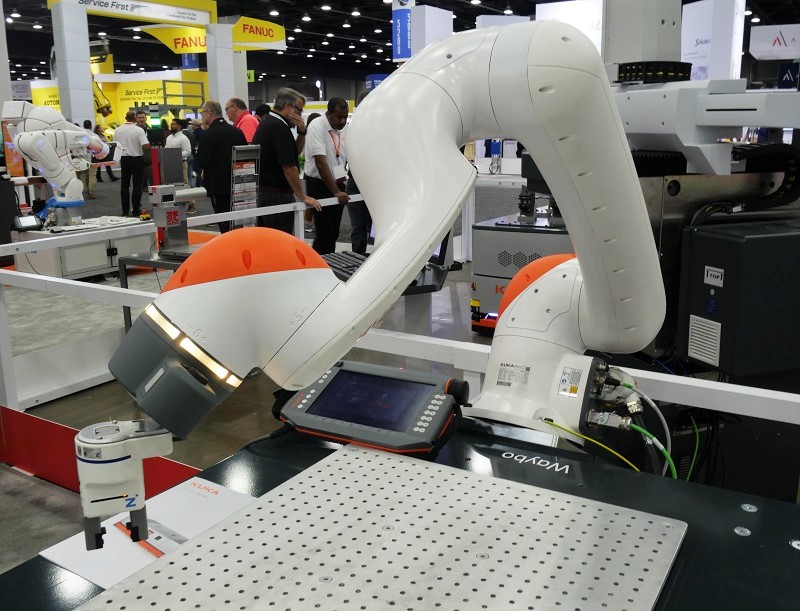
Softer construction materials may also be used to surround the robot, but at the same time, these materials must also be capable of measuring collision force and engaging the monitored stop mechanism.
Design of not only the robot arm, but all associated tools, work cell features, infeed and outfeed areas, and all other design considerations can minimize the impact of delivery of power from the robot.
The motion path also plays a significant role in limiting force delivery under collisions, or at least minimizing the chance of a collision entirely. In traditional robotic workcell design, the safety cage provided the boundary and within that space, every effort was made to reduce cycle time - safety of operators is not a risk. In the collaborative world, sacrifices must be made between the efficiency of the system and the safety of those around the robot.
Collaborative Robot Programming
These kinds of robots have brought a shift in the mindset of both applications (working safely without cages) as well as the programming skills required. Industrial robots require some basic knowledge of structured text, and the ability to interpret line-by-line program flow. With cobots, the priority has been the enabling of automation for businesses that lack the skills to develop in-house solutions or to purchase large integrated work cells.
The programming solutions for these cobots must match this skill level, leading to the introduction of ‘low-code’ and even ‘no-code’ programming (a term used and promoted by the manufacturers, not necessarily an officially recognized language type). Essentially, it’s the ability of an entry-level technician to pick up the teach pendant (or other teach method) and train the robot to complete a complex task without having to manipulate lines of code.

Hand-Guided Jogging
The teaching of points is the most basic fundamental part of any robot program. Most cobots use a form of button, either on the arm itself or on the teach pendant, that when pressed will release the brakes for the robot and allow the programmer to smoothly move the arm to the proper point.
If this location is simply a waypoint to avoid obstacles and isn’t critical down the millimeter, the point can be saved and inserted into the program flow directly. However, if the point is the final pick or place location, and orientation and placement are very important, the hand guidance must be supplemented with some precise motion.
For this precise touching up, many cobots allow the user to align the z-axis with the vertical base of the robot, so the gripper will not be approaching the target at an angle. This might not matter as much if it’s a small part to be grasped with pneumatic jaws, but imagine a large array of vacuum pucks to pick up a box. Even a slight angle might cause the gripper edges to collide with the box before it was supposed to activate, either stopping the robot or damaging the product.
For these final pick or place positions, cobot programming allows the programmer to make small adjustments via the pendant interface to be sure the approach and final point are exactly correct before saving.
I/O Commands
Reading input signals and energizing outputs is another common task for robots, but it’s harder to automate down to a simple series of hand gestures. One benefit that low-code has brought to the programming environment is a bit more conversational approach to determining the proper command words to accomplish a task. Instead of typing or sifting through a long list of commands to select the proper one, like in traditional programming, the low-code option takes a more problem/solution based approach.
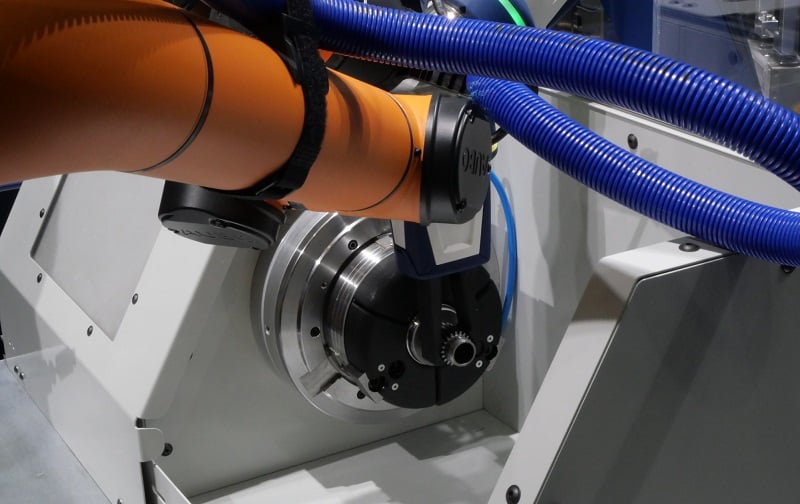
For many collaborative robot operating systems, the process follows something like this. When a gripper is attached to the robot I/O terminals, it is designed to identify itself using a predefined list of files from partner manufacturers, much like a USB device installs from a list of drivers installed on the machine. Alternatively, if it’s a custom-designed gripper, it will prompt the user to give it a name. The command options will provide a ‘gripper’ menu asking if the robot should energize or de-energize its gripper. In this way, the programmer is simply looking for a description of what she/he wants to accomplish, not seeking out the proper command word.
For external and networked I/O, the process may look and feel more like structured text programming. Using program flow statements, such as IF conditions, or pausing until inputs are energized are examples of tasks dependent on I/O.
These can be much more difficult to automate and explain graphically due to the endless variety of task objectives, so the commands are usually found in menus that can write HIGH/LOW to booleans or values to registers. Reading values from inputs and registers can be used to populate the conditions for the IF statements, wait conditions, and others.
Automated Workflow Applications (Apps)
One truly innovative benefit to the graphical environment is the interface that capitalizes on the most common tasks, such as palletizing.
In the palletizing example case, there is always a robot, an infeed conveyor, and a pallet. All other parameters are determined by the product and the facility. What shape is the product, how many are stacked on a layer, how many layers, and at what orientation are they placed? The questions must be answered for every palletizing program.
Because of this consistency, it is easier to design a standardized application to walk the programmer through each step, first asking where it should go to retrieve the product, learning the dimensions of the product, then determining the first drop point on the pallet.
After the first drop point is determined, the layer pattern and orientation, along with the product dimensions, make it very simple to allow the robot to calculate the rest of the program and get the process running very quickly. This palletizing example workflow is based on the OnRobot company’s D:Ploy platform, launched in early 2023 to assist in commissioning palleting, CNC tending, product transferring, and packaging solutions.
End of Arm Tooling for Cobots
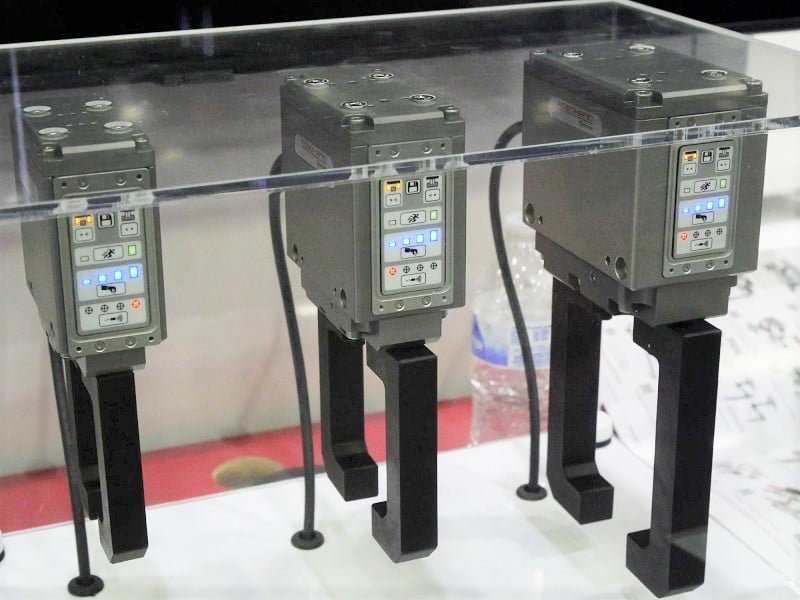
Cobots, being designed for safety, will have maximum payloads far lighter than their industrial relatives. The design of grippers must be factored into that payload, and this leads to greater innovation on the part of lighter, stronger materials. Since cobots can be more easily moved from place to place in a facility, there are also some special concerns about connecting them to prohibitive energy sources, such as pneumatic lines which may not be located at all spots. The design of tooling is certainly one of the major challenges in the world of industrial and collaborative robotics.
