head scratcher - PtP RTU runs with Windows box, but only temporarily with PLCs

Report from the field:

A flow meter with a Modbus RTU RS-485 port runs OK when polled by a Windows box with a USB/485 converter.

But when the Modbus master is replaced with either 1 of 2 PLCs, the Modbus comms runs only 3-5 minutes, before it fails. While running, comms passes valid data.

It doesn't matter if local VFD's are running or turned off, the result is the same.

The cabling was tested with a slave PLC replacing the flow meter and data was passed successfully beyond the 5 minute mark.

This is low speed, 9600 baud, operation.

The installed claims there is shielded twisted pair cabling. I'm getting confirmation on whether there's a signal ground connection on the PLC serial port (there is on the flow meter).

Presence or absence of 120 Ohm terminating resistors do not make a difference.

In one test, a PLC was placed within a meter of the flow meter and comm ran for 4 minutes then died.

I'm stuck. Any ideas?
 
Of course, the flow meter can't differentiate between a computer sending Modbus packets to it versus a PLC. So what's different?

Assuming the same registers are being accessed (i.e. both the computer and PLC are sending the same requests), it could come down to timing or the frequency of the requests. Perhaps the PLC is making requests much faster and eventually overloads the flow meter. Or perhaps there is some timing condition where the PLC times out and sends another request while the flow meter is still processing the previous one, and having two outstanding requests throws it off into the weeds. However, this would imply there is a firmware bug in the flow meter. The best way to confirm would be to capture the traffic.

It's possible, but less likely that it could be a ground reference issue, since it sounds like the PLC and flow meter may not share a common ground. Although it is curious that communication repeatedly fails in approximately the same amount of time. A grounding issue would likely be more random.
 
This is a very good question: you already tested lots of things. And the nearby test within 1 meter rules many cabling issues out.
It is obvious that the PLC (which one by the way?) communicates in a way that it is giving trouble to the flowmeter. It overloads it.
What can also give problems is too many slaves on the network, some master ports just don't have enough current to drive into the cable to run trough all interface optocouples in the slaves.
But I guess from your test that you are testing 1 on 1 (1 master connected to 1 slave) to rule this out.

It can surely be that your problem is caused by a combination of electrical issues and communication port implementation/configuration.

Electrical interface differences:
Don't forget that electrical interfaces of the windows PC with the RS485 convertor can be different from the one of the PLC. Maybe the voltages are just on the edge, or there is a problem with the grounding.
You have modbus RS-485 connections running with only the A and B lines (without grounding) but there are also implementations there there is A, B and the signal grounding. Officially the signals should be between the A and B lines (differential voltage) but you know how this goes....maybe somebody modified an interface from something else, lets say RS-232, to RS-485 and is not using the differential voltage between the A and B lines, but it takes the A-GND and B-GND voltages and subtracts those signals. So here the GND is very important.
When it works with 1 interface that works correctly how it should be: differential voltage between A and B and GND is only for shielding noise. It could be that the other one works with GND.
I would rule all possible issues out and use:
- proper 120ohm impedance corrected cabling, specially designed for RS-485, like Lapp Unitronic BUS LD. You can order it per meter at conrad and it is not expensive (about euro 2.50 p/mtr). See: https://www.conrad.com/en/p/lapp-21...et-sold-per-metre-600095.html#productTechData
- The Lapp Unitronic bus LD cable is 2x 0.22mm2. I always use the brown for A line, the white for B line and the green for the GND line. I don't use the yellow wire.
- connect on the last slave of the bus (when running 1:1 your flowmeter) a 120ohm resistor between the A and B line.

===> now another important one: communication port timing settings:

What can also give trouble, is that the flowmeter doesn't answer fast enough. The modbus master sends a polling request to the slave (that switched its port to listening, it is a slave). The slave recognizes that the message is for him and switches the electrical interface from receiving to sending. This can take time (few milliseconds). It could be that the windows PC (windows is slowwwww) is slowly switching from sending to receiving, but your PLC is don't that very fast.

What can also be a problem is that the windows pc only reads 1 address, whereas the PLC is receiving many adresses. This is dependent on how the port settings of the modbus are configured. I'll give you some examples in the picture.

In the past I had problems with slaves that had slow hardware that took more than 100ms to answer to a poll from the master. The master sends a retry too quickly and the buffer of the slave becomes overloaded, it cannot keep up.

The master must give the slave enough time to switch the electrical interface from receiving to sending, wait a little while to let the signals become electrically stable (very important), and only after that the slave starts sending its data.
The master timeout for a request must also be long enough of course.

See the red square in the picture: you see the master:
- timeout: it hopes to receive an answer within 3 sec.
- retry: when not it retries after 2 sec.
- and a very important one: wait to send. After switching the direction of the line, it gives the electrical signals 1ms time to become electrically stable on the line.
===> when you have long lines, or lines that are not proper with impedance (so: not 120ohm impedance corrected). This time may be much longer.

Now another issue: which modbus commands are used by default (see the orange square)

Most of my slaves use the 4xxxxx modbus range (16 bit word read/write registers).
I had problems in the past with slaves that could not react properly to function call 10 (multiple write command, so more than 1 register in a row).
To solve this I had to set the write call manually in the port configuration to
They only worked ok by manually switching the configuration of the port from function call 10 (multiple write) to function call 06 (single register write).
And then it works perfectly.
Nowadays I always use only call 06 for writing, since I noticed that it works ok in all situations.

So that is my take on this problem for now. I think it could be a combination of 2 problems.

I hope this gives you some new idea's to check out. Please do some additional checks and testing and gives us more information if you find out more.

gr. from Rotterdam, the Netherlandsmodbus help.jpg
 
Here are some options for capturing Modbus RTU traffic.

https://www.eltima.com/modbus-sniffer.html

https://ioninja.com/plugins/modbus.html

https://github.com/jzhvymetal/WiresharkSerialAdapter

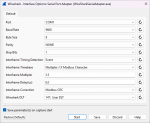
Although it's free, there is a little bit of setup required for that last one (which is all shown in the README on the project's GitHub page), but it seems to work well after you've configured the appropriate settings. Here's how I have my settings setup:
WireSharkSerialAdapter Settings.png

I also setup DLT 147 as "mbrtu" in Wireshark (also shown in one of the images from the README). Here's a YouTube video showing another way to set this up in Wireshark

In addition, I set my USB to RS-485 adapter's Latency Timer to 1ms in the Device Manager Advanced settings for my COM port, which seemed to help (again, shown in an image in the README).
 
Top