HIGH VIBRATION ON GE FRAME 9E GAS TURBINE.

@EBUWAODUWA,

This is something. Which unit is experiencing the problem? Because it seems there is more than one unit at the site.

In my personal experience, 18.0 mm/s is kind of low for a trip setpoint. All of the Frame 9E machines I worked on used 1.0 in/sec (25 mm/s) as the trip setpoint. BUT--the entire turbine shaft seems to be rocking and rolling.

There's one "non-invasive" inspection that could be done--a borescope inspection of the axial compressor.
 
@EBUWAODUWA,

This is something. Which unit is experiencing the problem? Because it seems there is more than one unit at the site.

In my personal experience, 18.0 mm/s is kind of low for a trip setpoint. All of the Frame 9E machines I worked on used 1.0 in/sec (25 mm/s) as the trip setpoint. BUT--the entire turbine shaft seems to be rocking and rolling.

There's one "non-invasive" inspection that could be done--a borescope inspection of the axial compressor.
We have four unit, but the machine give this alarm is GTG-2. At this point you can feel any real vibration on the grating or the machine or the bearing casing. We have done alignment with GE personnel, Rotor care. The bearing that was changed at Accessory gear box is new one from dubia.
 
@EBUWAODUWA,

What happens when you click on the 'Seismic Trend' button when the machine is running, and just after it trips? If CIMPLICITY was configured properly ALL of the seismic vibration transducers should be graphed FROM THE TIME THE 'Seismic Trend' BUTTON WAS CLICKED ON. So, someone clicks on the 'Seismic Trend' button at about 50% TNH and leaves the trend graph open until just after the 65% speed, or when the unit trips and then snaps a screenshot or a photo of the trend that would be very helpful.
 
Ther
@EBUWAODUWA,

What happens when you click on the 'Seismic Trend' button when the machine is running, and just after it trips? If CIMPLICITY was configured properly ALL of the seismic vibration transducers should be graphed FROM THE TIME THE 'Seismic Trend' BUTTON WAS CLICKED ON. So, someone clicks on the 'Seismic Trend' button at about 50% TNH and leaves the trend graph open until just after the 65% speed, or when the unit trips and then snaps a screenshot or a photo of the trend that would be very helpful.
There was a trend that was taken but i have done have access to the trend. It's with the top management.
 
@EBUWAODUWA,

You wrote:

"... At this point you can feel any real vibration on the grating or the machine or the bearing casing...."

Is that what you meant to write? Or did you mean to write "...At this point you can NOT feel any real vibration on the grating or the machine or the bearing casing...."

As some of the photos show, the entire turbine shaft #1, #2 and #3 bearings seem to be showing "high" vibrations--while at the same time, the generator rotor isn't showing anything at all, and I would expect at least the drive end bearing of the generator would be showing a little more than essentially 0 mm/s.
 
@EBUWAODUWA,

Like I said, I'm probably going to regret saying the problem is most likely NOT the turbine control system--and I'm still not entirely prepared to say that, but please answer some Mark* VI questions for us. ALL OF THEM--PLEASE.

1) Which Mark* VI card (or cards) were replaced?

2) Are there any red or yellow LEDs showing on the VVIB cards. (Cards, plural, as in multiple VVIB cards--because if the Mark* is a TMR panel (<R>, <S> & <T>) then there are at least three (3) VVIB cards, and maybe more.

3) Can you take a photo AT THIS TIME of the Diagnostic Alarm Display window, or maybe multiple photos if there are more Diagnostic Alarms than can be shown in the display (by scrolling the display using the slider at the right of the Diagnostic Alarm display window to expose more alarms).
 
Thanks for your response, i will do that on Monday. we have close for the day. I really appreciate your kind response. i will do the snapshot of the mark VI card R S T, if there is any yellow LED
 
@EBUWAODUWA,

There are big 37-pin cables which connect the TVIB card (which is where the seismic (velocity) vibration probes are terminated in the Mark* VI panel. These cables have special clips which are used to secure them in their receptacles on the boards (at BOTH ends of all of the cables). These clips are EASILY not put in the correct positions which means the signals passing through the cable connectors.

The issue of the 37-pin cable clips was mentioned in Post #5 to this thread.

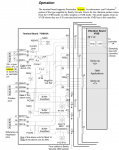
Here's a snippet from GEH-6421, in the VVIB section (which also shows the TVIB terminal board to which the vibrations sensors (several types) are connected and the terminal board is connected to the VVIB cards in the control processors (<R>, <S> & <T>).

1740152587892.png

[Often the Mark* manuals can be confusing and even somewhat incorrect or misleading because they try to use one diagram or drawing for several different versions of the same card or device. You're only interested in first eight (8) inputs--which are used for the eight (8) seismic vibration sensors on your machine (presuming they only used one VVIB I/O board per control processor). The seismic (velocity) vibration sensors are denoted by the circle with an S inside connected to the second and third terminal of each of the eight possible inputs.]

It could ALSO be that the removable terminal boards on the VVIB were not reinstalled correctly--it, too happens a lot that they don't get properly reinstalled because the technician is afraid of "breaking" the I/O terminal board (the TVIB in this case). The removable terminal boards have be FIRMLY pressed into the socket(s) on the terminal board(s) AND the screws have to be firmly tightened sometimes to fully seat the removable terminal board--though they should not be overly tightened, either. There should be NO gap between the socket on the printed circuit card (the TVIB in this case) and the removable termina board section (with the device field wiring attached to it).

I strongly suggest reviewing the device field wiring, the removable terminal board insertion and retention screws, and the 37-pin cable clip positions (JR1, JR2 & JR3, if the control panel is a TMR (Triple Modular Redundant Mark* turbine control panel). As noted before, BE CAREFUL removing and inserting the cable 37-pin connectors as they can easily be shorted against the metal socket of the 37-pin receptacle on the printed circuit card (the TVIB in this case).

The clips of the 37-pin cable connectors slide up and down (when the connector is vertical). I can't recall if up is locked or unlocked. But if someone holds the clip (JR1, then JS1 and then JT1) and presses the cable into the card receptacle and slides the little rolled metal end of the clip up or down it should be easy to feel if the clip is locked or unlocked when it is moved up or down. If I recall correctly, it clicks when being engaged OR disengaged. If the clip was NOT set to the disengaged position when the cable connector was inserted into the receptacle and then checked to be sure it's in the locked position it's entirely possible the pins and sockets of the 37 pin connector are not making full and proper contact. If the clip is in the locked position while it being pressed against and the clip is slid in the opposite direction the connector should move closer to the printed circuit card receptacle, and moving the clip in the opposite direction it was found in should lock the connector into the receptacle. Using a flashlight, and possibly an inspection mirror or taking a photo of the connector inserted in the receptacle with a smartphone should show if there's a gap or if the connector is firmly inserted in the receptacle as it should be. All that remains is to be sure it's fully inserted into the receptacle and locked in place with the clip. A slight tug of the cable connector SHOULD NOT pull the connector out of the receptacle if the clip is in the locked position.

[It really helps to see a 37-pin cable connector unplugged from a printed circuit receptacle and observe how the clip works and how it feels/sounds when it's slipped into the locked position when the connector is fully seated in the receptacle on the printed circuit card. BUT, doing this with any cable when the Mark* VI is powered-up is slightly dangerous, because of the possiblity of grounding/arcing/sparking if the cable isn't inserted back into the receptacle very, very carefully. If there is a spare cable in the warehouse and you can find the TVIB card which was replaced they can be used for practice and to learn how the clip is to be used to secure the cable connector in the receptacle on the printed circuit card.]
 
@EBUWAODUWA,

There are big 37-pin cables which connect the TVIB card (which is where the seismic (velocity) vibration probes are terminated in the Mark* VI panel. These cables have special clips which are used to secure them in their receptacles on the boards (at BOTH ends of all of the cables). These clips are EASILY not put in the correct positions which means the signals passing through the cable connectors.

Here's a snippet from GEH-6421, in the VVIB section (which also shows the TVIB terminal board to which the vibrations sensors (several types) are connected and the terminal board is connected to the VVIB cards in the control processors (<R>, <S> & <T>).

View attachment 4723

The issue of the 37-pin cable clips was mentioned in Post #5 to this thread.
Thanks sir, i will check on it on Monday. You have done so much, i really appreciate.
 
@EBUWAODUWA,

There are big 37-pin cables which connect the TVIB card (which is where the seismic (velocity) vibration probes are terminated in the Mark* VI panel. These cables have special clips which are used to secure them in their receptacles on the boards (at BOTH ends of all of the cables). These clips are EASILY not put in the correct positions which means the signals passing through the cable connectors.

The issue of the 37-pin cable clips was mentioned in Post #5 to this thread.

Here's a snippet from GEH-6421, in the VVIB section (which also shows the TVIB terminal board to which the vibrations sensors (several types) are connected and the terminal board is connected to the VVIB cards in the control processors (<R>, <S> & <T>).

View attachment 4723

[Often the Mark* manuals can be confusing and even somewhat incorrect or misleading because they try to use one diagram or drawing for several different versions of the same card or device. You're only interested in first eight (8) inputs--which are used for the eight (8) seismic vibration sensors on your machine (presuming they only used one VVIB I/O board per control processor). The seismic (velocity) vibration sensors are denoted by the circle with an S inside connected to the second and third terminal of each of the eight possible inputs.]

It could ALSO be that the removable terminal boards on the VVIB were not reinstalled correctly--it, too happens a lot that they don't get properly reinstalled because the technician is afraid of "breaking" the I/O terminal board (the TVIB in this case). The removable terminal boards have be FIRMLY pressed into the socket(s) on the terminal board(s) AND the screws have to be firmly tightened sometimes to fully seat the removable terminal board--though they should not be overly tightened, either. There should be NO gap between the socket on the printed circuit card (the TVIB in this case) and the removable termina board section (with the device field wiring attached to it).

I strongly suggest reviewing the device field wiring, the removable terminal board insertion and retention screws, and the 37-pin cable clip positions (JR1, JR2 & JR3, if the control panel is a TMR (Triple Modular Redundant Mark* turbine control panel). As noted before, BE CAREFUL removing and inserting the cable 37-pin connectors as they can easily be shorted against the metal socket of the 37-pin receptacle on the printed circuit card (the TVIB in this case).

The clips of the 37-pin cable connectors slide up and down (when the connector is vertical). I can't recall if up is locked or unlocked. But if someone holds the clip (JR1, then JS1 and then JT1) and presses the cable into the card receptacle and slides the little rolled metal end of the clip up or down it should be easy to feel if the clip is locked or unlocked when it is moved up or down. If I recall correctly, it clicks when being engaged OR disengaged. If the clip was NOT set to the disengaged position when the cable connector was inserted into the receptacle and then checked to be sure it's in the locked position it's entirely possible the pins and sockets of the 37 pin connector are not making full and proper contact. If the clip is in the locked position while it being pressed against and the clip is slid in the opposite direction the connector should move closer to the printed circuit card receptacle, and moving the clip in the opposite direction it was found in should lock the connector into the receptacle. Using a flashlight, and possibly an inspection mirror or taking a photo of the connector inserted in the receptacle with a smartphone should show if there's a gap or if the connector is firmly inserted in the receptacle as it should be. All that remains is to be sure it's fully inserted into the receptacle and locked in place with the clip. A slight tug of the cable connector SHOULD NOT pull the connector out of the receptacle if the clip is in the locked position.

[It really helps to see a 37-pin cable connector unplugged from a printed circuit receptacle and observe how the clip works and how it feels/sounds when it's slipped into the locked position when the connector is fully seated in the receptacle on the printed circuit card. BUT, doing this with any cable when the Mark* VI is powered-up is slightly dangerous, because of the possiblity of grounding/arcing/sparking if the cable isn't inserted back into the receptacle very, very carefully. If there is a spare cable in the warehouse and you can find the TVIB card which was replaced they can be used for practice and to learn how the clip is to be used to secure the cable connector in the receptacle on the printed circuit card.]
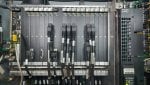
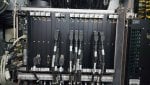
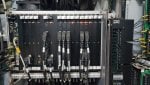
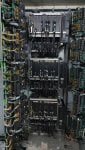
Attached here is the R, S, T of the mark VI card. There is no status light on any of the VVIB. We are still battling with the high vibration. Please if have any issue
 

Attachments

Top