 Facebook
 Google
 GitHub
 Linkedin
I use a Fatek FBs PLC for my home automation system. When monitoring, maintaining or troubleshooting the installation, I did not always want to carry a Windows laptop running WinProLadder with me. For many routine tasks, I wanted direct access from the iPhone or iPad that I already had nearby.
I wanted to have two interfaces on the same device:
This led me to develop a native iPhone and iPad application that communicates directly with a compatible Fatek FBs PLC over the local network, without relying on a cloud service.
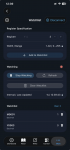
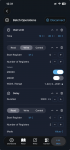
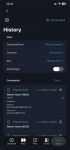
The engineering interface includes connection profiles, PLC discovery, register reads and writes, live watchlists, command history and reusable multi-step operations.
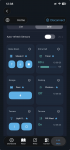
The automation interface maps the same PLC data to sites, zones, sensors and controlled devices.
The application is not intended to replace WinProLadder for PLC programming or configuration. Its purpose is to provide convenient access for monitoring, diagnostics, testing and everyday operation when opening a Windows laptop would be unnecessary.
I am interested in how other Fatek users approach this:
I wanted to have two interfaces on the same device:
- a low-level engineering view for working with registers, diagnostics and troubleshooting;
- a simpler everyday interface organized around rooms, sensors, lights, relays and blinds.
This led me to develop a native iPhone and iPad application that communicates directly with a compatible Fatek FBs PLC over the local network, without relying on a cloud service.
The engineering interface includes connection profiles, PLC discovery, register reads and writes, live watchlists, command history and reusable multi-step operations.
The automation interface maps the same PLC data to sites, zones, sensors and controlled devices.
The application is not intended to replace WinProLadder for PLC programming or configuration. Its purpose is to provide convenient access for monitoring, diagnostics, testing and everyday operation when opening a Windows laptop would be unnecessary.
I am interested in how other Fatek users approach this:
- Do you use Fatek controllers for home or building automation?
- Do you separate engineering diagnostics from the everyday operator interface?
- Which functions would you expect from a mobile field console?