Modbus and battery communication problem

Hello everybody!

This is my first post here, os if you need more details or information that I could provide to better understand my problem, please feel free to ask.

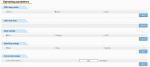
I am controlling a battery system (BESS) Sungrow with a CM4 using modbus TCP. I send commands to charge/discharge the battery depending on day/hour. The problem that I'm having is that sometimes the battery fails presenting a Fault, that goes to "Stopped Status" by itself, so far everything normal. The problem occurs when I try to send the command to "Start" again, receiving an answer from the slave and changing on the web to "Start Status", but not actually starting. I'll attach screenshots of the battery web app where I confirm the changes I send to the battery.
 

Attachments

Hello and welcome to the forum!

Can you provide the Sungrow model number of the BESS and/or a user's manual?

Is the web app your own creation, being served by the CM4 or is it from the Sungrow system?

When the battery fails and there is a fault, how do you remove the fault condition and clear the fault? I'm assuming this would need to be done before you can simply "Start" again, otherwise the fault condition would immediately cause another fault and the BESS would not start.
 
Hello and welcome to the forum!

Can you provide the Sungrow model number of the BESS and/or a user's manual?

Is the web app your own creation, being served by the CM4 or is it from the Sungrow system?

When the battery fails and there is a fault, how do you remove the fault condition and clear the fault? I'm assuming this would need to be done before you can simply "Start" again, otherwise the fault condition would immediately cause another fault and the BESS would not start.
Thank you for the quick reply!

1. Sungrow ST129CP-50HV
2. The web app is from Sungrow System. We connect to that using remote desktop, running on a raspberry connected to the same router/internet.
3. Yes, we remove the fault and right now we have to go to the web app and press on the Set bottom manually for it to start again. Sending the modbus command does nothing but changing the blue dot from stopped to start on the web app, but not actually start. We have tried this too without any fault present (to discard that fault prevent us to start again): change from start to stop with modbus command, and goes to stop, but then from stop to start, just the blue dot changes position.
 
Thank you for the additional details. Unfortunately I can't find any documentation online for the ST129CP-50HV other than a datasheet. Do you have a manual with the Modbus registers you can share?

The results from your stop/start test are interesting. The fact that the blue dot moves to the start position seems to indicate the Sungrow is successfully receiving the Modbus command. All I can think of is either this is a bug in the firmware of the Sungrow device or perhaps there's another register or setting that must be configured in order to actually start it from Modbus.

Can you duplicate the issue using 3rd-party Modbus master software such as ModScan, Modbus Poll, or Simply Modbus? If so, I recommend providing Sungrow's technical support with the steps to reproduce the issue using the Modbus master software so that they can investigate the issue.
 
Top