 Facebook
 Google
 GitHub
 Linkedin
Companion Guide to Ladder Logic / ST Conversion
This guide examines common ladder logic structures and presents the equivalent structured text representation, mainly intended as a learning guide for those getting started with ST.
Are you a seasoned ladder logic veteran, but brand-new to structured text? This guide compares most of the common ladder logic structures to their equivalent structured text format.
Not every ladder logic command is available in all IDEs, so the examples draw from multiple vendors. However, any IEC 61131-compliant structured text routine will accept the ST versions.
One note about tags in ST. Just like in any PLC program, variables can exist as global or local (program) tags. Tags are never declared right beside the ladder rungs, and likewise, variables are not declared right alongside the lines of code.
In the following examples, some snippets use variables beyond the I/O tags. They are listed as suggestions, but in real code, they will be declared as local (program) scope variables in the respective IDE, usually at the very beginning of each routine.
For all of these examples, InputTag is the real-world input terminal state, and OutputTag is directly sent to an output terminal. Assume they are already declared in the global tag/variable list.
Contacts and Coils
NO Contact (XIC):

OutputTag := InputTag; |
NC Contact (XIO):

OutputTag := NOT InputTag; |
Rising Edge (One-shot Rising):

VAR OldInput : BOOL := InputTag;END_VAR// Compare to see if it was 0 and is now 1IF (NOT OldInput AND InputTag) THEN OutputTag := 1;ELSE OutputTag := 0;END_IF;// Need to replace the old value so it can compare in the next scan cycleOldInput := InputTag; |
Falling Edge (One-shot Falling):

VAR OldInput : BOOL := InputTag;END_VAR// Compare to see if it was 1 and is now 0IF (OldInput AND NOT InputTag) THEN OutputTag := 1;ELSE OutputTag := 0;END_IF;// Need to replace the old value so it can compare in the next scan cycleOldInput := InputTag; |
Momentary Output Energize (OTE):
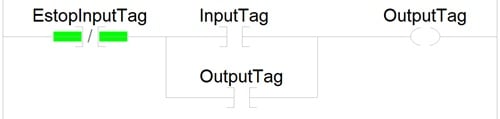
OutputTag := NOT EstopInputTag AND (InputTag OR OutputTag); |
Note: If the E-stop is a normally closed device (as most are), then use a NO contact instruction in the ladder, or remove the ‘NOT’ term from the ST code.
Output Latch (OTL):

IF InputTag THEN OutputTag := 1;END_IF;//Remember to find another spot to turn it off |
Output Unlatch (OTU):

IF InputTag THEN OutputTag := 0;END_IF;//Make sure there is another spot that turns it on |
Toggle:

IF InputTag THEN OutputTag := NOT OutputTag;END_IF;//This happens continuously while the rung is true. Consider adding one-shot logic to toggle on each distinct input |
Flasher:

VAR OnTime : TIME := Tx; // User input ON time, written with #ms, #s, #m, or #h suffix OffTime : TIME := Ty; // User input OFF time, written with #ms, #s, #m, or #h suffix InitOffTime : TIME := T0#ms; // Initially turns the output ON with no delay OldTime : TIME;END_VARIF InputTag THEN IF OutputTag AND ((TIME() - OldTime)>=OnTime) THEN OutputTag := 0; OldTime := TIME(); ELSIF NOT OutputTag AND ((TIME() - OldTime)>=InitOffTime) THEN OutputTag := 1; OldTime := TIME(); InitOffTime := OffTime;ELSE OutputTag := 0;END_IF; |
Math
Simple Comparison:
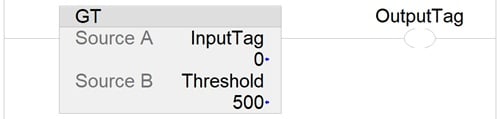
VAR Threshold : INT := x; // User input limit value Threshold2 : INT := y; // <u>Optional</u> second user input limit value Thresholdn : INT := n; // <u>Optional</u> all other user input limit valuesEND_VARIF InputTag > Threshold THEN OutputTag := 1;ELSIF InputTag > Threshold2 THEN // Optional multiple thresholds, like a fill level with intervals MoreOutputTags := 1;ELSE OutputTag := 0;END_IF |
All comparison operators are valid:
| X Greater than Y | X > Y |
| X Greater than or equal to Y | X >= Y |
| X Less than Y | X < Y |
| X Less than or equal to Y | X <= Y |
| X Equal to Y | X = Y |
| X Not equal to Y | X <> Y |
Comparison Limits:
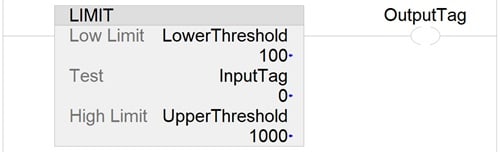
VAR LowerThreshold : INT := x; // User input limit value UpperThreshold : INT := y; // User input limit valueEND_VARIF InputTag >= LowerThreshold AND InputTag <= UpperThreshold THEN OutputTag := 1;ELSE OutputTag := 0;END_IF |
Computation:
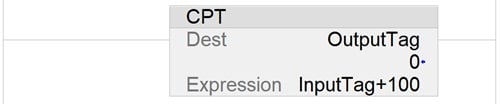
OutputTag := InputTag + 100; |
Linear Scale:
As an example to help this make sense, assume you want to convert an input -10 to 10 V signal into its equivalent 4-20 mA signal. This uses the point-slope calculation of a linear equation.
$$ y = m(x-x_1)+y_1 $$
Where
$$ m = \frac{y_2-y_1}{x_2-x_1} $$
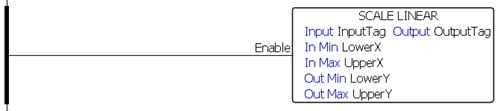
VAR LowerX : INT := A; // User provided lower input value (ex. -10) UpperX : INT := B; // User provided upper input value (ex. 10) LowerY : INT := C; // User provided lower output value (ex. 4) UpperY : INT := D; // User provided upper output value (ex. 20)END_VAROutputTag := ((UpperY - LowerY)/(UpperX - LowerX))*(InputTag - LowerX) + LowerY; |
Find Max or Min Value:

VAR MaxVal : INT := InputTag;END_VARIF InputTag > MaxVal THEN MaxVal := InputTag;END_IF |
- OR -
VAR MinVal : INT := InputTag;END_VARIF MinVal > InputTag THEN MinVal := InputTag;END_IF |
Counters and Timers
Both counters and timers are available as standard data types, accessed by function blocks in most IDEs.
Each example below will show two concepts:
- The standard function declaration and call.
- The code that explains the internal operation of the function, just for the love of the coding game.
Counter (Up Count):
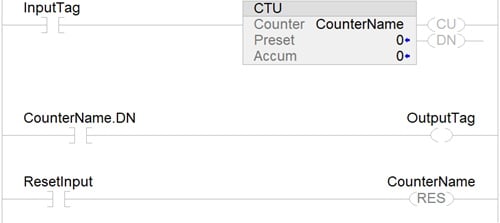
VAR CounterName : CTU; PRE : DINT := x; // User supplied preset valueEND_VARCounterName(CU := InputTag, RESET := ResetInput , PV := PRE);OutputTag := CounterName.Q; |
—----------------------
VAR ACC : DINT := 0; PRE : DINT := x; // User supplied preset value OldInput : BOOL := InputTag;END_VAR// Begins with a rising edge one-shot trigger IF (NOT OldInput AND InputTag) THEN ACC := ACC + 1;END_IF;OldInput := InputTag;// OutputTag acts as IEC 61131 Q bitIF ACC >= PRE THEN OutputTag := 1;ELSE OutputTag := 0;END_IFIF ResetInput THEN ACC := 0;END_IF |
On-delay Timer (TON):
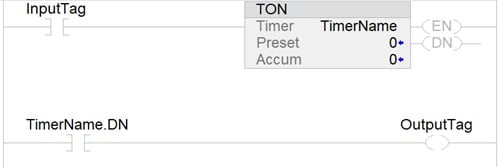
VARTimerName : TON; PRE : TIME := x; // User supplied preset value, written with #ms, #s, #m, or #h suffixEND_VARTimerName(IN := InputTag, PT := PRE);OutputTag := TimerName.Q; |
—----------------
VAR ACC : TIME := 0; StartTime : TIME := TIME(); PRE : TIME := x; // User supplied preset value, written with ms, s, m, or h suffix OldInput : BOOL := InputTag;END_VAR// Start timer on rising edge of input tagIF (NOT OldInput AND InputTag) THEN StartTime := TIME();END_IFOldInput := InputTag;// Continue accumulating while button is pressedIF InputTag THEN ACC := TIME() - StartTime;ELSE ACC := 0; // If InputTag becomes false at any time, reset ACCEND_IF;// In this routine, outputTag acts as IEC 61131 Q bitIF ACC >= PRE THEN OutputTag := 1;ELSE OutputTag := 0;END_IF |
Off-delay Timer (TOF):
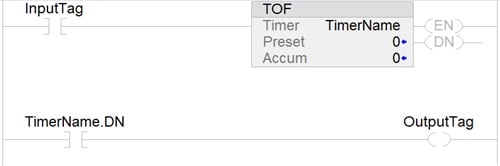
VAR TimerName : TOF; PRE : TIME := x; // User supplied preset value, written with #ms, #s, #m, or #h suffixEND_VARTimerName(IN := InputTag, PT := PRE);OutputTag := TimerName.Q; |
—---------------
VAR ACC : TIME := 0; StartTime : TIME := TIME(); PRE : TIME := x; // User supplied preset value, written with ms, s, m, or h suffix OldInput : BOOL := InputTag;END_VAR// Energize output (Q) on rising edge of input tagIF (NOT OldInput AND InputTag) THEN OutputTag := 1;END_IF// Begin ACC time on falling edge of input tagIF (OldInput AND NOT InputTag) THEN StartTime := TIME();END_IFOldInput := InputTag;// Continue accumulating while button is pressedIF InputTag THEN ACC := TIME() - StartTime;END_IF;// Reset output (Q) when time is reachedIF ACC >= PRE THEN OutputTag := 0;END_IF |
Fellow programming friends: if you notice any errors in these codes, please point them out so they can be corrected. I tried to keep them all accurate with the HTML formatting for the page, but please flag any errors or suggest alternatives to any of these routines - we appreciate the feedback!