Facebook
 Google
 GitHub
 Linkedin
First Test Run: Getting to Know the Bosch Rexroth ctrlX CORE
Get a first look at Bosch Rexroth’s ctrlX CORE, an industrial PC that unifies PLC, motion, and HMI through an app-based automation platform.
I have had the privilege of working with a great many PLCs and controllers over the years. Typically, I would approach a new platform by unboxing and installing the controller, then adding a couple of input and output devices. Creating and downloading a simple program would be the conclusion of the very first tutorial experience.
Recently, I was generously given a ctrlX CORE, an industrial PC from Bosch Rexroth, designed to improve the user experience by making it easy to share data across the various applications running on the device. For this initial tutorial, there is a lot of background information, so we will begin with a more high-level pre-flight briefing of the platform before diving into an introductory project later.
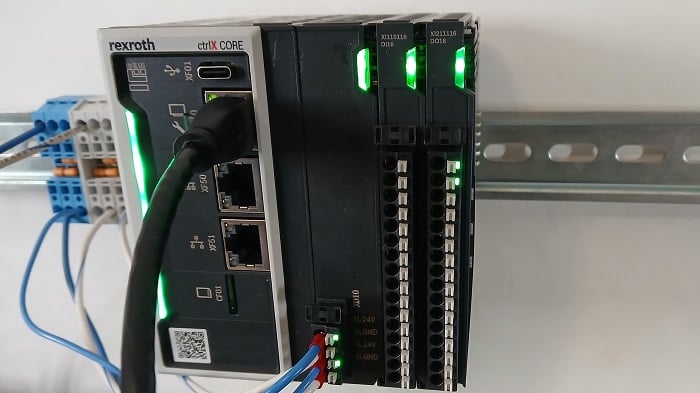
Figure 1. The ctrlX CORE from Bosch Rexroth.
First, What’s the Deal With IPCs?
The concept of the industrial PC (or IPC) was founded on the fact that no two use cases are exactly alike. Traditionally, when a new feature in a machine was required (such as support for an additional network protocol), it was necessary to buy a modular card to plug into the PLC chassis. Linear axis? A motion controller was required. Display screen? You need to buy a dedicated machine HMI; a simple monitor wouldn’t do the job.
Modern computers can handle all of these tasks, with plenty of resources left over. The idea is this: can a normal computer run a PLC program? Sure. What about calculating the position of an axis by running a PID loop? Easy. Providing a graphics card output for visualization? Of course, computers output to monitors all the time.
There is no real reason we cannot use a computer to consolidate the disparate functions that used to require a network of dedicated hardware devices. When a change is required, it’s only a software alteration, not extra hardware.
Does this make IPCs a perfect drop-in replacement for all PLCs? Some would argue that yes, there is nothing a PLC can accomplish that an IPC cannot do better. A more appropriate reality, however, might compare the tech specs and the audience. Will the user have the knowledge to troubleshoot errors, read codes, and take advantage of the platform's flexibility? If not, then a simple, dedicated PLC is likely the better option.
What is the ctrlX CORE?
This IPC is designed to tread the line between the flexibility of a raw OS and an engineering team's ability to implement changes quickly. While it does have an operating system, the user does not need to locate and install software like a standard computer. Instead, we can think of a smartphone analogy. When it arrives from the factory, a few basic default applications are pre-installed. For each unique situation, a central app store gives access to other apps that can be installed from that one location.
On the outside, this IPC has a USB-C port and several RJ45 network ports. This allows the device to communicate with Ethernet/IP, EtherCAT, and PROFINET devices; no additional COM ports are required. The ctrlX CORE can also receive local I/O modules that communicate over an EtherCAT bus on the backplane.
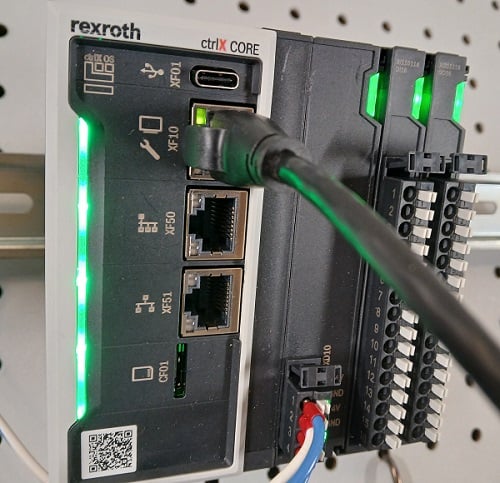
Figure 2. Communication ports on the ctrlX CORE.
A necessary computer item that seems to be missing is a human input device. Where is the keyboard, mouse, or monitor connection? The answer is that we interact with the ctrlX in a different manner.
Interfacing with the ctrlX CORE
The secret is the web server interface. This method of connection is quite common because it allows all sorts of access, diagnostics, and even limited programming without downloading software.
In the case of the ctrlX, the process is somewhat hybridized. We can unbox a brand-new ctrlX CORE, connect an Ethernet cable, and enter the IP address in any browser to connect. However, to build a PLC program, add EtherCAT modules, or define motion drives, we will still need to install certain software on our programming laptop.
First, we’ll explore web server access, and we’ll get to creating a PLC program in the next tutorial.
Connect the crtlX to 24 volts, then plug an Ethernet cable between the XF10 port and the port on your PC.
Open a web browser and enter 192.168.1.1 in the navigation bar. The screen will prompt for a login, and the default values are boschrexroth for both the Username and the Password.
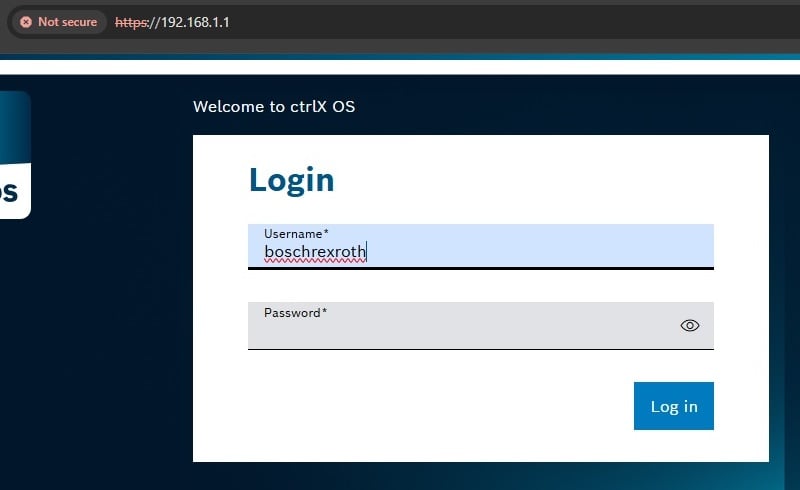
Figure 3. Login screen.
Navigating the Web Server
When we access the web server, the navigation options will be limited by the installed applications (apps). System apps are installed by the factory, while optional apps are added based on the user's needs. This IPC may act as a motion controller, a PLC, an IIoT gateway with I/O, or perhaps all of the above.
Home
This dashboard provides quick access to all of the other apps, run modes, network nodes, and settings.
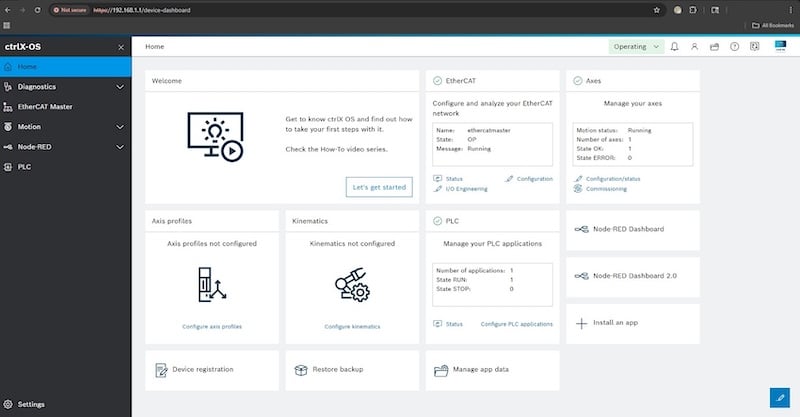
Figure 4. Home screen.
Diagnostics
Normal operational and error messages are displayed in the Diagnostics screen. Even better, each message code is a hyperlink to a help file that describes it in detail.
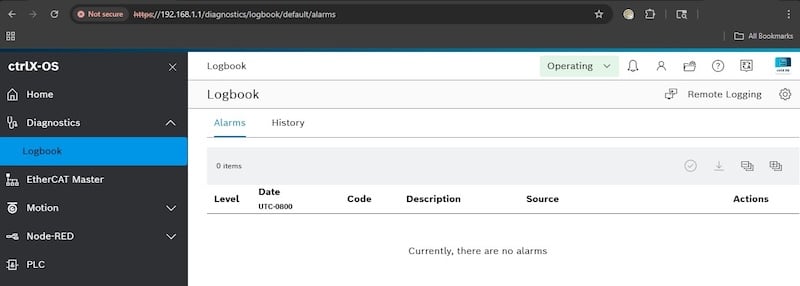
Figure 5. Diagnostics screen.
Other Apps
Depending on which apps have been installed, the menu will include other program names, each with its own unique operation. Many apps require licenses that allow basic or advanced capabilities.
Settings
This menu is the portal to all sorts of user configuration information. From this screen, we can add new apps, add user accounts/groups and change permissions, edit network addresses, access the data layer for various apps, and much more.
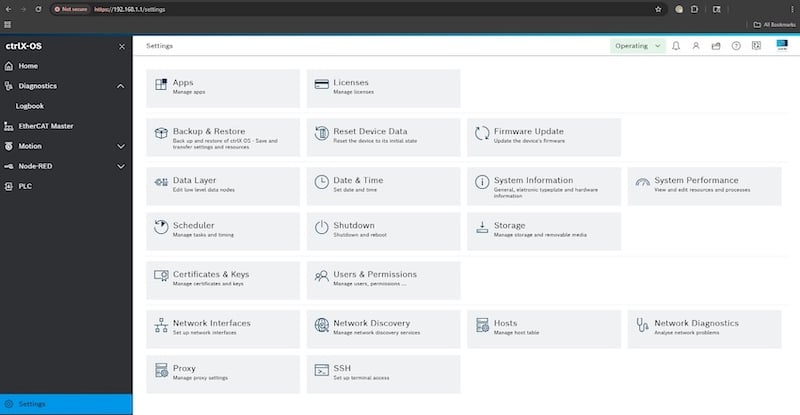
Figure 6. Settings screen.
Getting to Know the ctrlX CORE
In future articles, we’ll set up a basic PLC program, walk through a virtual axis for motion control, and explore a Node-RED application that coordinates all the apps in a single convenient dashboard.
Related Content