Facebook
 Google
 GitHub
 Linkedin
We are using an ABB DCS on site. The HMI server is running Conductor NT V5.0. We would like to back up Conductor NT, but found that the backup option is greyed out and cannot be selected due to insufficient permissions.
We checked the permissions of the currently logged-in account, which is Supervisor Level 3. In the Function Access Configuration, the Backup/Restore permission is set to Engineer Level 3.
It appears that the permissions are correctly configured. Moreover, another HMI server on site has the same configuration, and backup can be performed normally on that server.
What could be the reason for this issue?
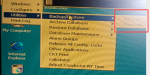
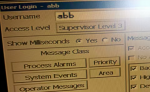
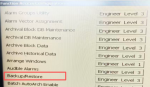
We checked the permissions of the currently logged-in account, which is Supervisor Level 3. In the Function Access Configuration, the Backup/Restore permission is set to Engineer Level 3.
It appears that the permissions are correctly configured. Moreover, another HMI server on site has the same configuration, and backup can be performed normally on that server.
What could be the reason for this issue?