Facebook
 Google
 GitHub
 Linkedin
Actuator-Sensor Interface: ASi Installation and Commissioning
A common field-level protocol for automation is ASi or AS-interface–a method used to convey actuator and sensor data and commands between I/O devices and the PLC control system level.
In the world of automation, communication protocols exist at different implementation levels, and each one has a specific purpose that defines its complexity. At the very lowest level, a network shares signals and commands between physical I/O devices and the host controller (like a PLC).
Historically, this is commonly accomplished by directly wiring the devices to a PLC remote I/O module with discrete and analog signal wires. While not technically a protocol, these single-wire solutions are still very easy to visualize, expand, and troubleshoot. However, cable bundles, one for each device, are very bulky for large machines, so fieldbus protocols were devised.
The actuator-sensor interface, also called AS-interface or simply ASi, is a pioneering method of reducing wiring complexity and data complexity to ensure that data is shared rapidly.
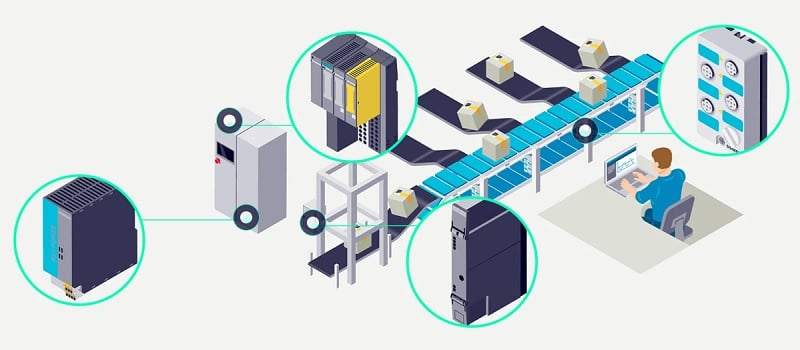
Figure 1. A typical AS-interface network with (left to right) a power supply, gateway, cabinet-based I/O, and machine mount I/O. Image used courtesy of Siemens
Required Equipment for ASi
The network begins with an ASi master, which is essentially the gateway between the device level and the control level. This gateway device manages all the ASi traffic, but it also has a second output fieldbus port to link to the PLC. ASi gateways can interface with Ethernet/IP, PROFINET, EtherCAT, Modbus, Rest API, OPC-UA, BACnet, and many others.
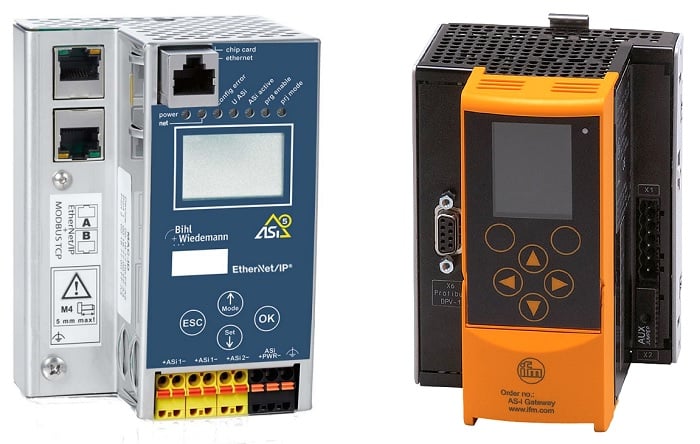
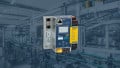
Figure 2. A couple of ASi gateway/master devices, one for Ethernet/IP (left) and one for PROFIBUS (right). Image used courtesy of Bihl+Wiedemann and ifm
Exiting the gateway is a 2-wire flat cable, inside which power and signals can both travel together. The total length of an ASi cable network is 100 m without additional repeaters, extenders, or additional in-line power supplies.
Usually, the flat cable extends in a trunk line, or bus, topology with modules installed directly over the length of the cable run. There are other formats as well, like ring topology, where the cable exits from one ASi port and returns to the other ASi port so that if the cable breaks at any location, there is still a second path for network traffic.
Connecting Devices to ASi Networks
Since the name is actuator-sensor interface, we must discuss how to connect the I/O devices to this 2-wire cable trunk line.
For this task, we use I/O modules that act as access points with common M12 ports, allowing a wide array of sensors, valves, buttons, and other devices to interact with the network.
These modules connect to the flat cable by simply clamping and piercing through the side of the cable. The advantage of this format is that you don’t need to pre-cut terminated cables between devices, and moving a device is very simple. When removed, the cable insulation simply closes up, and no repair is needed.

Figure 3. Two examples of I/O modules for ASi networks. Image used courtesy of Pepperl+Fuchs and Bihl+Wiedemann
These I/O modules usually support 2-, 3-, or 4-wire devices, which are common for sensors. Some of the M12 ports allow 2x I/O signals each, so a module with 4x ports may actually support up to 8x I/O devices. Typical I/O ports can provide up to 300-400 mA per port, with various modules allowing some flexibility.
Addressing the Nodes
Since this is a trunk line network, each module with I/O connections must be given a unique address. Depending on different addressing structures (standard vs extended), the maximum number of nodes may be up to 62. Each node is given an address either by the controller upon commissioning or by a handheld programming device unique to each manufacturer. Some ASi devices even offer addressing through USB connections to a PC software for initial setup.
Providing Extra Power
A final component of many ASi networks is an external 24 V power supply. Although power is provided over the flat 2-wire cable, it is often necessary to provide auxiliary power for large networks with more devices. For a small system, the ASi gateway can give power to the network with only a standard industrial 24-volt supply. Still, if the number of I/O devices exceeds around 15 (this number may vary depending on power consumption), an additional power supply is required.
The power supply connects to the network with a similar flat cable, but it uses a black color to indicate power only, while the data cable is colored bright yellow.
AS-Interface for Industrial Networks
ASi has been around for decades, and many manufacturers provide extensive product catalogs for everything from gateways to I/O modules. Manufacturers include Bihl+Wiedemann, Pepperl+Fuchs, ifm efector, Siemens, and others.
Even if you don’t use certain communication protocols on a regular basis, it’s a good idea to learn more about them in hopes of leveraging certain advantages if your future design specs ever call for something a little more advanced.