Facebook
 Google
 GitHub
 Linkedin
Managing and Configuring Switches for Secure SCADA Networks | Part 2
Learn about OT resilience strategies, including SSH, authentication, port blocking, and MAC address binding, methods that can be employed to protect network switches.
In a previous article, we discussed the OT segmentation and range of devices deployed at each layer of the Purdue Model. The entire production network, from Level 0 to Level 4, handles the crucial real-time plant data, while network switches facilitate data transfer from one layer to another.
In this article, we move forward to discuss the additional hardening techniques to make the OT network more secure and resilient.
Enable SSH (Secure Shell) Connectivity
The nodes deployed in the OT network should be more secure because the operational technology (OT) networks run critical grid, substations, and plant facilities. In today’s plant network, automation engineers rely on these nodes for remote access and management in a secure manner. The IEC-62443 is an international standard that also talks about the requirements for secure communication for Industrial Automation and Control Systems (IACS). Using the SSH protocol can satisfy the requirements of IEC cybersecurity requirements.
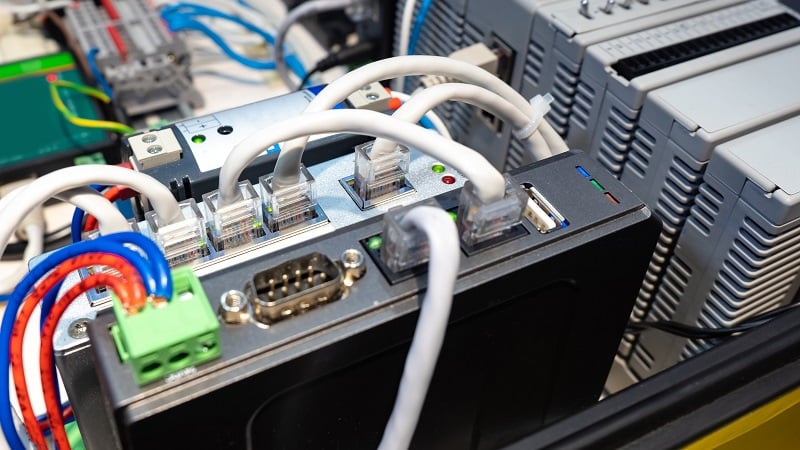
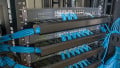
Figure 1. Industrial networking equipment can protect the most valuable data and capital assets in the factory. Image used courtesy of Adobe Stock
Let's explore the steps to configure a Cisco switch in order to connect remotely using SSH. The same method can be applied to routers and firewalls. SSH is a recommended protocol in production environments that deal with critical systems.
The first step is to set the “enable mode” password for the switch due to security reasons. When we remotely connect to the switch using an SSH session and type the "enable command”, the switch prompts us for the password. However, if we connect directly to the switch via console cable, then it is not required.
Disable HTTPS/HTTP Web Management
Most switch settings can be accessed through the web interface, similar to any user-friendly GUI, to configure, monitor, and troubleshoot. End users who are not familiar with command-line interface (CLI) mode can use this web interface. If you disable HTTP/HTTPS, you will not be able to manage the switch through a web browser, thus creating a more secure approach for switches deployed in the SCADA production zone.
In the industry, the routine practice is to configure the network switch via CLI through SSH. No doubt the web-based GUI is very helpful for less technical personnel, but it is likely to be a risk, since accidental erroneous changes might disturb the OT network. In other words, CLI is a much better methodology for those with the proper certifications and experience.
Authentication Against Local Username
As a field engineer or SCADA engineer trying to access the network switch (locally or remotely), we must pass the authentication and authorization security protocols to enter the device setup. The username/password conditions can be applied whether the service engineer tries to connect through the console port or SSH. The authentication credentials can be saved locally in the switch or on an external server. The following CLI commands are used to set the username/password for the switch.
First, enter the global configuration mode (type “config t”), and issue the following commands as shown in Figure 2.
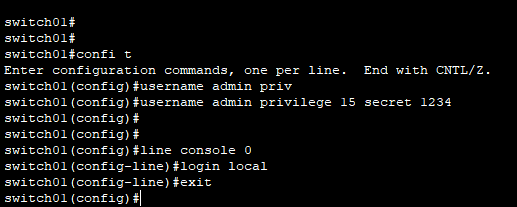
Figure 2. Commands to set username and password for console port authentication. Image used courtesy of the author
In this example, ‘admin’ is the username and ‘1234’ is the secret (password). The “line console 0” means physical console port, which is the primary interface for initial switch setup for a new switch. The locally configured username and password is set for the authentication. When an end user attempts to log in via the console port, in order to see the current configurations in the switch, issuing the command “running-config” will display the settings applied to the device.
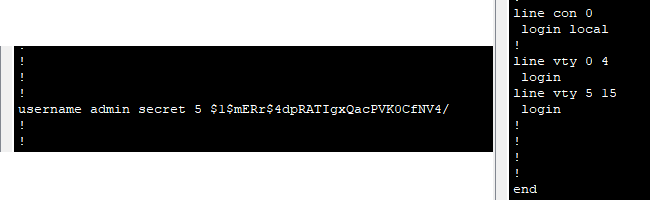
Figure 3. Username and encrypted password stored locally in the switch. Image used courtesy of the author
Next, to configure the SSH protocol for remote access and for authentication, use the locally stored credentials. The command “transport input ssh” is used to accept the SSH connection on the specified VTY lines. The VTY 0 4 means that the device allows five simultaneous remote connections (0 to 4), and the switch will reject remote connections other than SSH.
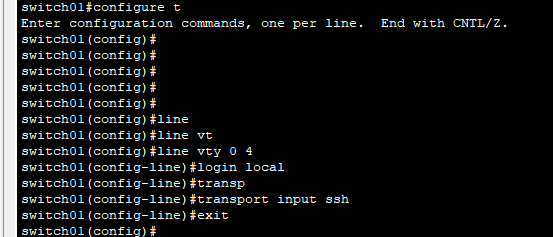
Figure 4. SSH protocol connection for 4x concurrent remote connections. Image used courtesy of the author
Port Blocking
The operational technology (OT) network segment, as already described, is a highly trusted zone, so blocking unused ports is even more critical than in office IT networks. The recommended practice is to block the unused ports of the switch and properly document the in-service ports, especially those used for the OT devices like RTUs, workstations, GPS, etc. As of my professional experience in mainly small and medium-sized plants, fewer switches are deployed for small plant networks, and it is often found that unused ports are not disabled. Blocking these unused ports in the switch is an essential security measure to prevent unauthorized node connectivity.
There are multiple methods to block unused ports on the switch. These options include blocking specific individual unused ports on the switch, or specifying a port range (e.g., port# 10 to 15). The following script can be used to block unused switch ports administratively.
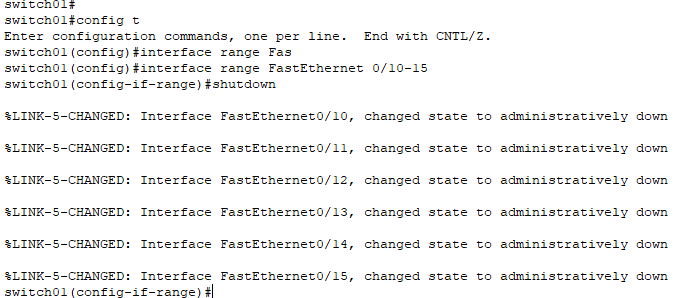
Figure 5. Blocking switch ports ranging from port# 10 to 15. Image used courtesy of the author

Figure 6. Enabling SSH protocol connection for 4 concurrent remote connections. Image used courtesy of the author
MAC Address Binding
The concept of MAC binding is that each port of the switch is bound with the hardware connection of one particular PC, HMI, server, or other device.
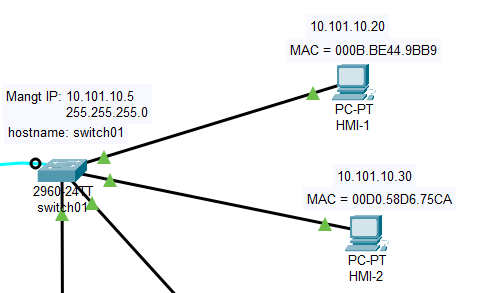
Figure 7. MAC addresses of devices are bound to switch ports. Image used courtesy of the author
Below, we will examine the steps to perform the binding of the MAC addresses of HMI-1 and HMI-2 to ports# 3 and 4 of the switch. The advantage is that the switch port will terminate the connections if new devices with different MAC addresses try to connect to these ports.
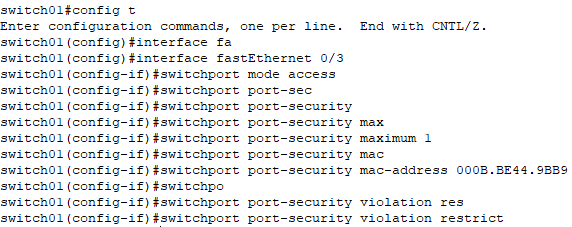
Figure 8. Binding MAC addresses to switch ports. Image used courtesy of the author
The “show mac-address-table” command will display the information related to static MAC binding.
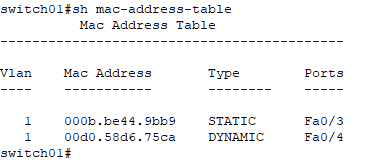
Figure 9. Information for MAC address binding in the current configuration. Image used courtesy of the author
Summary
The article highlights the encrypted remote connection of the OT nodes or field devices using the SSH protocol as a replacement for insecure protocols like Telnet. For smaller IT/OT networks in substations and plants, usernames/passwords for accessing the switches are stored locally instead of on an external server.
The article also examined how to disable unused ports and how to apply MAC address binding to allow authorized devices to connect to specific ports. Each of these hardening techniques will strengthen the overall resilience of important OT networks.