Facebook
 Google
 GitHub
 Linkedin
New to PLCs? Five Critical Features Every Beginner Should Know
Learn five essential features to consider when selecting a controller, from I/O and software licensing to networks and web access.
When you are first exploring PLCs, you may find an intimidating list of specs in a datasheet. Although every spec is important in certain situations, many features are fairly optional. You can get by with or without many of these. However, there are a few very important features that absolutely must be considered for project success. Here is a list of 5 of the most important.
Embedded or Modular I/O
Many PLC series include options with some digital and analog terminals built right into the CPU, so you only need to purchase one item up front. Various model numbers might include digital vs relay outputs, sinking vs sourcing inputs, or different analog options. Selecting the right one can be a major budget-saver.
Also, consider whether further modules can be added later. The built-in I/O might be enough for now, but can it support more modules for future expansion?
If considering a PLC with embedded I/O, be sure to verify that it is still programmed using your preferred software. Some smaller micro PLCs are great for simple projects, but are programmed with different software and may not allow much expansion later.
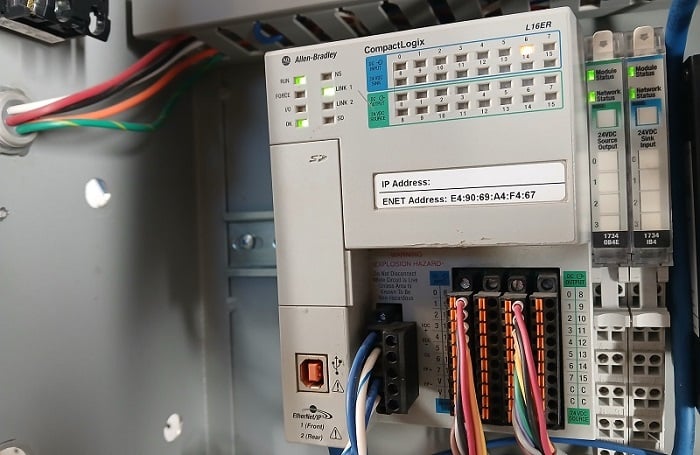
Figure 1. This PLC has both embedded I/O and two modules on the right side.
Software Licensing Process
The options for software are almost as varied as the number of PLCs on the market. Paid software is always available in multiple tiers, usually starting with a low-cost or free entry level with limited command sets or program size. There may also be a significant up-front cost difference between an annual subscription and a one-time permanent license. Many engineers prefer the permanent license, but they consider whether software upgrades are included. That might not be a problem in various projects.

Figure 2. Permanent licenses can be useful for longevity, but lack periodic updates.
Another method to consider is how the license is acquired. Some license keys are provided in a hard copy or a USB dongle, while others are supplied by a local distributor. Some one-time licenses are available digitally (such as an email) at the time of purchase.
There are many examples of highly capable software that have neither a license nor a purchasing cost. This can be extremely helpful for small projects or for personal learning, but they can’t really be used without first purchasing the PLC hardware.
Language Options
The IEC 61131 standard outlines three officially recognized PLC languages, and two others that were addressed in previous revisions of the standard, so they are still found in many installations. There are many opinions about which is better, but I am not interested in that debate. I have used all of the languages, and my preferences are simply based on what I find the most familiar. You will have a similar bias, but you must also consider who is likely to read the program later; will they be able to troubleshoot problems? If your software supports multiple languages, this may be a great way to learn a new one.
In North America, the most common languages are Ladder and Structured Text. In Europe, Function Block Diagrams are very common, whereas Ladder Diagrams are not as widespread. Structured text is also a common application.
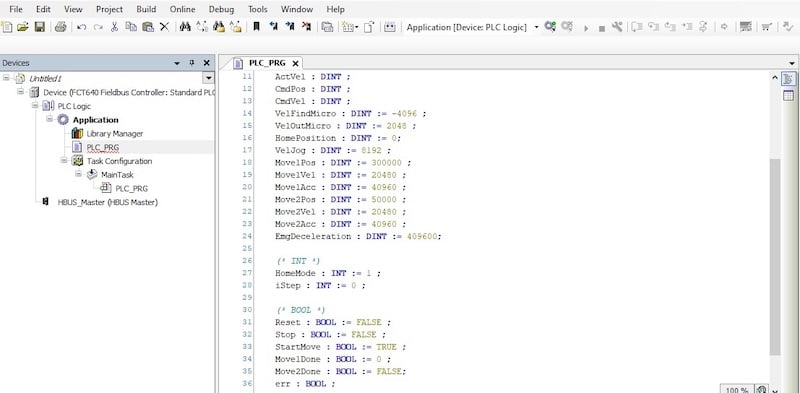
Figure 3. An example of a structured text CODESYS program.
Network Connections
It’s hard to find a modern PLC that doesn't have some form of network support. But this is a point of caution: the shape of the port does not always define that supported kinds of networks. The most familiar port is the 8-pin RJ45. This most likely supports Ethernet, PROFINET, or EtherCAT. In rare cases, a port is multi-protocol, meaning the protocol can be selected in the software.
You absolutely need to know your network before selecting the PLC. Will you require Ethernet support? Modbus TCP devices? EtherCAT motion? If you require two or more protocols, ensure the PLC supports add-on communication modules. I strongly recommend, do NOT purchase the PLC without carefully assessing your network needs. This will lead to significant extra costs for gateway adapters and headaches.
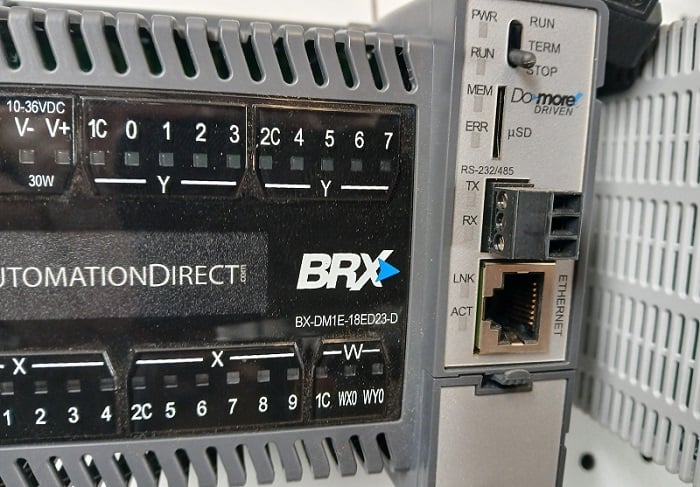
Figure 4. This PLC provides access to Ethernet and RS-232/485 networks.
Web Server Access
The web server feature isn’t necessarily a make-or-break feature for a PLC, but it may be a deciding factor when comparing two options.
Basically, a web server is a program stored on the PLC, not on your computer. But, just like regular programs, not all web servers are alike. Sometimes a web server allows some limited programming access. Sometimes, the web server allows configuring IP addresses and other system information. Sometimes, the web server is used to observe I/O states and alarms for troubleshooting.
The web server is accessed by connecting it to your computer via a network cable. Open your favorite web browser and enter the PLC's IP address.
If you see that a web server is featured on a PLC, be sure to find out what you can accomplish with it. You may be pleasantly surprised with what you can assess without extra HMI hardware.
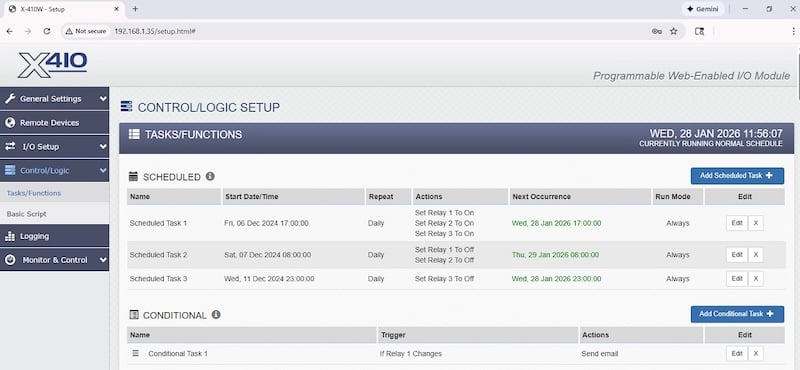
Figure 5. This web server allows some basic control logic programming.
Familiarity with PLCs
Once you work with a few PLC projects, these features will become quite obvious. Until then, don’t get overwhelmed with all of the details, and just focus on what’s important.
More than anything, don’t be afraid to try out new PLCs and languages whenever you have the chance. Every bit of variety will increase your skills.