
 Facebook
 Google
 GitHub
 Linkedin
PLC Programming Tips: Understanding Produced And Consumed Tags
Learn about produced and consumed tags in PLCs, their functions, setup, and important considerations for effective data sharing between controllers in a control system.
No matter how long you've been working with Programmable Logic Controllers (PLCs)—whether it’s just a year or two decades—there will come a time when you encounter something new or unfamiliar. You might remember learning different methods when you started with PLCs or just might be looking for an easier way to do something. One important concept to understand is how we assign names or "tags" to specific devices or addresses within a PLC system. There are various types of tags, and in this article, we'll focus on two particular kinds: produced and consumed tags. We’ll explain what these tags are, what they are used for, and how to set them up in a way that's easy to grasp.

Figure 1. Large industrial plants may use multiple control systems that require multiple controllers to communicate with each other. Image used courtesy of Adobe Stock
What are Produced and Consumed Tags?
Before we begin, imagine a scenario in which you have a complex control system that requires data distribution among multiple controllers. So, how is this accomplished? You might wonder why you should not simply use read/write commands for this task. While that’s certainly an option, produced and consumed tags offer a more efficient way to transfer data at regular periodic intervals (RPI) with minimal reliance on ladder logic. This approach simplifies the process by eliminating the need for specific events or complex logic to facilitate data sharing. So, let’s first take a moment to clearly define what produced and consumed tags are and how they function within a control system.
In the scenario stated above, you would have at least two or more controllers in your system communicating with each other, most likely through an ethernet network or the same chassis. So, for this data, one controller must broadcast (produce) the tag meant to be available for use by the other controllers. The other controllers must be able to simultaneously receive (consume) the data that has been produced. These tags can send and receive data without ladder logic and transfer data if the network connection to each PLC is valid. Note that this is not limited to only one PLC producing tags–in fact, every PLC in the system can be a producer and consumer–but for this to work properly, some considerations must be followed.
Special Considerations When Working With Produced and Consumed Tags
For two controllers to share produced or consumed tags, both must be in the same backplane or attached to the same control network, such as a ControlNet or EtherNet/IP. Although produced and consumed tags can be bridged over two networks, Rockwell Automation does not support this configuration. When working with produced and consumed tags in a control system, adhering to specific guidelines is important. These tags must be scoped to the controller and match in data types, including any user-defined attributes such as RPI.
Additionally, the size of standard produced and consumed tags must not exceed 500 bytes, and they can only be created while the controller is offline. To provide connection status information with a produced tag, users should define a custom data type that starts with a CONNECTION_STATUS type, followed by other relevant data members.
Requirements For Safety Tags
For those using GuardLogix PLCs, produced and consumed safety tags can be used, but stricter requirements apply. The size limit is reduced to 128 bytes, and connection status information is mandatory. Similar to standard tags, users must create a user-defined data type that begins with a CONNECTION_STATUS type, accompanied by additional data. Notably, the “Class” field must be designated as “Safety,” and safety tags can only be modified when not in a secured safety state. Furthermore, Compact GuardLogix 5380 and GuardLogix 5580 Safety controllers can only produce safety tags via unicast, while they can consume safety tags through either unicast or multicast.
Setting Up Produced and Consumed Tags
To properly configure produced and consumed tags, ensure that all relevant data is consistent across PLCs. I assume you have already established a network connection, so we can proceed with setting up the producer tag. Note, for a producer tag, you will want to create this offline and in the ladder logic of the PLC that will be producing the tag. In RSLogix 5000, right-click on the controller tags and select "New Tag." This will allow you to create a new tag where you can specify the tag name and add a description. Note that the tag's name is case-sensitive and must be used exactly as typed in a later step. Select "Produced" from the “Type” dropdown menu.
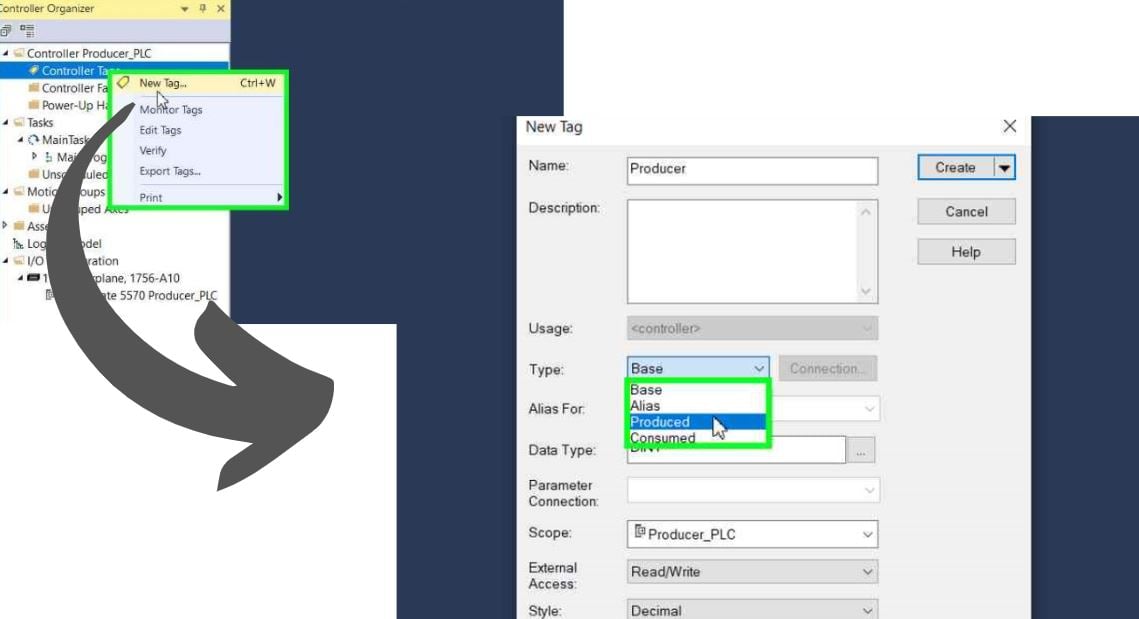
Figure 2. Steps for setting up a produced tag to distribute to other PLCs. Image used courtesy of the author.
Upon selecting the "produced" option, the connection dialog will become active. Click on the connection button, which will prompt the display of a new menu. This menu will allow you to set up the maximum number of "consumers" granted access to this tag. After selecting the appropriate number of consumers, please press "OK" to finalize the creation of your tag. After creating the tag, be sure to download it to your PLC.
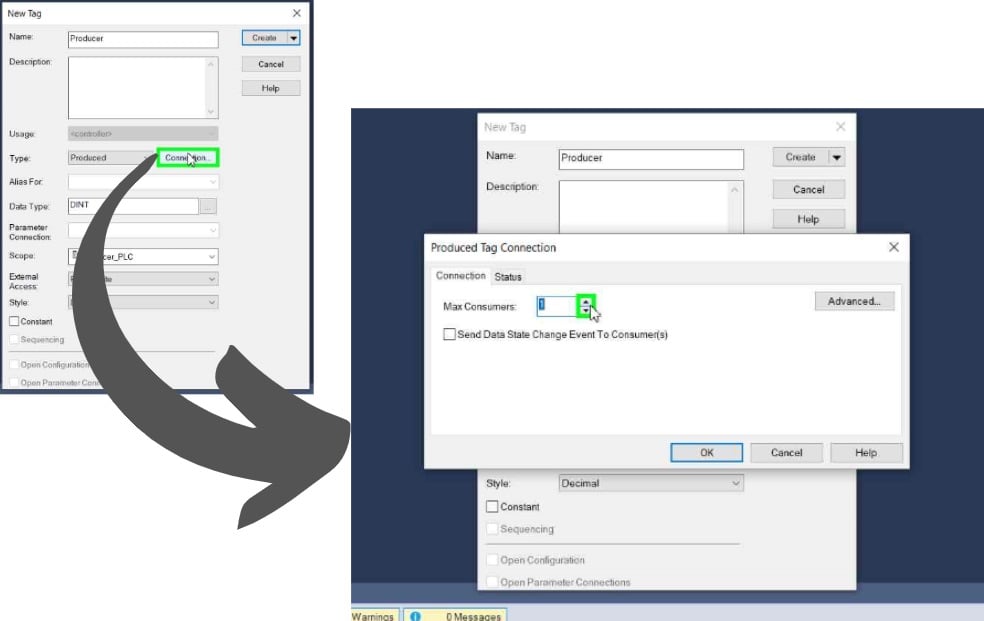
Figure 3. Setting up the maximum number of consumers for a produced tag. Image used courtesy of the author.
To establish a consumed tag, it is essential to ensure that all steps are executed while the PLC is offline. Begin by creating a new controller tag. After assigning a name to the tag, select "consumed" from the type drop-down menu. Subsequently, click the connection button, which will prompt the appearance of a new menu.
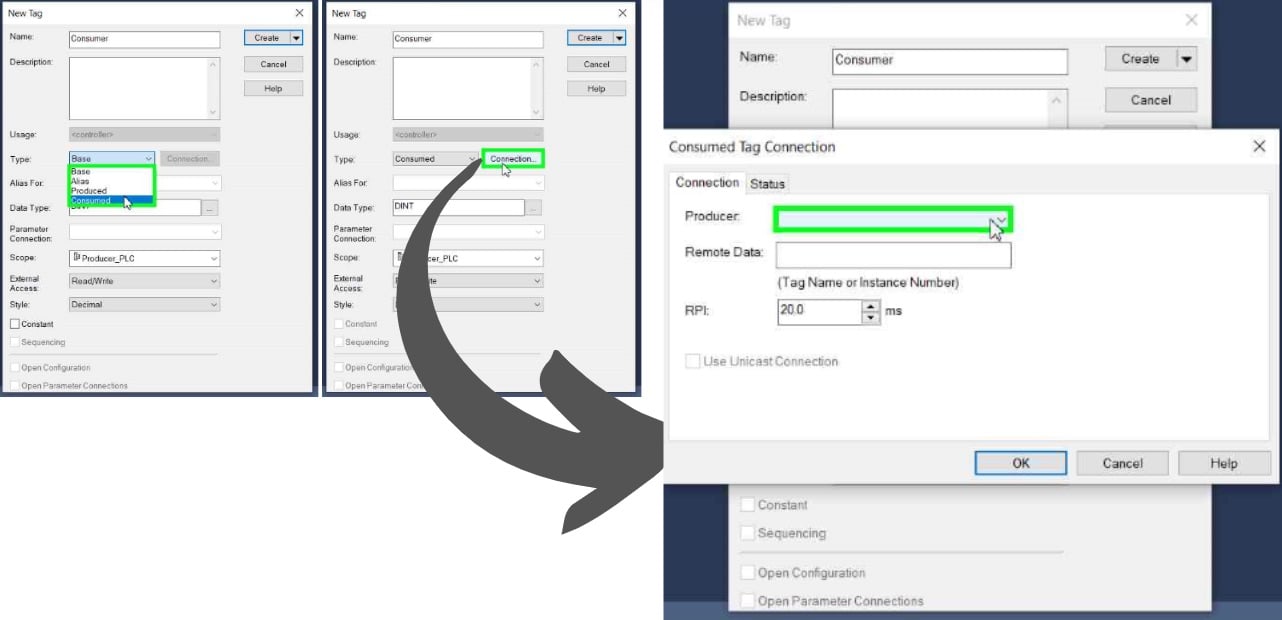
Figure 4. Setting up a consumed tag. Image used courtesy of the author.
You will notice a few more options available for selection in this menu. In the "producer drop-down menu," choose the PLC that will supply the produced tag created earlier. For the remote name, make sure to copy the produced tag name exactly as it was typed when creating the tag. The final step is to select your RPI (Requested Packet Interval) value. This setting determines the frequency at which the data packet will be transferred, allowing you to receive specific data. Once you have completed these steps, press OK to finish creating your consumed tag and download it to your PLC.
When considering data transfer between PLCs, utilizing produced and consumed tags presents a highly efficient method for inter-PLC communication over the same network, eliminating the need for supplementary logic. However, ensuring that the produced and consumed tags are configured accurately is critical, as any discrepancies in the required data parameters can lead to transfer failures. Proper alignment of tag definitions and configurations is essential for successfully communicating your produced and consumed tags.
Related Content









Informative article