Facebook
 Google
 GitHub
 Linkedin
Questions for the Experts: Industrial Firewalls
I had some questions about firewalls for industrial networks, topics like selecting, configuring, and updating the software, so I turned to some experts for a little advice.
For many control engineers (myself included), the topic of security in networking can be difficult to understand. Many resources are written for home or office users, and the situations are so widely varied that you can’t settle on simple, guaranteed answers to questions.
For today’s inquiry, I was curious about the presence of firewalls in automation equipment. This led me to seek explanations from a team that always provides excellent input about the computing world: OnLogic. I posed my questions, and they provided me with some great answers.
Overview of Firewalls
Before we dive into the questions, a brief explanation of firewalls might be helpful, especially if this is a brand-new topic for you.
Essentially, a firewall is a piece of software that examines all traffic attached to a network (like your wifi or Ethernet connection) to choose which messages to allow and which to block. Various firewall setups can lead to ultra-secure networks where virtually no traffic is authorized, but, of course, it is very hard to access devices for programming. On the other extreme, a simple, unsecured network might be simple to troubleshoot with any laptop, but this can lead to massive cybersecurity risks.
You can generally trust the devices on your network, but you really shouldn’t trust a single thing out in the world (wide web) unless it can be verified.
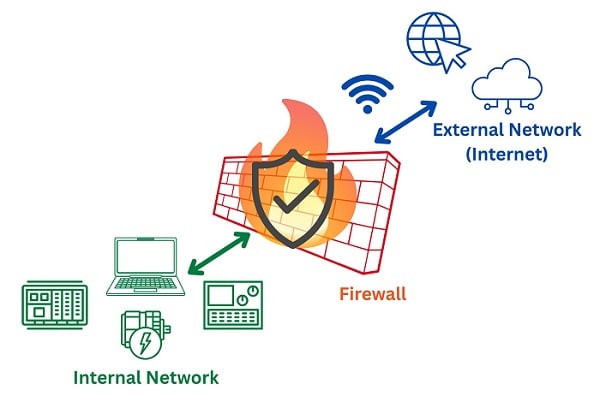
Figure 1. The basic concept of a firewall.
But there are many more questions: how do firewalls work, how are they configured, and where are they stored? For these answers and more, I turned to my friends at OnLogic for the following input.
1) Is there a difference between firewalls for industrial vs. home/office networks?
A TCP/IP or other network packet is the same format, regardless of its environment. However, each environment certainly has its own needs.
A home network often requires nothing more than the firewall bundled into a cable/DSL/fiber router, which usually has default rules that roughly translate to something like, “let my phone on my home wifi connect to the internet and receive reply and related traffic, but don’t let strangers on the internet initiate connections to my smart TV.”
Meanwhile, a small to medium-sized office may have a single firewall device that blocks unexpected traffic, while still allowing employees to connect to file servers, printers, and other company services.
A global company with multiple offices, production sites, and data center facilities may have much more advanced segmentation and inter-site VPNs and host both public and private websites. For those needs, multiple firewalls must be configured to discard unwanted traffic, but still allow all necessary interactions to occur. This is done while simultaneously logging network events from intrusion detection systems for audits and analysis, and other advanced functionalities. The firewall option chosen by each of these examples might (and likely should) be quite different.
2) Exactly how do firewalls prevent access to a network?
At its most basic, a firewall is a device or software application that limits the flow of network traffic. The way the filtering is achieved depends on the type of firewall.
A traditional network firewall inspects individual packets' source and destination IP addresses as well as TCP or UDP port numbers, then consults a pre-defined configuration to determine if the traffic should be allowed.
A more sophisticated stateful firewall, rather than considering each packet in isolation, considers packets within the context of the network conversation, reading packets before and after it to determine if the traffic is expected and acceptable.
An even more sophisticated firewall might actually inspect the application layer logic in the packets themselves. An example would be a web application firewall, often called a WAF, which inspects HTTP traffic for known exploit patterns or unexpected data in the request body itself. This type of firewall can be very powerful and effective at providing protection in a situation where filtering by IP address or port alone isn’t sufficient to both allow the necessary access while mitigating risk to an acceptable level.
A similar but slightly different technology would be an intrusion detection system or intrusion prevention system, typically abbreviated IDS/IPS. Similar to a firewall, an IDS/IPS inspects network traffic, system logs, and other available data. The IDS/IPS employs various heuristics, or ‘learning’ algorithms, to determine if the traffic is potentially threatening and can then either alert a security team or take direct action itself (that’s the distinction between detection and prevention). Rather than having a rigid set of rules regarding what is allowed and blocked, IDS/IPS typically rely on continuously updated policies. Just like updating an antivirus, an IDS/IPS ruleset should be updated regularly to stay ahead of active threat patterns.
3) Are they bi-directional, as in, do they prevent unauthorized traffic both in and out of the network?
Yes! Firewalls can be configured to inspect ingress traffic, egress traffic, or both. While traditionally one thinks of firewalls as preventing access to a network or device, within the modern threat landscape, egress filtering can be just as critical, if not more so.
Devices on industrial networks tend to have much more rigidly defined netflows than on multipurpose user networks. In this case, security can be significantly improved by implementing strict egress firewalling. Consider a device that is compromised, such as by a supply chain attack, which has injected malware into an update. If the device is on a network with strict egress filtering, it may be unable to contact its command and control server, significantly reducing the chance that it can be leveraged to chain into a larger compromise before being discovered and remediated.
4) Where does the firewall 'live'; would it be in a controller, switch, gateway, or IPC?
Some industrial controllers (PLCs, for example) may be beginning to incorporate security features, but most currently do not have such firewalling and filtering functionality built-in, instead prioritizing safety and performance.
A network switch may have some firewall functionality, or “access control lists,” depending on the switch and its OSI (or Open Systems Interconnection model) capabilities. A device operating as a gateway or router would often have firewalling functionality, or even act as the primary firewall itself.
Simpler control system architectures may have an isolated network shared between different functions, and this doesn’t need an internal network firewall at all. But more often, when such a segmented network is connected to anything else, that’s when a firewall would likely enter the equation. That being said, some more complex control system architectures include firewalls between the separate functions, for example between operator interfaces and controllers, to protect against some forms of operator mistakes or interface misuse. They might also exist simply to protect the controller network interfaces from having to interact with unexpected network packets at all, keeping their performance focused on their intended tasks.
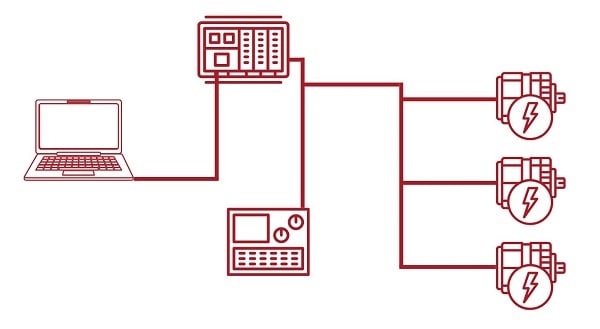
Figure 2. An isolated network like this example might not need an internal firewall, except to prevent excess traffic between devices; an efficieny issue, not for security.
In circumstances where an industrial network segment is physically connected to another network, like employee emails or other services, or to another segment of the architecture, the gateway between those networks would often be a firewall or a router performing firewall functions.
5) Are firewalls pieces of software that are downloaded and installed, as in, can the end user of a controller choose certain firewall software, or is it installed by the manufacturer?
Firewalls come in many flavors, from end-user software to operating system-level software, to industrial computing devices specifically designed for optimized network packet inspection.
A personal computer running Microsoft Windows has a built-in software firewall, and a corporate network may be using a device from Cisco, Palo Alto, Fortinet, etc. to protect company environments. Open source package collections can also be popular for firewalling simple to complex network environments.
In industrial environments, many options are available. For example, a network that contains PLCs and HMIs could be physically segmented entirely, where other computing devices, even if physically located nearby, would be unable to send any traffic to the automation devices without physically plugging in another cable, access to which is often behind lock and key. That same environment could be connected to a network firewall device with deny by default rules, with a few allow rules for certain privileged devices to adjust configuration to the automation controllers, be it locally or remotely over a VPN.
6) How much control does the end user have over settings, and do they need to be updated over time?
While many firewall options will attempt to be as user-friendly as possible and keep things behind a simple user interface, others offer full control over network packet inspection, allowing focus as narrow as specific bits in a network packet being 0s or 1s.
Typically, up to advanced network complexities, a firewall with options for stateful inspection of source/destination IP, and source/destination TCP or UDP ports can be sufficient.
In environments where equipment and topology rarely change, modifications to firewall rules can also go unchanged for long periods of time. There could be times when new equipment is introduced, or a new engineer brought on board, for example, that may require minor changes to a firewall configuration to ensure necessary access. Other environments can change more rapidly, with new services commonly being introduced, staff changes occurring, or sites being opened, requiring more frequent adjustments.
Even if changes are infrequent, regular audits of firewall configurations are recommended to ensure there are no accidental allowances granted that could result in a mistake, or worse, a vulnerability that could be exploited in an attack.
Firewalls in Industrial Networks
This article is only a brief overview of some of the questions surrounding firewalls and security. I hope that this serves as a firm foundation for building more skills in secure networking principles in the future.
All images used courtesy of the author
Related Content