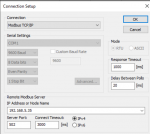
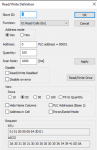
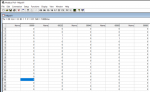
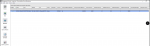
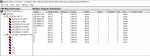
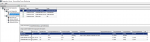
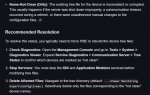
I have an issue with my relay ABB REX640, I would like to add this device to the Power monitoring expert software but it's not communicating. I tried the modbus poll and it has communication. Any idea on what is causing the issue?
Does the software show a reason it's not communicating, such as an error message or error code?
Please also post the settings you've configured in Modbus Poll to establish successful communications and the current settings you are trying to use in Schneider Power Monitoring Expert.
Does the software show a reason it's not communicating, such as an error message or error code?
Please also post the settings you've configured in Modbus Poll to establish successful communications and the current settings you are trying to use in Schneider Power Monitoring Expert.
In the StruxureWare Management Console, click on the Tools menu and select System > Diagnostics Viewer to find more information about why the status is marked as "Failure".
In the StruxureWare Management Console, click on the Tools menu and select System > Diagnostics Viewer to find more information about why the status is marked as "Failure".
None under the "Communication Diagnostics". There's a great possibility that REX640 is not yet ready for modbus communication. But I don't know how to confirm this.
blocked – The Log Inserter requires configuration information but all available resources are in use. By default, the Log Inserter can simultaneously request only up to 2 trees per site and 6 trees in total. The Request Update Time value indicates how long the request has been pending.
Additionally, the Comments column shows "Tree in use by GROUP1.REX640-not-clean". This is another hint as to the underlying issue. From the same document as above:
If the client's name ends with -not-clean, the node is currently being evaluated by Treemon/Validator.
So perhaps there is an issue with your device tree file or perhaps changes to the device tree file were made that have not yet been synchronized with the StruxureWare Management Console. Here's what Google AI spits out regarding this:
To resolve this status and synchronize the device configuration, you generally need to perform a retrieve or verify configuration action within the Management Console.
Resolution Steps (General)
Specific steps may vary slightly depending on whether you are using StruxureWare Data Center Expert or Power Monitoring Expert, but the general process involves retrieving the current configuration from the device:
Navigate to the device in the device tree within the Monitoring perspective of the StruxureWare client.
Right-click on the device that shows the "-not-clean" status.
Select an option such as "Retrieve Device Settings" or "Verify Configuration" from the context menu. This action prompts the software to communicate with the physical device and download its current configuration parameters.
Monitor the status in the configuration status pane or log. The status should change to "Complete" or "Verified" after the process is finished, and the "-not-clean" flag should be removed.
Additionally, the Comments column shows "Tree in use by GROUP1.REX640-not-clean". This is another hint as to the underlying issue. From the same document as above:
So perhaps there is an issue with your device tree file or perhaps changes to the device tree file were made that have not yet been synchronized with the StruxureWare Management Console. Here's what Google AI spits out regarding this:
Additionally, the Comments column shows "Tree in use by GROUP1.REX640-not-clean". This is another hint as to the underlying issue. From the same document as above:
So perhaps there is an issue with your device tree file or perhaps changes to the device tree file were made that have not yet been synchronized with the StruxureWare Management Console. Here's what Google AI spits out regarding this:
After deleting the old files and again creating a new modbus device, I got a different error message. Different from "tree not clean"
Possibly there are missing steps in my procedure or settings that needs to be configured.
As I said I'm not familiar with the Schneider software, but to me it seems you may be reading data from the REX640 by reading coils (function code 0x01) in Modbus Poll, but in the Schneider software it seems you may be attempting to read data by reading registers (e.g. Holding Registers using function code 0x03) and looking at specific bits in those registers. This is not the same thing.
As I said I'm not familiar with the Schneider software, but to me it seems you may be reading data from the REX640 by reading coils (function code 0x01) in Modbus Poll, but in the Schneider software it seems you may be attempting to read data by reading registers (e.g. Holding Registers using function code 0x03) and looking at specific bits in those registers. This is not the same thing.
If your ABB REX640 works in Modbus Poll but not in PME, the problem is likely configuration, not hardware. First, check that the baud rate, parity, stop bits, and node address match exactly. PME needs the correct driver or device template to read registers. Sometimes, a custom Modbus device is required in PME. Also, confirm that PME supports the function codes your relay uses. Timeout or polling settings can also block communication. Firmware versions may affect compatibility. For practical reference, you can study PCB projects like this Modbus to MQTT board. It shows how Modbus devices communicate with monitoring systems. Use it to understand register mapping and polling. Start by testing simple registers first. Adjust PME settings gradually. Logs in PME often show useful error details. This approach usually solves Modbus integration issues efficiently.
If your ABB REX640 works in Modbus Poll but not in PME, the problem is likely configuration, not hardware. First, check that the baud rate, parity, stop bits, and node address match exactly. PME needs the correct driver or device template to read registers. Sometimes, a custom Modbus device is required in PME. Also, confirm that PME supports the function codes your relay uses. Timeout or polling settings can also block communication. Firmware versions may affect compatibility. For practical reference, you can study PCB projects like this Modbus to MQTT board. It shows how Modbus devices communicate with monitoring systems. Use it to understand register mapping and polling. Start by testing simple registers first. Adjust PME settings gradually. Logs in PME often show useful error details. This approach usually solves Modbus integration issues efficiently.

 Facebook
 Google
 GitHub
 Linkedin