Facebook
 Google
 GitHub
 Linkedin
Understanding the Industrial Network Protocol CC-Link
This article will explore CC-Link and how it is used in industrial automation. Learn its history, uses, and how to implement it in control systems.
In industrial automation, network protocols like Ethernet/IP, Modbus TCP, and PROFINET often dominate the conversation. But if you’ve ever worked with Mitsubishi PLCs or automation systems in East Asia, you’ve likely encountered a less-discussed but equally powerful protocol: CC-Link.
This article will provide a basic understanding of CC-Link, where it's used, how it works, and how to implement it. Whether you’re a control engineer brushing up or just getting started, this is a solid jumping-off point.

Figure 1. CC-Link, developed by Mitsubishi Electric, was designed for fast and reliable communication between PLCs and remote devices. Image used courtesy of CC-Link.org
A Brief History of CC-Link
CC-Link, short for Control & Communication Link, was developed by Mitsubishi Electric in the late 1990s. Initially created to provide fast and reliable communication between PLCs and remote I/O devices, CC-Link quickly gained traction in Japanese and Asian manufacturing.
To expand its adoption globally, Mitsubishi helped form the CC-Link Partner Association (CLPA), which is a non-profit organization that now oversees the protocol. Today, CC-Link is supported by hundreds of vendors, and its newer variants are capable of gigabit Ethernet speeds.
Primary CC-Link Applications
CC-Link is primarily used in factory automation environments, with strong representation in industries like automotive manufacturing, electronics and semiconductor fabrication, food and beverage packaging, and machine tooling and CNC systems.
You'll often see it in Mitsubishi-heavy environments, and it operates mainly at the field device level and controller level, handling communication between PLCs, remote I/O modules, HMIs, drives, and sensors. While CC-Link is less common as a plant-wide backbone than Ethernet/IP or Profinet, newer variants like CC-Link IE are pushing into that territory.
Communication Types and Physical Layers
CC-Link comes in several variants, each with its physical medium, data rate, and typical use cases. These variations offer flexibility depending on the size and complexity of the automation system.
CC-Link (Classic) is the original version of the protocol, using a shielded twisted-pair cable with the same specifications as for RS-485 networks. It supports a daisy-chain topology and offers communication speeds of up to 10 Mbps. A single network can accommodate up to 64 stations, making it well-suited for high-speed I/O and device-level control in relatively compact systems.
CC-Link IE (Industrial Ethernet) brings the protocol into the world of Ethernet, using standard Cat5e or Cat6 cables and achieving communication speeds of up to 1 Gbps. It comes in several variants: CC-Link IE Control is designed for controller-level networks, enabling fast communication between PLCs and controllers; CC-Link IE Field targets field device networks, connecting remote I/O, drives, and sensors; and CC-Link IE Field Basic offers a software-based version that can run on general-purpose Ethernet hardware, trading some real-time performance for the benefit of easier integration.
CC-Link/LT is a further simplified version aimed at reducing wiring complexity in smaller applications. It uses a dedicated 3-wire communication cable and supports communication speeds up to 156 Kbps. Like the Classic CC-Link, it uses a daisy-chain topology but is designed for compact, low-cost systems where fewer devices and simpler configurations are required. While not as widely adopted as other variants, it offers a lightweight option for small machines or modular systems.
Implementing CC-Link in a Control System
To implement a CC-Link network in a control system, you'll first need a CC-Link master module. These typically reside inside a Mitsubishi PLC, such as the Q-Series or iQ-R, but they might also be a third-party gateway, such as the Local & Intelligent Station Gateway 5209-DFNT-CCLINK by HMS Networks, an Ethernet/IP to CC-Link specifically designed for Allen Bradley PLCs.
The master device controls communication on the network and manages data exchange with compatible slave devices, which can include I/O modules, drives, sensors, and HMIs. These devices must support the specific variant of CC-Link being used, whether it's the classic RS-485 version or one of the CC-Link IE Ethernet-based options.
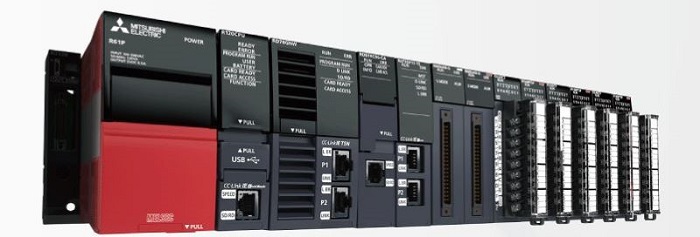
Figure 2. The MELSEC iQ-R series from Mitsubishi can act as a CC-Link Master Module. Image used courtesy of Mitsubishi
For the classic CC-Link network, the setup involves a daisy-chain topology using shielded twisted-pair cabling. Devices are addressed by setting station numbers, often via DIP switches on the hardware. Terminating resistors are required at each end of the network to prevent signal reflection, and the total cable length and the number of devices are constrained by the data rate and network rules. Configuration is typically done using Mitsubishi’s GX Works software, which allows engineers to define station parameters, monitor communication status, and diagnose issues.
In contrast, CC-Link IE variants—such as IE Field or IE Control—use standard Ethernet cabling (Cat5e or Cat6) and can support much higher communication speeds, up to 1 Gbps. While the physical layer is Ethernet, these networks still maintain deterministic timing, often requiring specialized switches or hardware to maintain performance. Addressing and network configuration are handled via software tools provided by CLPA or integrated into Mitsubishi’s programming environments. Some versions, like CC-Link IE Field Basic, are designed for flexibility and allow implementation on general-purpose Ethernet ports without additional hardware, albeit with a trade-off in determinism and speed.
Whether using the classic or Ethernet-based versions, CC-Link implementation requires a careful understanding of topology, addressing, and hardware compatibility. However, once configured, it provides a stable and high-performance backbone for industrial automation tasks.
Interfacing with Other Networks
What about a typical industry example, when you have many devices on Ethernet/IP or Modbus, but you’re also using CC-Link?
That’s where network gateways come in. Vendors like HMS (Anybus), Moxa, and ProSoft offer hardware to bridge CC-Link with other protocols. Additionally, the CLPA promotes the use of CSP+ files, which are device profiles that make configuration easier, similar to GSD (for PROFINET) or EDS (Ethernet/IP) files.
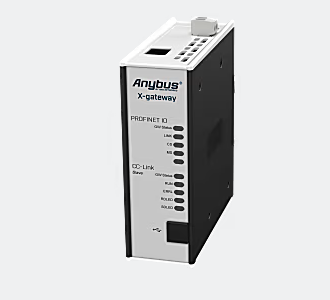
Figure 3. Shown above is the Anybux X-gateway that can be used as a slave for interfacing from a CC-Link to a PROFINET-IO control system. Image used courtesy of HMS Networks
At the moment, CC-Link isn't the typical user's first choice for communication protocols, but in the right applications, CC-Link can provide a good choice for machine builders or automation applications. With the introduction of CC-Link IE and IE Field Basic, it’s evolving to fit into more modern, Ethernet-based systems while still keeping the signature Mitsubishi tight integration. If you're working in automation, understanding CC-Link can provide a serious advantage for a low-cost system.
Related Content