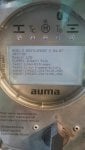
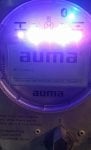
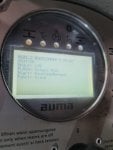
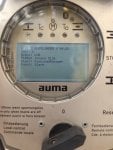
Auma Actuators AC 01.2 which are failing to bootup with WD-Timeout error

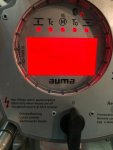
I have two AUMA Actuator AC 01.2 which are failing to bootup. The one I have already attempted the firmware update without solving the problem.
On the display I keep getting a WD-timeout error when power cycle off and on which I cannot locate in any of the manual available.

Image 1 and 2 is from actuator that got a firmware updated.

Have anyone maybe experience similar challenges and how did was it resolved.

GK
 

Attachments

same problem
I ended up managing to resolve the problem in my case. The initial cause in my case was that both actuators were on the same 3 phase ac power and I found that one of the phase was disconnected. When it was restored the one actuator started working normally.

The 2nd actuator which also had a firmware update as part of the remedy attempts started giving additional faults but after additional faultfinding, I discovered there were not physical defects and a process of elimination pointed to the only change which was the firmware and since the initial update was done with only two of the ac phases healthy, I resolved to reattempt the update after which all faults got cleared. It appears with the one phase missing the 1st firmware update did not download successfully.

Hope the above helps.

GK
 
We are also facing issues with our Auma valves here at site. The display won't boot (same as image1 of this thread). All valves are already working for months. Everytime we have a power interruption and after restoring power, 1 (or 2) Auma valve(s) will get stuck in the bootloader sequence. I cannot upgrade the firmware because it has not fully booted up yet. It can recognize the SD card but still, stuck in that sequence. The 3-phase supply is ok (as opposed to what Germanus discovered). The only way to fix it, is to change the display (which is the CPU). But is there a better way to check why it get stuck in the bootup sequence?
 
We are also facing issues with our Auma valves here at site. The display won't boot (same as image1 of this thread). All valves are already working for months. Everytime we have a power interruption and after restoring power, 1 (or 2) Auma valve(s) will get stuck in the bootloader sequence. I cannot upgrade the firmware because it has not fully booted up yet. It can recognize the SD card but still, stuck in that sequence. The 3-phase supply is ok (as opposed to what Germanus discovered). The only way to fix it, is to change the display (which is the CPU). But is there a better way to check why it get stuck in the bootup sequence?
Hi Superbullet, we have 8 of the same Auma valves. When I was experiencing the fail booting, I was fortunate enough to have working valves to do several test. I tried the display swap too but it didnt solve problem. I also tried to swap each of the PCB cards accessible by removing the display face and they didnt work either. The other options I was considering which I didnt try were the COMs module and the power supply cards. So if the CPU swap doesnt work maybe you can try those, my rational being maybe the DC supply board was slowing giving in since our valves are quite old.

Good luck
 
Thanks for the ideas Germanus. But my issue is similar to pknayak82. Your screenshot reveals that the LCB seems to boot some files but hung in the process. Mine does not show any files but rather hung just after I switch on the power (immediate). It does not show the AUMA logo at all. Swapping the LCB works fine as we also have a working valves that I could use. All our valves are fieldbus. If there is somehow a way to reformat the program (just like Windows when it hangs) so we won't have all of these useless LCBs that we have to replace and store in the cabinet with the label "defective". Auma does not answer our queries so we have to buy all the LCBs plus some spares if another valve becomes defective in the future. This is not the only issue we are facing with the Auma MOVs. There is comm lost, phase fault, MWG fault, etc. All of these, we managed to fix by ourselves. So I might be able to give an idea with other guys here how to fix them if they face similar issues.
 
Thanks for the ideas Germanus. But my issue is similar to pknayak82. Your screenshot reveals that the LCB seems to boot some files but hung in the process. Mine does not show any files but rather hung just after I switch on the power (immediate). It does not show the AUMA logo at all. Swapping the LCB works fine as we also have a working valves that I could use. All our valves are fieldbus. If there is somehow a way to reformat the program (just like Windows when it hangs) so we won't have all of these useless LCBs that we have to replace and store in the cabinet with the label "defective". Auma does not answer our queries so we have to buy all the LCBs plus some spares if another valve becomes defective in the future. This is not the only issue we are facing with the Auma MOVs. There is comm lost, phase fault, MWG fault, etc. All of these, we managed to fix by ourselves. So I might be able to give an idea with other guys here how to fix them if they face similar issues.
Hi did you solve the issue..if it's solved pls let me know how to do
 
Hi did you solve the issue..if it's solved pls let me know how to do
We were able to get a firmware update from Auma. You need to send the serial number of the MOV that is failing then you can download the files and put it in your flash drive. The problem why it did not work the first time was because the files that I originally had was not really for a firmware update. So, even if it does not boot, it will actually get the update from the flash drive once you insert it (need a reboot to be able to detect).
 
Como actualizo el Fimware de esas compuerta AUMA, si la pantalla se queda estatica con ese anuncio
If you have the flash card, open the LCD display and at the back of it, there is a memory card slot. While power to the MOV is off, insert the card to the slot. Power up the MOV. While booting up, it will get the update from the flash card. It will reboot a couple of times to complete the update.
 
If you have the flash card, open the LCD display and at the back of it, there is a memory card slot. While power to the MOV is off, insert the card to the slot. Power up the MOV. While booting up, it will get the update from the flash card. It will reboot a couple of times to complete the update.
hello my friend do you have any firmware update file for AUMA AC 01.2 type ? if everybody have it please share or send it to me, my Email Address is: [email protected]
thanks
 
Hi all
We gave this isdue with Auma controllers
Profibus DP
Already replaced new one but error with UNDEFINED IN DISPLAY
HOW TO SOLVE THIS ISSUE.
In past when face problem with controller only replaced by new one and already working fine, but now not .
 

Attachments

Auma works in hot and cold environment except if the pipe where you installed it vibrates too much. If it does, Auma has an option to install the electronics in a separate enclosure, away from vibrating medium. Engineers should assess the project before ordering.
 
In humidit enviorment Auma not work good.
Many times found scaling and water inside the connections and electronics cards ,While its sealed good.
Auma visited the site and they suprise why this issue happen.
 
Top