Facebook
 Google
 GitHub
 Linkedin
Math Operations Using the OpenPLC Platform
This article will illustrate the setup and use of OpenPLC variables and math instructions within a ladder diagram program on a microcontroller or single-board computer platform.
OpenPLC enables the computation of data for many open-source PLCs. Like traditional PLCs, the OpenPLC software provides a library of math instructions to assist with industrial automation computing tasks. These math computations are used for tasks such as scaling, unit conversions, and production count management.
Math-based actions can easily be implemented using the IEC 61131-3 programming languages like Instruction List (IL), and Structured Text (ST) due to their text-style/English format. The Ladder Diagram (LD) programming language will be used to illustrate the math operations using the OpenPLC software, as it is commonly used in building complex logic operations for industrial controls for machines.
Overview of OpenPLC Math Instructions
Math instruction for arithmetic operations is performed on variable data using the OpenPLC software. A discussion on variables can be found in a previous OpenPLC article.
The primary math instructions included with the OpenPLC include addition (ADD), subtraction (SUB), multiplication (MUL), and division (DIV). The OpenPLC software can perform advanced math operations like exponents (EXPT) and modulus (MOD).
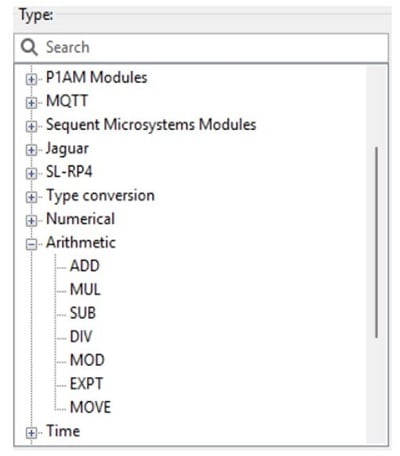
Figure 1. OpenPLC math instructions are found in the Library on the right side panel.
Data Types
All math instructions can make use of any numeric data type. The most common for math equations are integers (16-bit INT and 32-bit DINT length) or floating point numbers (REAL).
The data type values are created during the Tag Listing activity during the LD build process. All data type values can be changed within the Tag listing, provided they are not coming from physical inputs.
One common PLC challenge has been prevented in the OpenPLC environment. Although any math command can make use of any numerical data type, it does not allow mixed types. This means that you cannot add a REAL to a DINT, and you cannot perform an operation with INT inputs sent to a REAL output.
This is a beneficial approach because it reduces intermittent errors that can occur with mixed types. Using a REAL input for a DIV command, for example, may lead to whole-number answers some of the time, but a fractional answer at other times. Certainly, rounding errors may still happen with integer math, but forcing consistent data types across operations ensures that any such errors are predictable.
Addition (ADD) FB
The most basic math operation is addition, facilitated by the ADD function block. The ADD command may use multiple input values (usually an analog input or a number stored in memory) and provide exactly one numerical solution. The ADD FB can be used to activate a physical output device like an alarm or pilot alerting the user that a final answer has been computed.
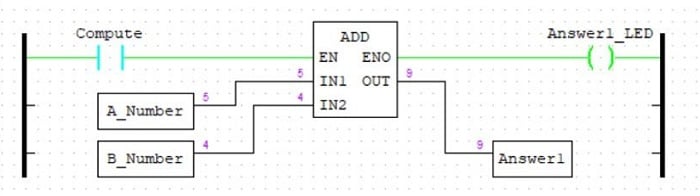
Figure 2. ADD LD Program.
In this ladder diagram, the Compute button will initiate the arithmetic operation into the EN input. Additional inputs can be included when selecting the ADD command. Lastly, the Enable Out (ENO) digital output will turn on the Answer1_LED indicator.
Subtraction (SUB) FB
The math operation of subtraction is essentially the same as a negative addition, but this subtraction is implemented using a SUB function block. Upon closing the Compute button contacts, the two variable data types are subtracted from each other.
In these examples, values have been simulated from the Tag Listing and are shown in purple text. In this example, 5-4=1, a simple example equation. Further, the Enable Out (ENO) pin will turn on the Answer2_LED indicator.
Subtraction calculations can be used to determine error within a PLC pressure monitoring application. The error can be determined by using the SUB FB, given the psi set point and the actual measurement from the designated sensor.
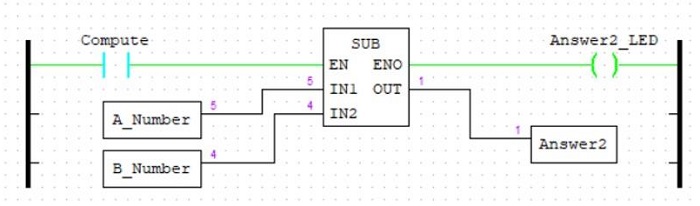
Figure 3. SUB LD Program.
Multiplication (MUL) FB
Multiplication is a series of addition operations, and the MUL FB will perform this operation on two or more variable data types or numbers. The activation operation is the same as the ADD and SUB, an activation of the EN input.
This example will multiply the A_Number by the B_Number (50x144), producing the answer of 7200. This arithmetic instruction may be used for scaling temperature sensor data within a paint process control application, where a calculated temperature value is determined by multiplying the measured analog digital converter (ADC) value by the scale factor.
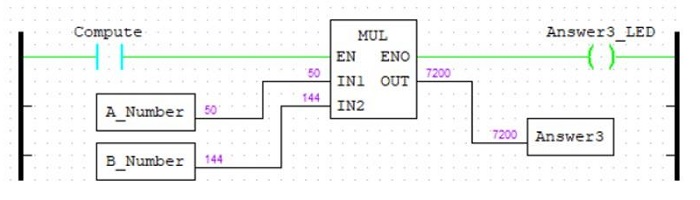
Figure 4. MUL LD Program.
Division (DIV) FB
Division is another math operation limited to two input values. Care must be taken to avoid dividing by zero, as this produces an invalid mathematical result. If 0 is entered into the tag value for IN2, the program will fail to execute. In this example, performing the division operation of 7200/144, the resultant answer is 50.
For integer-based numbers (INT and DINT), there are likely to be errors if the answer is not a whole number. When the division operation is performed, any remainder is cut from the whole number (truncated). Even if an answer happens to result in, say 8.99, the integer answer is only 8. This problem can be solved by using REAL data types, but note that the input values must be converted to REAL types as well.
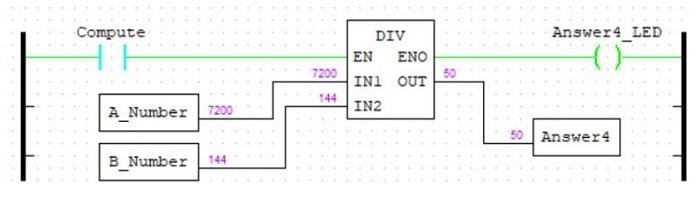
Figure 5. DIV LD Program.
Modulus (MOV) FB
A modulus command returns the remainder after a division operation. This is commonly used in manufacturing environments to toggle an output by dividing by 2, and the remainder will always be either 0 or 1. The construction of the MOD LD program is illustrated in Figure 6.
Like the DIV FB, the modulus instruction is restricted to 2 variable numbers. The first IN1 is the dividend (number to be divided), the second IN2 is the divisor, and the OUT is the remainder after the whole-number quotient.
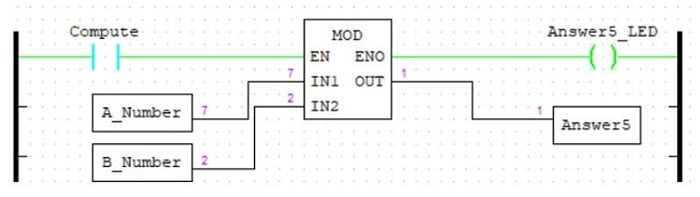
Figure 6. MOD LD Program.
Exponent (EXPT) FB
The final OpenPLC Math Instruction FB is the exponent (EXPT). The EXPT FB is an advanced arithmetic function where a base number raised to the nth power (the exponent) will result in a final answer. The EXPT FB can find applications in chemical process reactors where the PLC performs the exponential growth or decay model calculations.
To ensure proper setup of the EXPT FB, a real number must be defined in the Tag Listing of the LD program. The exponent or the power will be established as an integer. Figure 7 illustrates the setup and result of 7^2.
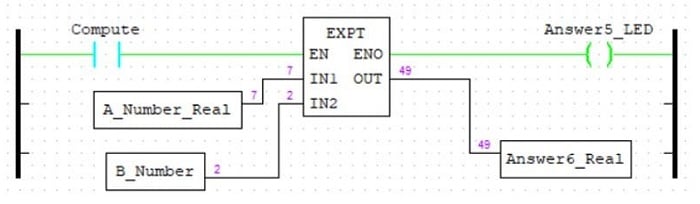
Figure 7. EXPT LD Program.
Conclusion
Besides performing logic-based control operations, OpenPLC can execute mathematical instructions. The math instructions presented demonstrate the potential computing power of the OpenPLC software. As shown in each LD program, defining the variable data types properly will reduce compilation errors during the download process to a target ESP32 or Arduino-based PLC.
By building each LD rung meticulously, sophisticated conversion equations like determining degrees Celsius to Fahrenheit can be accomplished using OpenPLC math instructions. The example OpenPLC LD programs may be obtained from here.